Saturday, June 4, 2011

Ways to Optimization for Google 2011 - Part 3

In parts 1 & 2 I have already discussed much of the onsite SEO factors, as well as some off site stuff such as inbound links and algorithmic updates. Here are some factors that are only slightly contributing today, but show a very strong probability of being major aspects tomorrow. If Google rankings are important to you, these are a few items you will want to consider seriously.

Social Media and its Impact on Organic

A few weeks into the new year, Matt Cutts officially announced that your social media presence may help improve your organic rankings. Now don’t get all excited and go gung-ho on stuffing your facebook and twitter profiles, that wont do you much good. The way to Google’s heart is by having established facebook and twitter users link to and reference your website, and your other social media profiles. If enough profiles that have a decent reputation start to reference you, it can have a positive spin on your organic search results.

Don’t bother creating dozens of phoney accounts, it won’t work. Instead direct your efforts towards promoting your brand and doing and posting things that will encourage others to talk about you and link over. In the long run you will benefit significantly, not only from a potential boost in organic rankings, but by a larger following in your social profiles leading to more branding, customer loyalty, and of course sales!

There is also some speculation that social profiles may actually start to become stronger than inbound links.

Google’s +1

This is one of Google’s newest editions. The +1 button at Google is Google’s rebuttal to Facebook’s “like” button. While it currently is not believed to impact organic search results, it really just a matter of time before this is an influential factor. There is no doubt that this will become a ranking signal, so better to get on the bandwagon now just in case.

To use +1, you must be logged into your Google account, and have +1 enabled within your Google Profile. Google may be requiring all Google accounts to have a profile page as early as this summer, so if you don’t have one yet, you may want to consider creating yours.

Clicking +1 essentially gives your vote, saying that you like that page. A record of what you have +1’ed can be found on your profile page for others to see. Keep an eye out, as these +1 buttons will be branching out from the SERP’s. Just this week Google rolled out “Plus One for Websites” which allows users to add the button directly to any webpage – making it even easier.

Well, that is our 2011 version of my 3 part series on how to optimize for Google. I hope you found some useful tidbits of information here that you can use to help improve your rankings, site traffic, and bottom line!

Ways to Optimize for Google 2011 – Part 2

In Part one of How To Optimize for Google, I discussed some of the fundamental on-site SEO aspects and how they have changed over the past few years. This article focuses on a few algorithmic updates as well as some updates in the inbound link landscape.

Google Algorithm Updates


Caffeine Update


The Caffeine Update came out in2010. While it does not directly impact your search rankings, it does speed up the entire optimization process. Before you would make a change on your site, wait for Google to spider the change, Google would index the change, and then eventually apply that update to its search rankings.
Now with Caffeine in place, Once Google spiders and indexes your site updates, the impact on the organic search results is virtually instant. Now you basically just have to wait for Google to spider your site to see the changes, taking what was sometimes, a few months of waiting out of the equation.


Google Instant

Google recently rolled out Google Instant. While this update does not directly impact search results, it does impact how search results are displayed, and can impact the traffic you receive. With Google Instant, search results update as you type in real time. As you type new words into the search box, the results change, which can result in fewer people scrolling down to see the entire top 10. If the searcher does not see what they want in the results above the fold, they may be more inclined to keep refining their search until they see what they want at the top of the list.

With this in mind, it opens up opportunities for more long tailed search traffic, but it also reduces your chances of getting traffic if your rankings are below the fold, making top 3-5 results that much more important. Also, once you are in the top, you want to ensure that your description and title tags are catchy to make sure they attract some visitors!

So while this update does not directly impact your rankings, it can impact your search traffic.


Farmer Update & Unique Quality Content

The “Farmer” or “Panda” update is the latest major update over at Google. While their main target appears to be content farms, any site with substantial amounts of “useless” content is at risk of suffering as a result of this update.

If you are building a new site, or want to take advantage of this update the key is creating useful, relevant, unique content. It’s really something most sites should be doing anyways, but now there is more encouragement to actually do it.

Talking about the “Farmer” update is easily a post in itself, but there is one piece of key info to know about. Unique quality content is good. Duplicated, low quality content is bad. This has always been true on a few levels, only now, that duplicated and low quality content won’t just go “supplemental”, it can actually damage the rankings for the rest of your site, so it is really important now to ensure your site does not have any low quality pages floating around.


Inbound Links

There have definitely been some changes in the way links are handled over the past few years, although some of the fundamentals have remained the same.


Reciprocal Links

These are still not bad, but have much less value than they did 3 years ago. The value of reciprocal links continues to drop, perhaps someday it could reach zero, but given that there are many highly legitimate reasons to have a reciprocal link, I doubt this will be the case.

Keep reciprocal links very relevant. If you can trade the links from contextually relevant pages rather than standard “link” pages, your links will stand a better chance of actually providing you with some value. Links traded by means of a reciprocal directory listing, or link drown out on a lengthy “links” page, are in most cases not worth your time.

As usual, relevance is key, so keep the links within your industry, and also be sure to mix up descriptions and anchor text, and where possible get inline links from actual page copy – they certainly are the most natural, and hold the most weight.


Paid Links

Google doesn’t like this. That hasn’t changed. What has changed is that they are much harder on paid links now. If Google finds you buying paid links for SEO purposes (not using the rel=nofollow) they can penalize both you and the site you bought the link from. Unfair? Perhaps, but many still take the risks. If you buy “dofollow” links for the purposes of SEO, be warned, Google may drop the hammer down on you, so tread lightly.


Some food for thought: In theory, paid links may not hurt you – think about this. Google still says that you can’t do anything to harm your competitor’s site. SO, does that mean, if you went out and bought your competitor dozens, or even hundreds of paid links, Google would not penalize them? How can Google tell who bought the link in the first place? Seems to me, unless your name is JC Penny, they will focus more on penalizing the link SELLER, not the buyer… I don’t recommend going out and 
buying links however, I think there is a valid risk here, but perhaps not all it is hyped up to be?


Articles and Press Releases

Keep it relevant and unique and writing articles and press releases can still be a great way to help out your link portfolio. Articles tend to work best if you create unique articles for distribution to each publication or blog. Consider guest blogging, where you write for other industry specific blogs in exchange for a link in your bio, or throughout the article. Many blog owners may go for this trade as they get valuable unique content, you get a link – it’s a very fair trade.


Forum Posts & Blog Comments

The value here, if any, is minimal. Do it because you love it and want to contribute, not because you think you will see a spike in rankings. Most links are blocked via nofollow anyways as these areas are so widely abused.  This applies to Guest Books as well, if there are even any still in existence – I haven’t seen one in years.


Link Farms & “Bad Neighbourhoods”

Stay away from these. They have been bad for years and years, and they always will be.


Dmoz, Yahoo, and other Authoritative Directories

Yes, some directories can still give you some great links, especially directories that are on topic with your industry. Directories that are moderated are often slightly better, as there is that human element and not all links are posted. Helps to reinforce that they won’t link to just anyone, as is the case with DMOZ.
Look for industry specific, and geographically specific directories, as some can provide you with some good inbound links.

Be sure to check in next week for part 3 on How to Optimize for Google, where I will talk about the role Social Media is playing in organic SEO, and how it may impact things further into the future.

New Ways To Optimize for Google 2011

It has been nearly 3 years since I wrote my original 3 part series on “How to Optimize for Google”. Since writing that article some things have certainly changed, while others have remained exactly the same.

Here is a redux adjusted to follow some more recent changes over at Google. Note that this is by no means a full-out comprehensive list, That would take a book, not an article.

I Part 1, I will discuss the basic SEO & on-site elements. Parts 2 and 3 will talk about links, major algorithmic updates, and the impact of social media.

Basic SEO elements that have not really changed.


I don’t want to go into any significant depth in many of the basic areas of SEO. Most of these have not changed anyways. Here is a summary of items from my original “How to Optimize for Google Part 1 of 3” that still apply today.
  • The Right Keywords: As long as search is keyword driven, this will always be important. The focus has switched slightly in many cases avoiding difficult general phrases and targeting long tail and geographic specific ones, but the right keywords are still needed.
  • Title Tags: Try to keep them to less than 70 characters.
  • Keyword Placement in Body Text: Keep it natural; include your targets throughout wherever it makes sense.
  • Synonyms. You don’t hear many people talking about this anymore, but sprinkle in some synonyms just for fun as I believe it can help in some cases
  • Keywords In Domain: It does look like the value here has dropped, but not off the charts, so it can still help. Just be sure to keep it clean.
  • Keywords in Filenames: There is some value here, so don’t ignore it, but don’t abuse it either.
  • Keywords in Heading Tags: Still important if natural.
  • Inline Links: Still good, get them if you can as they can often appear more natural.
  • Site Navigation: Not much has changed here. Google has more success in spidering JavaScript, so the potential for a roadblock is reduced, but still be careful how you link.
  • URL Structure: Messy URL’s can be indexed, but your rankings and your users will thank you if you keep it clean. You may need the canonical tag to help you here, more on that later.

Basic SEO elements that have changed

  • The Meta Description Tag
    This one is really up in the air. It depends on who you ask, but many claim that this tag no longer impacts your position in the organic rankings. That said, often it will still appear as the description used by Google within the SERP’s. So if you think it helps with positioning or not, there is no debating that it can still be very important. Keep it unique on all pages, less than 160 characters and try to get a couple keywords in there too, just in case it is still a ranking signal – it can’t hurt.
  • Keyword Density
    Yikes, this has become a swear word. I hope I don’t get censored. In a nutshell don’t worry about it. Write good content that uses your targets in a natural way and you’ll be fine. No need counting and dividing and calculating. Want some proof on this? Check the density for the top 10 ranking sites for just about any phrase – you likely won’t see much correlation.
  • Link Anchor Text
    This is a funny one. When links first took off as a major signal, having your target phrase as part of the link anchor text was key. Today, while that is still useful, you definitely do not want to go overboard. Text such as “click here” which was once taboo in terms of SEO, now can help add to a natural looking link profile. Bloggers and website owners who are not thinking about SEO will often just use “click here” or use the sites domain as anchor text, hardly what most would consider “SEO Friendly” but very natural.If you are in the midst of a link building campaign, variety is good, so don’t rule out a link just because the anchor text is not exactly what you had hoped.

Newer On-Site SEO Factors

Over the past few years, there have been many changes. Here are a couple onsite items that were not a consideration when the original How To Optimize For Google article was published.


Canonical Tag

In early 2009 Google announced the implementation of the Canonical Tag. This is hardly new news today, but it is new since the last version of this article.

In a nutshell this new(ish) tag allows you to basically tell Google to ignore a URL and specify where the identical URL that they should pay attention to resides. This is particular useful for dynamic websites that contain a lot of duplicate content, or utilize tracking URL’s or parameters.

To use, simply post this tag on any page that should be recognized under a different, more permanent URL.
<link rel=”canonical” href=”http://www.example.com/product”>

Now when Google sees this URL http://www.example.com/product?trackingid=1234 they will ignore the extra parameters and instead treat is as simply /product.


Site Load Speed

I for one always speculated that site load speeds played a role in the ranking algorithm for some time. Almost exactly one year ago (April 9, 2010) Google announced that they were incorporating site speed into search rankings.

Either I had been right all along and Google just took this time to officially announce it, or I had been wrong and my suspicions had come true – either way it didn’t change the fact that it was officially made one of the factors to consider.

At the time site speed entered into the algorithm, it impacted fewer than 1% of search queries. I suspect the number is similar today. Regardless, a faster site means happy customers which means more sales – and in this case, it can help get higher rankings, which means even more customers. Do yourself a favor, make your site as fast as it can be.

Friday, June 4, 2010

Google Is Bing’s 4th Largest Referring Source

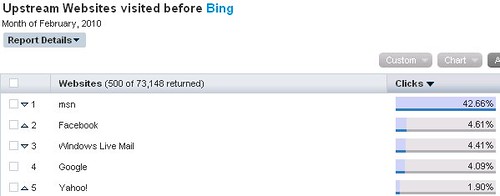
What sites send Bing the most traffic? Here’s a surprise. According to Hitwise, Google is Bing’s fourth largest referring source.
Below are the top five sites that drive traffic to Bing, or “upstream” to Bing, as Hitwise calls it:
Bing's Referrers from Hitwise
MSN is by far the top source, the last site visited by 42.7% of Bing users before they went to Bing. That’s not surprising. MSN — Microsoft’s portal — has long been a huge search driver for Microsoft. In fact, the company recently said that half of all Bing queries come from MSN.
Bing is also the default web search engine for Facebook, so Facebook makes sense as the number two referrer, at 4.6% of traffic.
Windows Live Mail — that’s another Microsoft property that ties into Bing search — so it’s another one that makes sense logically. It’s at 4.4% of traffic.
But Google as the fourth largest referring source, at 4.1%? Google, which competes against Bing? How’s that happening? Probably two ways.
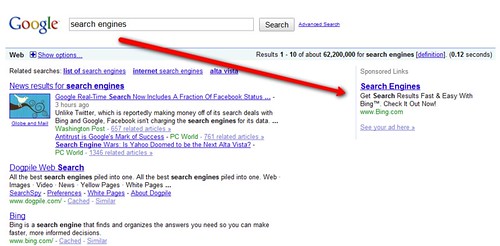
First, Bing buys ads on Google, like this:
Bing Ads On Google
You can find Bing ads showing up on searches at Google for bing, cashback, search engines, flight comparison and image search, to name some examples. Interestingly, Bing doesn’t appear to be buying ads against its tagline, that it is a decision engine.
Bing also does a lot of TV advertising. TV ads are known to drive search queries. So there’s a good chance that when someone sees a Bing ad, they decide to google Bing and discover what they’ve just seen!
All this also applies to Yahoo, which drives 1.9% of traffic. Bing advertises there, and TV ads probably generate queries on Yahoo for Bing, as well.
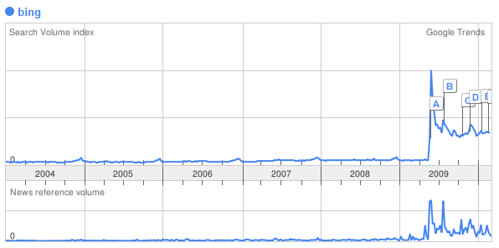
It’s clear people do search for Bing by name on Google. Using Google Trends, we can see the growth of this over the last year. Here’s the search volume of those seeking Bing on Google:
Bing Searches On Google
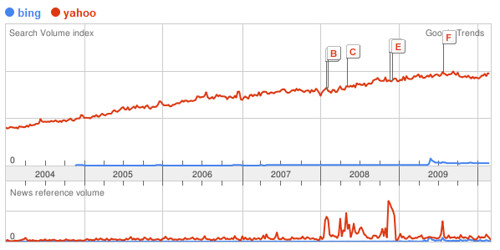
Still, that’s nothing compared to the number of searches that happen for Yahoo on Google. Here’s the Bing chart again, this time with searches for Yahoo on Google added in:
Searches For Bing & Yahoo On Google
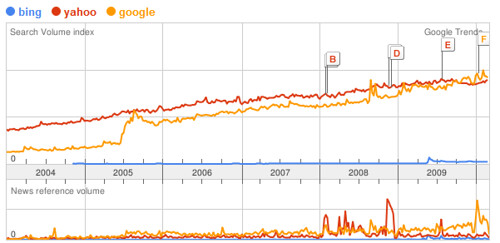
Oddest of all, currently more people search on Google for Google than for Yahoo or Bing. Here’s the chart:
Searches For Bing, Yahoo & Google On Google

Thursday, March 11, 2010

Google Adds Biking Directions to Maps

While you are pondering on the points made by Todd about online retirement, here’s a worthwile albeit healthy activity that you may want to consider – biking. And to help you navigate your way through U.S. cities on your bike, Google has just added useful biking directions and bike trail data to Google Maps.


Google has been gathering these bike trail data for quite some time now and now that they’ve gathered as much data as possible, these biking directions are now part of the Google Maps interface. These biking directions provide efficient routes and allow you to customize your trip, make use of designated bike lanes, calculate rider-friendly routes as well as customize the look of the Google Maps to suit  cycling activities.

Google has also added information about bike trails, lanes, and recommended roads directly onto Google Maps.  This will help you  get better sense of route and trails worth traversing if you’re into recreational ride.  You can check out the bicyling layer on the “more” button at the top of  a Google Map. This layer has three types of lines – dark green for dedicated bike-only trail, light green for a dedicated bike lane along a road and dashed green for roads recommended for biking but has not bike trail.

Google Maps currently has more than 12,000 miles of bike trails, and bike lane data for 150 U.S. cities. You may check out Google Maps biking directions here.

YouTube Mobile Now Serving Banner Ads

With the ever growing site traffic of  of  YouTube mobile site, it is not surprising that  Google will take advantage of this to serve advertisements.  In 2009, YouTube mobile’s site traffic increased by 160%. You can just imagine how good this site traffic will be in terms of potential for more ad clicks and brand campaign awareness.


So, YouTube has started serving ads, particularly banner ads on its mobile site’s home, search and browse pages. This is being rolled out to American and Japanese YouTube mobile websites, that is – m.youtube.com on your mobile phone’s browser.

According to Google, this is a great way for advertisers to reach YouTube viewers across multiple platforms. But for us users, this could become pretty annoying and additional data costs if we’re not on an unlimited mobile data plan. It’s a good thing if there’s always free Wi-Fi around.

But then, who are we to complain, right? After all, YouTube videos are free to consume. So, expect more banner ads from the likes of Sony, Kia and the others the next time you browse for the latest sensation on YouTube video. Hopefully, the ads won’t annoy you enough to look for an alternative mobile video site.

If you’re a brand campaign manager, you ought to know that those banner ad spots are sold on a full-day basis. You can extend your ad campaign run from the YouTube website to the mobile site. To know how you can go about this, visit this site.