Search and Social team is happy to announce the launch of advanced SEO toolkit allowing you to do multiple SEO tasks from one handy dashboard!
SEJ tools offer plenty of options allowing to build and promote multiple projects. It covers various tasks from content creation to link building and keyword position monitoring so that you didn’t ever need to leave anywhere.
Most of the tools are currently powered by Raven SEO tools but we are adding new resources and tools which are exclusive for SEJ readers. Please share your thoughts and feature requests in the comments!
Research Any URL or Domain Page Rankings
Just go to “Research” tab, provide your domain, URL or a keyword and see the following data:
- The keyword;
- The domain Google position for this term;
- Cost of the term;
- Overall number of results for this term;
- CPC for this term;
- Average monthly search volume.
Further actions:
You can add each word to manager to further work with it or to SERP tracker to monitor its positions.
Below you can also see the paid search words the domain is ranked for as well as the list of top competitors in organic search.
Analyze Domain Basic Stats
For any domain you enter you will be able to see the following data:
- The number of indexed pages in Google and Yahoo;
- The number of link to the domain (via Google and Yahoo);
- .EDU and .GOV links to the domain (via Yahoo);
- Domain age and expiration;
- Google PageRank;
- Alexa traffic;
- Dmoz listing.
Analyze On-Page Data
Provide the URL and see the following analysis (along with recommendations):
- Semantic structure (the use of headers);
- Page Lynx view;
- Page content size;
- Page download time;
- Outgoing links; etc.
Manage and Monitor Your Link Building Campaign
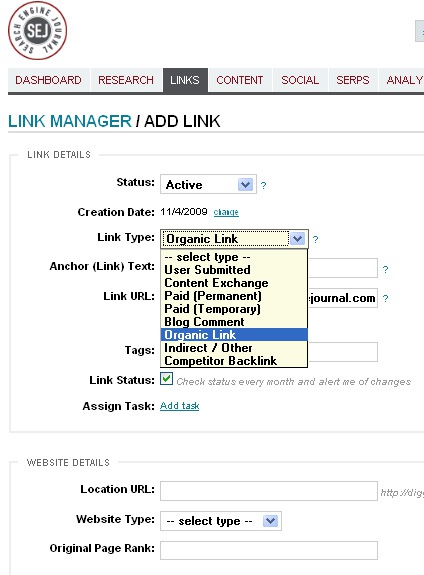
The software provides solid ways to store, organize and manage your link building campaign: categorize links by tags, types of linking sites and types of the backlink itself (paid, organic, etc); monitor the link status change; estimate your backlink anchor text variety and activity.
First, add all the links you want to keep an eye on:
- Specify the link status (if it is queued, active, declined, etc);
- Provide the link details (anchor text, URL, type);
- Link placement (where it is located, the type of the linking site, etc);
- (Optionally) Assign tasks and add comments. If you’re a task administrator, you can assign a link record task to another user on your account.
Further actions:
- After you create the list of all (potential, active or deleted) links you want to manage, select the ones you want to keep track of and add them to monitoring;
- Generate and export reports on your link building based on the time frames.
Add and Manage Content
The software allows to add content to your blog – it may turn really useful when you need to post to numerous blogs, so you don’t need login to various dashboards.
Just go to “Blog manager” behind the CONTENT tab, click “Add blog”, provide your blog details (including admin login info) and you are done! You can also make the data public to let all the managers access the blog, save and publish content.
Monitor Your Reputation Across Numerous Sources
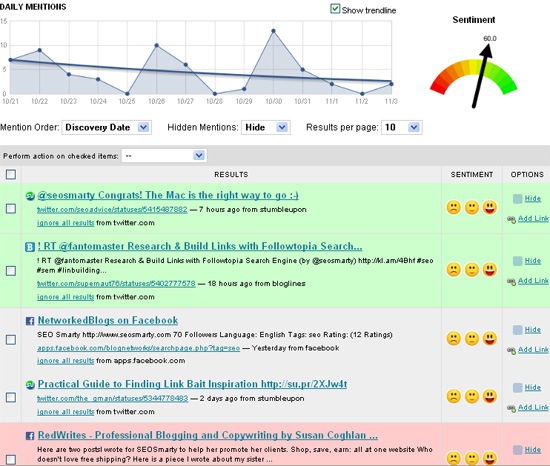
“Media Monitor” hiding behind SOCIAL tab tracks and alerts your brand mentions across numerous social media platforms. Moreover, it creates a handy chart representing your name popularity within the set period of time.
You can also perform the sentiment analysis of your brand mentions. Next to each listing you will be able to click an icon representing an emotion (positive, negative or neutral):
Monitor Your Brand Across Forums
You can also monitor your brand mentions (or any keyword) across forums and discussion boards (the feature is powered by Omgil):
Just enter your search term and see the results: the discussion date, title and the excerpt:
Check Where Your Brand Name Should Be Reserved
There are plenty of social media sites you may want to join (if not to participate, then at least to claim your brand name to protect your reputation). You can do that with SEJ tools by going to “KnowEm” link behind SOCIAL tab (the feature is powered by KnowEm) and providing your brand name (or the moniker you tend to use). After that you’ll see:
- Websites where your name has been already claimed;
- Websites where this name is still available (for you to claim it):
Monitor Your Keyword Positions
The software allows to monitor key words and phrases in various search engines. Just provide your search terms (or upload the CSV file if you need to submit a number of them).
Reports can be downloaded as a PDF or a CSV file. The trend (gained or lost positions) will be represented with green and red arrows:
- Set the search engines you want to track (You can set to track Google, Yahoo, Bing as well as numerous local versions of Google and Yahoo). The option hides behind “Search Engines” link in SERPS tab;
- Add competitors and compare your rankings. The option hides behind “Competitors” link in SERPS tab.
Analyze Your Traffic Stats
To analyze your traffic stats, you’ll need first to activate Google Analytics by authorizing a specific Google Analytics account so the system can access the data. The software will fetch and display the following data:
- Top referrals;
- Top keywords;
- Top search engines.
Manage Reports and Users
The software allows to generate and schedule reports as well as create report templates. It also saves the report history.
You can also allow your whole team to work with the tool by creating new users and assigning various roles.
- Create roles in “Role manger” (Unrestricted or Read-only roles);
- Add and manage users in “User manager”






.jpg)
