Wednesday, March 3, 2010

Test and Analyze On-Page Links with LinkSidebar

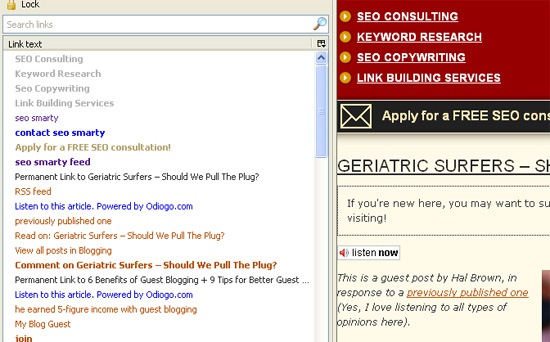
LinkSidebar is a useful FireFox addon that allows to view, search and test hyperlinks in a web page.
Let’s give it a test drive, shall we?

It took me a few minutes to figure out how to actually open the sidebar after the installation. It turned out I should have used the shortcut key [Ctrl+Shift+L] or the view menu (View->Sidebar->Links).

LinkSidebar allows the user to:
  • See all hyperlinks in the current web page, including any hyperlinks inside frames;
  • See the total number of hyperlinks in the current webpage.
Link sidebar

Clicking on each link in the sidebar will open the page in a new tab.

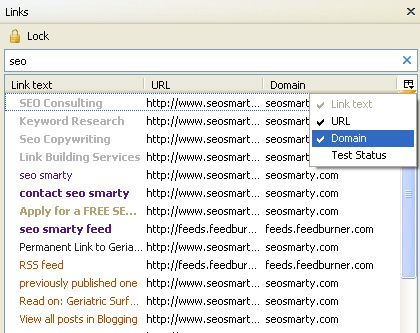
You can customize the columns to show the anchor text of each link, its URL and domain:

LinkSidebar

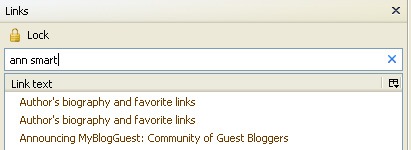
You can search a handy SEARCH option to filter on-page links by a keyword:

Linksidebar

Two handy advanced search operators are supported:
  • You can use quotes to find the exact phrase.
  • You can use a minus (-) sign before any word to exclude links containing that word from the results.
For example, to search for all the links to youtube videos except videos of cats, type “youtube -cats” in the search box.
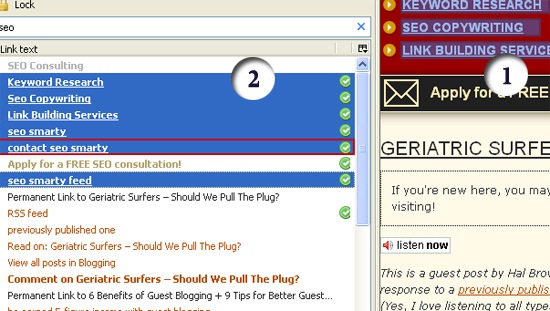
Further on, you can select links in the list (to select many links hold CTRL and click the links you want to select) to be able to:
  1. Highlight them on the page;
  2. Test them:
Link sidebar


To summarize, the addon allows to:
  • Search the links in the current webpage (to find / filter links by a keyword in the URL path and anchor text);
  • Select multiple links to open in tabs or copy locations for all selected links;
  • Test links in the webpage, filtering out unwanted links with quick and easy searches;
  • Highlight selected link on a page. 

Penalties, Bans, and Paid Search

There are numerous posts on PPC vs SEO, who gets more money, and all that mumbo jumbo. To me, it’s right up there with “SEO is dead” type posts, good for attention, but there should not be any versus in that relationship. (Note: Most of the more recent posts point out that both are beneficial) The two have more in common than both sides would care to admit sometimes.

One thing that they do have in common is the infamous and often feared Google ban/penalty. Yes, if you haven’t heard yet, you can get penalties and banned from AdWords. The new Quality Score system has penalties built in that reflect in your quality score for a keyword. The lower your quality score, the more potential there is for higher costs and lower placements. That is the equivalent of a sudden drop in rankings.

When it comes to bans, it is actually harder to return from a ban in AdWords than being de-indexed on the organic side. This could change but for now if your account is banned, you cannot just make a new one, and there is no form to ask for re-inclusion after the issues are fixed. There are ways around this of course, but just like making a new website, on a new domain, on a new host using new information and all, it takes time to get the historical wonderfulness that might have existed before.

There has been nothing “official” on the AdWords Blog that I can see, but a WebmasterWorld thread did feature a response from AdWords Advisor – a long time Google AdWords employee and generally helpful person to the forum members at WebmasterWorld. The AdWords team acknowledged that bans were being put in place for those advertisers that were seemingly deceiving the end user.

How to Not Get Banned in AdWords

This is simple; follow the Quality Guidelines for account setup, ads, destination URLs, and landing pages. PPC Blog covers this as well. You want your quality score to be as high as possible for the best CPC and placement right? The same things apply here. Make sure you are providing quality and you will be fine.

This round of bans was seemingly targeted at affiliates. This does not mean that you cannot buy ads from Google as an affiliate. If you build a site that adds something for the end user to consume that is of value that the original seller does not provide, you are fine. However, if you build landing pages solely for the purpose of PPC and only action a user can take is to click through to the original seller’s site via your affiliate link you are adding no additional benefit.  Be a good affiliate and make your site something that people will want to return to.

What to do When You are Banned

If you think you have been unfairly banned from Google AdWords, your one option is to contact an AdWords Representative to request a review of your account.

My tip: You need to be sure you have done nothing wrong. Don’t use other people’s actions as a litmus test for your own actions. “But my competitor was doing it” is not a reason to give to Google when asking for re-inclusion on the organic side, and the same applies to asking for an account review on the AdWords side.

If you were cutting corners or violating the Quality Guidelines, cut your losses and find a new project. As of right now, you would have to start everything new, site, account, address, email, credit card, and more to get another account for the same project.

And if you go through all of that, pay attention to the quality guidelines, and add the AdWords blog to your RSS reader. Google changes their mind all the time, and it’s best to keep up so that this never happens to your business.

Google Search Results Get the Star Treatment

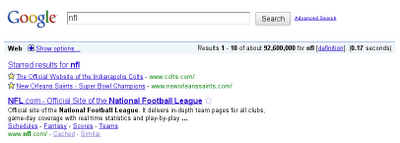
Google’s long-standing effort on making its search engine results pages more personalized continue with the roll out of a new feature – marking search results with cutesy, yellow star icons.


Actually, Stars are replacing  the SearchWiki, which according to the Official Google blog didn’t get to be appreciated by users especially since it changes the order of Google’s organic search results. So, as an alternative way of marking and rediscovering web content provided by Google search results – marking them with Stars is a more lighweight and flexible solution.

To mark a search result with the star icon, you simply need to click the star marker. Once marked, the next time you do a search, all your previous starred items related to your current search will appear in a special list at the top of  your results.

The Star feature syncs with Google Bookmarks and Google Toolbar. And while you are browsing the web, you can quickly click on the star icon to favorite a webpage and place it on the list of items that you have starred.

Google is rolling out the Star feature in search globally in the next few days.

Google Launches Gesture Search for Android 2.0 Phones

Google announced a pretty cool feature that most of us Android phone users would surely find useful and innovative – gesture search.  Basically, what this does is to free you of  the task of typing your search terms.  With gesture search, all you have to do is to draw alphabet gestures on your Android phones homescreen. Gesture search will then suggest search terms based on what you’ve drawn.


Gesture Search is a Google Labs application supporting all Android phones with version 2.0 or above, in the U.S. only. It lets you quickly find contacts, installed apps, a bookmark or a music track.

The different gestures that you can draw on your Android phones’ touchscreen include – draw any letter, horizontal cross to erase a query, left to right for erasing an entire query and right to left for removing the last letter or space in the query.

In addition, Gesture Search also considers your search history and puts the last search query you’ve used to the top of the list the next time you perform another related gesture search.

To download Gesture Search, just visit the Android Market and search for it. But then again, it’s good for U.S. Android phone users only. Hopefully, Google will make it available to other users worldwide.

Google Grades Itself On SEO Best Practices

Culminating an internal project that seems to have lasted for several months, Google has published a “Google SEO Report Card” showing the results of an internal SEO audit on the home pages of 100 different Google Products. The main verdict? Like many companies, Google’s web site is a mixed bag of good SEO tactics and missed opportunities.

Picture 1

The SEO information in the report is basic in nature, but it’s an interesting report that may serve to validate SEO itself to some people. The report cards runs nearly 50 pages and is available for download in PDF format.

Google says the report card was distributed internally in February and that some teams have already begun acting on the recommendations, with others planning to take action soon.

Google Simplifies Verification For Multiple Owners In Webmaster Tools

Google has announced a new and easier way to share ownership of verified sites in Webmaster Tools.
Rather than having to upload multiple verification files or create multiple meta tags, there’s a new “Add a User” tool on the site verification page; it looks like this:

verify

There’s no confirmation involved — the new owner has access as soon as this form is used. And these extra owners have the same level of access and power inside Webmaster Tools as the primary owner. As you can see on the image above, the new owners must also have a Google account.

14 Ways to Increase Online Profits

 The latest online marketing and publishing best practices.

At the Summit you will experience sessions that will teach you many ways of increasing your online profit.

Below is a list of just 14 of those ways. Don't miss your chance to experience top-notch training and networking with other successful content marketers, producers and publishers.


14 Ways to Increase Online Profits
  • 1. SEO Campaign Management
  • SEO Campaign Management: Using Free Content, SEO, PR and Link Building to Drive Website Traffic & Build Email Circulation -Discover the latest findings from successful publishers including best practices on SEO, blogging, email marketing, landing page design, copywriting and more.
  • 2. Social Media Strategy
  • Social Media Strategy & Twitter: Exploring the Web 2.0 strategies and tools for marketing with blogs, forums, Twitter, Facebook, and LinkedIn. -Discover how to create a comprehensive social media strategy for building loyal followers, strengthening online relationships and disseminating commercial messages.
  • 3. Building Online Partnerships
  • Building Online Partnerships: Employing Advanced Networking Techniques for Increased Audience Development & Higher Profits -Discover rarely known and unconventional marketing tactics aimed at partners and products that are designed to create maximum results with minimal resources.
  • 4. Email Copywriting
  • Email Copywriting Secrets: Discovering How your Email Open Rates, Click-Throughs & Revenue Can Soar by 50 Percent Annually -Have your email copywriting content, market, specific issues and challenges addressed by national copywriting superstar Mark Everett Johnson.
  • 5. Managing Online Reputation
  • Managing your Online Reputation: Establishing Email Credibility, Maximizing Email Delivery Rates, & Maintaining your Email & Online Reputation -Discover email technology requirements and the latest tools to help you better monitor your email reputation.
  • 6. Building Email Circulation
  • 17 Ways to Build Email Circulation: Developing your Online Audience is Job #1 -Discover the successful strategies online publishers are using to develop an audience.
  • 7. SEO Copywriting
  • SEO Copywriting Workshop: Writing Stronger, SEO'd Landing Pages to Attract more Traffic from Google and Maximize Email Conversion Rates -Learn how to weave keywords into your landing page copy with master copywriter Peter A. Schaible.
  • 8. Digital Product Strategy
  • Digital Product Strategy: Building your Digital Media Pyramid -Learn how to make your digital programs better, more efficient and more profitable by experiencing different strategies for developing brands, products, businesses and revenue streams.
  • 9. Homepage Website Design
  • Homepage Website Design: Increasing Website Traffic, Usability & Conversion Rates with Effective Periodical Websites -Discover over a dozen best practices in designing media websites created by intensive observation, testing and experience.
  • 10. Website Advertising
  • Maximizing Revenue with Website Advertising: Packaging & Pricing Online Sponsorships -Discover how to create packages and prices for online sponsorships that will increase your profit potential. Session presented by as sales expert Dan Ambrose.
  • 11. Keyword Research & Targeting
  • Keyword Research & Targeting Workshop -Discover how to do intensive keyword research to discover the phrases and terms your site should be targeting. Also learn how to create SEO-friendly headlines, subheads and body copy.
  • 12. Evolving with Changes in the Digital Landscape
  • Managing Digital Media Transformation across Additional Platforms: Exploring Opportunities to Expand your Brand Using Video Technology, Blogging, Membership Websites, Digital Events & Digital Sponsorships -Learn how leading publishers are successfully transitioning their traditional print products and brands to digital products and platforms.
  • 13. Understanding the Digital Future
  • Thriving in the Digital Future: Mequoda Summit Keynote Presentation by Don Nicholas -Discover the latest trends, case studies, statistics and metrics for the online publishing industry.
  • 14. Running Your Mequoda System
  • Why Mequoda Systems Fail: Hiring, Retaining & Compensating Digital Rock Stars -Discover how to hire, train, organize, retain, motivate and compensate the best people to help your publication gain success.  

Ten Top Tips for Video Marketing Your Online Business

 Nearly all internet marketing professionals use video as one of the core methods for marketing their business. These ten tips aim to help you get started creating short, attractive, effective videos based on solid keywords that convert and that stand the test of time.

Video grabs people's attention far more quickly and effectively than text, audio or photographs. Making a short video can capture a thousand words and pictures and helps to get across your personal brand and lifestyle.

It's important to stand out in the crowd on video channels and search engines. Aim your headlines at capturing the imagination regarding your topic. So don't be dull - test out curiosity, shock or fun tactics for getting those download clícks.
First of all, get set up.

When you're starting out, it's ok to just use your webcam. It will give you the chance to practice while you're honing your presentation skills before you fork out for a camcorder. When you're ready, you can purchase an inexpensive digital video recorder, like say the Flip and a tripod.

Make sure you take your videos in well-lit conditions. Inside your office you'll need decent lighting, or you can whip out your camera when you're out and about. It makes for a much more interesting back drop.

OK. So now let's go through each of my TOP 10 TIPS for creating and using videos to market your business.

#1: Keep Your Videos Short

Whether you're loading videos on YouTube or just putting them up on your website or blog, it's really important to keep to just 5 or 6 minutes.

If needed, you can of course break longer topics up into a series of smaller videos, which you could market as a series (see tip 10).

#2: Post Videos on Your Sales PagesM

You can use video on your sales page to introduce the main benefits of your product or business opportuníty. How about placing a video on your sales page or sign up pages.

This helps to orientate visitors and to highlight the main points of your regular, written sales letter.

#3: Choose Your Keywords Carefully

This is really an important tip, because it will affect how your video gets picked up by the search engines and other internet 'bots' that seek out content.

Research your top keyword phrases. Pick keywords that will attract the right kind of traffic and leads - research like crazy to find out what your prospects are looking for - and be sure to include your keywords in headings and tags and description boxes.

Doing this research and tracking clíck thrus (CTR) and conversions will help you secure your most cost-effective keywords and keyword phrases.

#4: Have a Clear Purpose & Structure

Your keywords will help make sure you target your video on the right purpose before you start. Does your video answer the questions your visitors have in their heads when they're searching for solutions. Make things crystal clear.

Stay on topic and give added value - unique value if possible - and your videos will convert much better for you. Write down a structure - a set of headings - for what you're going to cover. Have a script if necessary.

You can mention any links that you have to another video specifically on that related topic.

#5: Look at the Camera

The aim here is to connect with your audience, both in the topic you choose and the content as well as in your communication style. Remember you are talking to people - real live people. What are their needs and wants, hopes and fears.

With regards to presentation, stick your líst of headings right next to the camera so you stay looking in the camera at all times, rather than looking away at a screen or down at your notes.

An authentic and honest video is far more valuable than a glossy TV like broadcast. So don't worry if you're not up to TV presenter standards. Just be yourself and enjoy the opportuníty to reach out to people in a different way than using text copy.

#6: Create a Clear Call to Action

You should create one very clear service and call to action. It's very important that people know exactly what to do as a result of watching your video.

What is your most wanted response (MWR)? Don't confuse visitors with lots of options and different offers. Focus on the single most wanted response.

Alternatively, you can put your video up next to a sign up box - linked to your emaíl marketing - and clearly ask them to opt ín, more than once. Provide an incentive, such as a free report or further video coaching resources.

#7: Encourage Comments on Your Video

One of the best things about video is that it's a very personal, social medium. The more people that are talking about your video and passing it on, the more buzz you'll create.

Visitors may return to your page to see who has commented since their last comment. There may accumulate a whole líst of tips that have been created by your niche community, prompted by your initial video post. 

It’s Official: Google’s Proposal For Crawling AJAX URLs is Live

 Today at SMX West, Maile Ohye from Google confirmed that Google is indeed now crawling AJAX pages that use the standard proposed last Fall. The documentation is live on Google Code and you can also take a look at my recent article about how to implement the standard and its pros and cons. Maile mentioned that the Google Web Toolkit team is eager to help with any implementation questions over at their community forums.

If your site uses AJAX and have uncrawlable URLs due to a hash mark (#) as part of the URL structure, this implementation is likely worth looking into.