Friday, October 30, 2009

Let the Music Begin! Google Makes Search Musical

There you go, what has been buzzing around for the couple of days is now finally official. Google has just rolled a new search feature for discovering millions of songs via the same simple Google music search interface.


ms2

So now every music-related query that you do on Google’s music search will give you search results with links to an audio preview those songs. This is made possible through Google’s collaboration with major online music players MySpace, iLike and Lala.  The feature will let you preview the song right on the Google SERPs.  Links for purchasing the songs are also provided through MySpace and Lala.

Aside from this, if you don’t know the specific details of a particular song, the Google music search feature will link you to relevant information found on Google’s music content partners – Lala, Pandora, and Rhapsody.  You just need to enter some lines in the lyrics of a song and Google will help you find that song. Google will index these sites and provide you with results related to your music-related query that are linked to the contents on those three sites.

Google’s music search feature will be rolled gradually in the U.S. International users will have access to the same search feature later on. More details plus a demo vide can be found here.

Google Monkey Splits Google SERPS into Columns


 I have shared quite a few methods to tweak Google search results page: we know already how to remove redirects from Google SERPs, or how to add a sidebar to Google search which allows to see more relevant information.
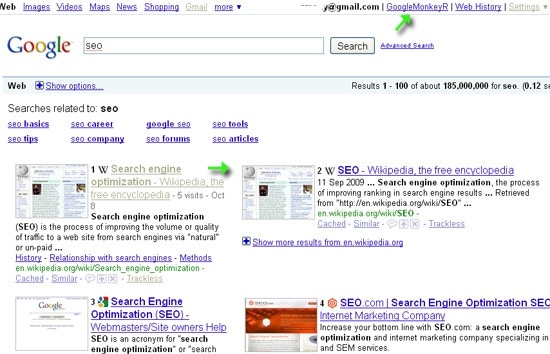
And here’s another way to make even more of Google SERPs: see more Google results at a glance as well as preview target pages. Google Monkey is one of possible ways to do that. That’s a Greasemoneky script that has quite a few cool features worth checking out.
The script allows you to add the following features to Google SERPs:

  • Sort search results into columns (up to 4 columns);
  • Number results;
  • Open results in a new tab;
  • For each result show the domain favicon or thumbnail (or both).
Google Monkey
Additionally you can also:

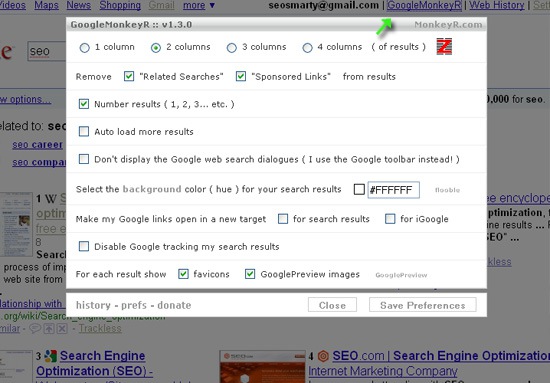
  • Remove "Related searches" and "AdWords" results;
  • Auto load more results;
  • Hide the Google web search dialogs (if you use the Google toolbar instead);
  • Set the background color;
Also, you can customize all settings via the handy dialog (accessed via the link in the top right corner of the SERPs):

Google Monkey preferences

Saturday, October 24, 2009

How To Generate Free Website Traffic FAST??

It goes without saying that if you don't have website traffic, the other components of your web business can't work very effectively. Without eyeballs on your sales letter, you won't make any sales!

There are many ways to generate fast free website traffic, but many of them aren't readily available to the average, lesser-known marketer.

Joint ventures are an excellent way to get tons of others to send you there traffic. However, joint ventures hinge upon relationships/connections, and many of the people with the most traffic have tons of their own products to promote. Those who own large lists are also approached about joint ventures so often that they may have commitments that extend out past six months.

If you do have a large list, getting immediate traffic to your website can be as simple as sending a compelling email. However, it takes time to build a quality list. It also takes time to build strong relationships and trust with your list members.

Another one of my favorite ways to generate lots of free traffic is by creating an inexpensive product and then allowing others to selling it and keep 100% of the profit. However, that does require a product on a really hot topic, and you still have to recruit affiliates.

You are also giving away 100% of the money on the sale (sacrificing early profits), and your goal there is not so much traffic but to build a list. I do often do this, using a script called Rapid Action Profits, which deposits proceed from the sale directly into my affiliates Paypal accounts while adding the new subscriber to my list automatically.

However, for generating traffic that is free, fast, and even long-term, I recommend creating lots of content and putting it in the path of the search engines. In fact, I often do this when I'm launching a new product, or even promoting a new affiliate product. Here are the down and dirty steps that I take:

1) Do your keyword research, striving to identify the "buying keywords" that your target customers are using. One easy way to do that is to use the "Google External Keyword Tool" to research which keywords get the most searches. This tool is free to use, and will also suggest related keywords to you.

What you are looking for is evidence that people are searching on a given phrase, and that those people are spending money. The Google External Keyword Tool will tell you this.

You can also enter a keyword phrase that you plan to target into the regular Google search box, and look at how many Google AdWords ads display on the right side of the page. These are people paying for each click from people who search on that term, and then click through to their sites. Presumably, they wouldn't pay for those clicks unless these customers were spending money.

2) Use your target keywords to craft titles for 20 articles. In addition to the keywords make sure that your title also promises some benefit. The article title is what's going to get you the most traction in the search engines.

3) Actually write those 20 articles. They can be as short as 400 words. If you have trouble writing, go to several of the bigger article directories and read what others have written on the topic. Also Google the keyword and look at what experts have had to say on the topic. Then write the articles.

If you are still stumped, simply plug your mike into your computer and then talk about the topic. Most of us are certainly good at talking. Record your thoughts then go back and organize them and you have an article (or several articles).

Add a resource box to the article that tells the reader to go to your site for more information, or resources (your product) on the topic. When linking back to your site, use your keyword as the anchor text where permitted.

4) Turn each article into a video. The simplest way to do this is probably to put your main points on PowerPoint slides. Then as you read your article, flip through the slides, and record it using Camtasia screen capture software. As easy as that, you have a movie.

5) Turn each article into a podcast (an MP3). Just read the article and record it using software built right into your computer. You can also download free recording software for tons of places on the internet. One of my favorites is Audacity.

7) Write several press releases using the article titles as your topic. Here you need to get a little creative, but as an example, for this article I would use, "Website Traffic Expert Reveals How To Generate Free website Traffic Fast."

These press releases are being written for SEO purposes, so the exact wording is not so critical. You are going to share several point in the press release and then you are going to link to one or two websites that you want to call attention to. Your links will use your keywords as the anchor text.

8) Submit these articles, videos, podcasts, and press releases to article directories, video sharing sites, podcast aggregators, and free press release sites. Since I do this for numerous products and projects, I use an automated submission site. Being a very prolific writer, I have weeks when I may do 20-40 articles (while still running my web business).

9) "Rinse and repeat!" What happens over time is that you'll soon have so much content in cyberspace that you'll achieve critical mass. At that point you'll rank for your most important keywords as well as lots of longtail keywords. At that point, you'll be amazed at the traffic.

To speed up the process you can also post your articles to an optimized WordPress blog that's been configured to "ping" RSS aggregators, social networking sites, and bookmarking sites each time that you post. If you don't know how to do that, it's beyond the scope of this article, but most webmasters familiar with WordPress can set that up quickly for you. WordPress is very simple, yet very powerful.

There you have it, "How to generate free website traffic fast!" Yes, there is work involved, but when you see the results, you'll know that it was well worth it.


Facebook Marketing, Does It Work?

Quite frankly, you've got to pay attention to Facebook marketing strategies if you want to be on the cutting edge. Currently, Alexa ranks Facebook the number three website on the entire internet over the last three months. However, this month (September 2009) Facebook is rated #2, passing up both YouTube and Yahoo. It's a simple fact that Facebook is the wave of the future online and it's something that can help all of us make more money from our respective businesses. My goal in this article is to simply share with you how you can take some simple concepts and drive them straight into your profits. 

First we need to ask what the main purpose of Facebook is for the majority of online users. To break things into absolute basics, social networks are built to do just that, be social and network. People don’t want to be badgered by business offers on their Facebook accounts again and again. I’m constantly annoyed on Facebook by people who send me ‘opportunity of a lifetime’ messages, and you probably are, too. (If that's you, you need to stop it immediately.)

So what you want to do is just be on Facebook to really connect with people, and to benefit them in some way if you can. If your goal is to improve others lives, simply convey value in your messages and they are find to send out, as long as the sole purpose of the message isn't to sell something! ADD VALUE before you do anything, and people will instinctively be attracted to looking at your business offers on their own.

Really, it’s a similar concept to networking at a Chamber of Commerce meeting or a Church of some kind. Have you ever been attacked by a business opportunity at Church? I have. It’s annoying, much in the same way as it is to be spammed on Facebook by offer after repetitive offer.

Before I get too far into this, I want to be clear. Now Facebook isn't my main promotional strategy, but I do use it often. What I use Facebook for is simple, I connect with the people who opt in to my newsletter by finding them on Facebook and saying hello. What I’ve found is this simple act of connecting increases the amount that my subscribers purchase from me by 200%. Simple, isn’t it? Then I simply connect with the people who ask me questions. I don't take too much time doing this, I just respond to all of my messages a couple of times per week.

It really makes me wonder why so few people actually take the time to personally touch base with their customers. Using this simple technique, I've created a lot of great relationships, and made enough money to make it worth it. Try it, and let me know how it works!

Remember, just keep in mind the following principle and you'll be ok. Give abundantly, and you'll recieve abundantly in return. This simple law governs all successful, long term marketing online. I'll see you on Facebook.

Friday, October 23, 2009

Learn more about robots.txt

This is the video about how Google handles the robots.txt file. learn more about robots.txt. You can watch it if you want:

Chrome Browser Tested on Google Chrome OS

Here’s a close looking into knowing how the upcoming Google Chrome OS will behave, specifically how the Chrome browser will look like on Chrome OS. A Techcrunch reader was able to grab the code from the Chromium build folder, installed it and is now reporting some of his observations.

First thing that you’ll notice is a new logo in the upper left hand corner of the screen depicting a colorful circle with a white center. When you clicked on the logo, it gives you a window that says Google Short Links that requires a Google.com domain for it to be used correctly. It’s still remains a mystery though as to what this link actually contain although there is a disclaimer that reads – “Google is not affiliated with the contents of Google Short Links or its owners.” On the opposite side where this mysterious logo appears is a clock, a network status indicator and a battery level indicator. Right now, only the clock is functional. A drop down menu is also in the same side. If you are a Chrome browser user, this is similar its drop down menu, only this time a new option labeled “Chrome OS” is added. There is also an option for Touchpad settings, clear browsing data, import bookmarks and settings as well an option to switch to full-screen mode. Hoax or not? This image and coverage seems pretty solid. Can’t wait to get a Google Chrome Netbook next year.

September 2009 U.S. Search Engine Rankings by comScore


* Based on the five major search engines including partner searches and cross-channel searches. Searches for mapping, local directory, and user-generated video sites that are not on the core domain of the five search engines are not included in the core search numbers.

Americans conducted 13.8 billion searches in September, down 1 percent from August (which had one additional day compared to September). Google Sites accounted for 9 billion searches, followed by Yahoo! Sites (2.6 billion), Microsoft Sites (1.3 billion), Ask Network (541 million) and AOL LLC (416 million).

7 Offline Tactics To Drive Visitors To Your Website

Most of my business is web-based, but I use all and every marketing technique that can boost my sales. Offline and online together gives you a good mix of marketing processes to use if one or other slows down or stops completely. These are 7 offline ways I use to drive visitors to my website and they should be part of your marketing strategy too.

1) Classified Ads Out of date?
You would be surprised how effective small classified adverts in niche magazines are in driving people to a website. Because you only have a few words, treat it like a Google Ad. Keep the headline relevant, the text topical and end with a call to action to visit your website for more information. I also give a telephone number for people to call for more information.

Why? Because it gives me the opportunity to get a mailing address which I can use. I then send offline mailings and postcards to them at a later date and this has proved very successful.

2) Display Advert
A bigger statement, but also a lot more expensive. Usually a quarter, half or full page of the publication so you can make more use of your headline and body text to create interest and give them more reasons why they should visit your website.

Because of the increased cost, you need to think this carefully as it is not always justified. Remember to test all adverts that you run for responsiveness to the advert AND conversion to sales.

3) Flyer or Insert
This is so simple you must implement it immediately. With every physical order you send out to new customers include a flyer that advertises another of your products and / or website. Once those customers have bought from you they have confidence in you and now is the ideal time for them to buy from you again.

Flyers are also a cheap and effective way to reach new customers when you have a Joint Venture (JV) arrangement with another business. For instance, we have a Junior Soccer Site and so an ideal JV would be with a major sporting goods supplier. Every time they send out an order, we have a potential new customer reading our flyer, at very little cost to us.

4) A Full Direct Mail Pack
Direct mail is a specialised area and you need to treat it with caution as it's easy to lose money when you don't know what you are doing. With direct mail you must understand your lifetime customer value and have a good knowledge of your response and conversion metrics to be successful.

In the past I have experimented and tested including a web address on my order form to see if that had any effect on orders. The results were variefd because in one niche market it increased my normal conversion levels but in another it showed a fall.

I can't be certain why; but one theory is that by including a web address on your order form you are giving your customer the option to put your order to one side to 'deal with later online', but usually 'later' means they won't get round to it.

5) A Single Letter or Postcard
I successfully use this technique a lot with existing customers or customers who haven't bought from me in a while and need rejuvenating with a new offer.

Keep it simple with a personal, one page letter or postcard giving a small amount of information and a call to action directing your customer to a website.

6) Seminars
Once your business becomes successful you will probably be asked to speak at, or run, seminars and workshops on your niche topic and it is a great way to promote your product or service.

You must always, always, include a web address within your presentation to direct your audience for t more information about you or your products. I recommend you put up a special page for the event you are at and tell people they can download your presentation (or offer a special report) if they visit the site and leave their name and email address.

Also, get the most from your business card and make sure it has a call to action on it as well as your details. Offer it to those you meet during the event and give them a reason to contact you afterwards.

7) Books
Books are an excellent marketing tool and not as hard to write or produce as you might think. In the book you can place bounce back offers directing people to your websites for more information or free downloadable gifts and you can use the book to place adverts for your own products or services.


By selling it you can increase your profits, or just give it away as a bonus at seminars and generate more traffic to your website.

These 7 simple offline techniques will drive online sales. Don't make the mistake of thinking that an online business only means you do everything on the Internet.

Google Analytics New Features: Intelligence Engine, Custom Alerts & More

Google has just announced a number of new features for Google Analytics, including more powerful reporting capabilities, greater customization options and a new “intelligence engine” that Google says can help search marketers drive smarter data insights. Here’s a rundown of the new features, and why they’re important.

Analytics intelligence

Google Analytics new “intelligence engine” comes with default alerts that will show you interesting trends in the data: it surfaces insights. Exactly how the algorithm that does this works is not clear, but it certainly takes into consideration many variables, in a very Googly manner. This can be a great way to start your day looking for insights—a kind of a conversation initiator for web analysts.

As we can see in the screenshot, Google did not let us down when it comes to design and UI. The interface is very intuitive and lets the analyst move through new alerts quickly.


Some really interesting things you can do:

Define your alert sensitivity. This controls the number of automatic alerts that will be triggered to appear in the Intelligence report page. As Google explains, “a higher significance rating is assigned as the difference between the actual performance increases with the expected performance.”

Create advanced segments based on alerts. On the right column of each alert you will see a link to create a segment. This is highly useful, since through alerts you might discover high converting segments that should be tracked separately, so Google makes this segment only one click away.

Change grouping method. This is very handy if you prefer to look at the data grouped by metrics or by dimensions. It’s a very useful way to change the data arrangement.

Creating custom alerts

Creating alerts is a very effective way to track visitor segments that are specially interesting to you. Let’s say you run a banner campaign to bring people into the website. How can you decide when to stop the campaign? Now you can use alerts to have an email delivered to you once your campaign bounce rate increases by 10% compared to the same day in the previous week. This is valuable because the website visitors (where the banner is shown) might get used to it, meaning that you reached those users that were high probability prospects. The option to compare to the same day in the previous week is a very good addition since it accounts for weekly variability.


Other new features

In addition to the intelligence engine and the ability to create custom alerts, Google has also enhanced Google Analytics with the following new features, according to this Google Analytics blog post:

Expanded goals & site engagement goals. Two new goal types allow you to measure user engagement and branding success on your site. The new goal types allow you to set thresholds for Time on Site and Pages per Visit. Furthermore, you can now define up to 20 goals per profile.

Expanded mobile reporting. Google Analytics now tracks mobile applications built for iPhone and Android devices. Mobile app developers can understand how users engage with their mobile apps, such as what actions are taken within an app and what features are used. In addition, for customers with a mobile website, Google Analytics can now track traffic to mobile sites from all web-enabled devices whether or not the device runs JavaScript.

Advanced analysis features (incl. advanced table filtering). Google Analytics provides an arsenal of power tools you can use to perform in-depth, on the fly analysis without having to export your data to spreadsheet tools. Using Secondary Dimensions, you can view multiple levels and combinations of data side by side instead of having to drill down into each level. You can then use the Pivoting feature to cross-tabulate two different metrics with two different dimensions.

Multiple custom variables. Custom Variables gives power-users the flexibility to customize Google Analytics tracking to collect the unique site data most important to their business. With this feature, users can classify any number of interactions on the site into trackable segments.

Despite all of these great new features, we will still be dependent on human beings to analyze and take action on the data. Even Google Analytics evangelist Avinash Kaushik has written about his 10/90 rule, which says that just 10% of web analytics relates to tools, while 90% of both cost and success has to do with humans who analyze data and make recommendations for change based on their insights.

Google Analytics Becomes More Powerful, Flexible and Intelligent

Google is rolling out some useful enhancements to its already useful and powerful Google Analytics tool. These new features give the Analytics tools more power, flexibility and intelligence.

Here are the highlights of the new features of Google Analytics:

* Addition of two new goal types for measuring user engagement and branding success that allows webmasters to set thresholds for Time on Site and Pages per visit. Up to 20 goals can now be defined.
* Improved tracking of mobile websites and mobile apps on mobile devices even if the device is running Javascript or not. This was made possible through the addition of a server side code snippet on mobile websites using Google Analytics
* Addition of Advanced Table Filtering feature for advance data analysis and for filtering rows in a table based on different metric conditions
* Creation of Custom Report with the option to select Unique Visitors as a measurement against any Google Analytics dimension
* Multiple custom variables, sharing segments and custom report templates for enterprise adaptation of Google Analytics. These tools provide customization options for enterprise Google Analytics usage

These are the highlights of the enhancements that were done to Google Analytics but the most interesting new feature is perhaps the Analytics Intelligence. This new feature provides automatic alerts when there are significant changes in the data patterns of site metrics and dimensions on a daily, weekly and monthly basis. Analytics Intelligence will prompt you on the most significant indicator that you should pay attention to. This will give you more time on doing corrective action to the issues highlighted by Google Analytics.

Add Cool Features to Google Search with Google Bump

Google Bump is a n awesome Greasemonkey script worth giving a try. It adds some cool functionality to the Google web search:

Main features include Multisearch, Image & Video results with a Player, Wikipedia definitions and links, and some clutter cleanup by

Most Useful Features:

1. MultiSearch

Search 3 search engines simultaneously (available via the drop-down). Search results will open in new tabs. Available search engines include: Google, Digg, CNN, Flickr, Wikipedia, YouTube, Ebay, etc:


2. In-Line Video and Image Search

The tool searches videos and images and displays relevant results in the sidebar (another way to make the most of Google search sidebar):

(You can view any video right within Google SERPs)


Tool configurations:

"General" tab:

* Open links in a new tab;
* Use MultiSearch;
* Resize the search button.


"Appearance" tab:

* Remove search suggestions;
* Remove Sidebar ads;
* Choose Layout.


"Other Searches" tab:

* Search Wikipedia;
* Search videos;
* Remove videos from search results:

Google, Too, Will Index Twitter Updates

Oh, that was fast. Google’s Marissa Mayer just announced that Google will also include Twitter’s public updates to Google’s searh results. So, that’s what the non-exclusive Twitter deal with Microsoft Bing meant.Exactly how Google will implement this search result integration is yet unknown. This is where Microsoft one upped Google. But it might actually work in favor of Google though. It’s like saying, go ahead test it first and see how it goes, when you’re done and user’s are done with you, that’s the time when we’re going to strike. Clever move.

It’s a good thing that Microsoft still have a back up ammunition – Facebook. Now this is where Google can’t compete.

Soon it will be a question of which stream of user-generated updates are more useful and which are not. It’s a battle between the two top social media tool and the two search engines were caught in-between.

And who might the winner be? I would prefer that you send the answer to me via Twitter DM than send it to my Facebook account.

Saturday, October 17, 2009

7 Tricks to Get Google of Links

Top 7 Tricks to get google links

Trick 1: Search for links to particular web pages of a competing site
Alongside with link:www.your-competitor.com search for link:www.your-competitor.com/products.html or link:www.your-competitor.com/services.html and so on.

Trick 2: Exclude internal links

You may examine the internal linking structure of your competition if you want to gain some insight on their navigation and marketing steps. But as we want to find more external links, let's exclude the internal ones.
You can do this by adding -site:site.com operator to your search query. Type in
 link:http://www.your-competitor.com -site:your-competitor.com or
linkdomain:www.your-competitor.com -site:your-competitor.com" and 
you'll get a list of external backlinks only.
There's a dropdown option in Yahoo! site explorer that does the same.


Trick 3: Exclude links coming from certain domains

The -site: modifier lets you exclude links coming from specific sites. So, whenever you see a large chunk of links coming from same domain add -site:thisdomain.com modifier to your query and the links from this site will get replaced with new ones.
You can add -site: multiple times in one query so that you have something like this:


Trick 4: Check links coming from certain TLDs

This is a little known trick. The site: modifier actually lets you get a list of links coming from domains with certain TLDs: .com, .org, .edu, .co.uk and so on. Just type in link:http://www.your-competitor.com site:.gov or linkdomain:www.your-competitor.com site:.gov and you'll get a list of .gov sites linking to your rival.
Note: Do this in Yahoo! regular search, not site explorer


Trick 5: Exclude links coming from certain TLDs

This is an even lesser known trick. You can exclude certain tlds from the results with the -site:.tld modifier. Usually the biggest chunk of links comes from .com's so add a -site.com modifier and you'll get lots of new link data.


Trick 6: Use different combinations of the first 5 tricks

Try link:http://www.your-competitor.com/page.html -site:your-competitor.com -site:.com
Or link:http://www.your-competitor.com site:.org -site:wikipedia.org
Give it a thought and I'm sure you'll come up with lots of your own. Feel free to share your findings in the comments


Trick 7: Use the above 6 tricks in different search engines

Don't limit your searches to Yahoo! and Google, go to AltaVista, Alexa, (Bing doesn't give you link data, so forget about it) but then there're Exalead, Excite and tons of regional search engines. Search them, remove the duplicates and you'll have a goooooooooooooooogol of competitor's links to study.

Quickly Find out Which SERPS Page You Are Ranked

I love those tiny, less-known scripts that are fun to play with. Last time I shared one that highlights your domain within Google SERPs and here’s another script which makes a good company to that highlighting one: a Greasemoneky script that shows which page of Google search results your site is at.

The script takes you exactly to the page where your domain is, so you won’t have to click-through yourself. Here’s how it works:

Make sure you have Greasemonkey plugin installed and download the script;
Go to Google, provide your search term and hit “Search”,
Notice one more field and type your domain there,
Hit “Go”, sit back and wait for the tool to list through the pages until it finds you.


By default, the tool stops at page 30 if your domain is not found. To search deeper, you can edit the script:

Select Tools -> Greasemonkey -> Manage user scripts;
Choose “Which page am I on? ” in the left-hand panel;
Click “Edit”. This should open the installed version of the script in your favorite text editor. (If it doesn’t, choose any text editor to open the script);
Find this line and change “30″ to whatever you want:
var lastPage = 30

Wednesday, October 14, 2009

Yahoo Patents Human Edited Search Results Ranking

So, what is Yahoo up to now with regards to its search results? Reports say that Yahoo has just received the U.S. patent for something called “Method and apparatus for search ranking human input and automated ranking.” Yahoo applied for this patent in 2002 and has finally received the ownership of the said concept.Let’s see, this seem a pretty clever idea if Yahoo is to market it as an improvement of its search engine results. Basically, if implemented for whatever means, it will calculate search rankings on Yahoo Search based on a combination of automated search algorithms and human editor input – hence better search results, presumably.

Here’s how the Yahoo Patent on Human Edited Search would benefit users:

Ranking by human editors reviewing search results provides more relevant ranking than automated processes and even search users, because human editors possess better intelligence than the best software and more clearly understand distinctions in pages, and human editors focus on areas of their expertise. For example, a human editor would more easily spot a page that is irrelevant but contains terms designed to get a high ranking from an automated process. However, human editors cannot process the volume of searches typically received by a search system and cannot keep up to date the queries they do process in view of the relevant pages that are added for consideration, modified or removed. In addition, in an open-ended query system, the number of possible queries can easily be in the millions. Even if editors concentrate only on the most common queries, the results change all the time as new data becomes available, old data becomes irrelevant, new meanings are created for old terms, or new events occur. If the results are based solely on what the human editors decided on one day, they might be stale and out of date the next day.

So essentially if you’re an SEO worker and you’ve successfully work on a particular site to make it rank higher on a particular search query based on Yahoo’s search algorithms, your site might not actually appear on the first page of the Yahoo SERPs if the human editors found it not so relevant to the search query at all. Of course this will be based on your site content.

Here’s Yahoo’s official statement about site ranking, demotion and promotion:

Promotions and demotions might be absolute (“Rank this document first highest.”), relative to itself (“Rank this document four positions higher than it would otherwise be.”), or relative to another document (“Rank this document higher than this other document.”). Other types of promotion/demotion might include “remove this document from consideration no matter what the automatic system suggests”, “this set of documents are to be given equal (‘tied”) rankings”, “do not rank this document higher than position P” for some integer P, or the like.

It’s pretty interesting to know how Yahoo could pull this blending of human and automatic site rankings off. Also, how this would affect SEO work.

Google Takes 71% of U.S. Searches

Here we have the search data for September from Experian Hitwise showing that Google accounted for 71.08% of all U.S. searches. Bing, Yahoo and Ask.com accounted for, 8.96%, 16.38% and 2.56% respectively.


The search data was culled from all searches conducted for four weeks in September ending Oct. 3, 2009.

Google’s search data increased by 1% from August 2009, while both Bing and Yahoo suffered a decrease of -5% and -3% percent.

Interestingly, Ask.com’s share of U.S. searches is a big 8% leap from its August share. And this might continue to increase especially with the Ask Deals service which Ask.com blended with its search engine.

Another interesting thing to note is the fact that despite the decrease in their search shares, combining Bing and Yahoo’s data still falls a little less than 50% of Google searches. The declining trend will certainly not help Bing and Yahoo to reach Google’s level. In addition, Bing’s data include searches made on Bing.com, Live.com and MSN Search but excluding those searches made on Club.Live.com.

Five steps: How to outrank your competitors on Google

To get high rankings on Google, it is not necessary to have everything that Google expects from a great website. You just have to be better than your competitors.

If you have a website with optimized web pages, it is usually the quality of the links that make the difference. The following tips will help you to get better rankings than your competitors:

Step 1: Find out who your competitors are

Search for five of your main keywords on Google and write down the URLs of the websites that rank best across these keywords. These websites are your main competitors on Google.

Step 2: Check the anchor texts of these websites

The next step is to find out how many of the links to your competitors contain your target keywords. To do this, enter the URL of a competitor in IBP's link manager (IBP > Link > Add sites > Find websites that link to your competitors).

IBP will find all web pages that link to your competitors and it will also show you the anchor texts that are used in the links. IBP enables you to sort the found websites by link text so that you can quickly see which link texts are used.

Required action: Your website should have more inbound links that contain your target keywords than the websites of your competitors.

Step 3: Check the PageRank spread of these websites

Although the official PageRank number that Google displays in its toolbar is a flawed metric, it can still help you to find out why some websites rank higher than others.

If you've used IBP to find the web pages that link to your competitors ((IBP > Link > Add sites > Find websites that link to your competitors) then you also have the Google PageRank of each site that links to your competitors.

Click the PR column header in IBP to sort the found websites by PageRank to find out how many links from high PageRank pages your competitors get.

Required action: If your competitors have more inbound links from web pages with a high PageRank than your website then you should try to get more high PR links. IBP can help you with that.

Step 4: Check the top level domains of the inbound links

If you want to get high rankings on Google.com.au then it might be important to have many inbound links from .com.au websites.

Required action: If you target local Google versions (Google.com.au, Google.co.uk, etc.) then your website should have more inbound links from websites that use the corresponding top level domain than your competitors.

Step 5: Check the content of the linking pages

Google prefer's websites that get links from related websites. If you sell shoes then a link from a fashion blog is much better than a link from a website about puppies.

Required action: Your website should have more inbound links from related websites than the websites of your competitors. IBP's link builder can help you to find web pages and blogs that are related to your site.

If you follow the five steps above, your website will get better rankings than the websites of your competitors.

Wednesday, October 7, 2009

FoxySEO: A Quick Way to Access Multiple SEO Tools

FoxySEO is a nice FireFox addon that installs an additional toolbar allowing to instantly access multiple SEO resources and perform a plenty of SEO tasks.
Foxy SEO Tool is a free, open source toolbar that provides quick and easy access to a multitude of search engine functions such as Google Site, Yahoo! Site Explorer, Live Fromlinks, etc
Here’s a quick overview of available options:
Google menu includes:
• Google cache;
• Google site: search;
• Google search engines (Google news, Google images);
• Google Webmaster Tools dashboard etc

Yahoo! menu:
• Yahoo! SiteExplorer page for the current domain;
• Yahoo! SiteExplorer page for the current page.
"Others" menu includes Bing and its very helpful [LinkFromDomain:] operator for the current domain:


"Traffic" menu offers to quickly check traffic stats for the current domain via Alexa, Compete, Google Trends and Quantcast.
"Social media" menu gives a quick access to most popular social bookmarking and voting sites:

"Network" menu lets you check the current domain IP, geo location and server headers.
"Keyword" menu offers to search one of the following tools for a selected text:
• Dictionaries;
• Google Trends;
• Google Insights;
• Wordtracker; etc

The "tools" menu currently offers a W3C validation and Spider Simulator function which displays a web page just as a search engine would read it, in the order of the html code of the page, without the layout code.

The tool was reviewed under SEJ policy.

Sunday, October 4, 2009

SEO tips and tricks for Bing

Microsoft's new search tool Bing has been out for more than three months, and it's gained a healthy 11 per cent market share in that time.

That alone makes it a search engine worth optimising for, but add in the recent deal with Yahoo – which will see Bing used as the search tool across both firms’ web estates – and any webmaster can't ignore Microsoft's latest search attempt.

We talked to Dan Cohen, MSN's SEO guru, and got some tips from the Search Technology Centre in London to help bring you up to speed and make sure everyone using Bing can find your sites.

Don't panic

The first thing to know is that there are no substantial differences between optimising for the rest of the web and for Bing, according to Cohen. Any site which uses best practice for design and optimisation will do as well via Bing as it does any other search engine, so if you've properly categorised and linked your site, and have good use of keywords, there's no reason to panic just because Bing's now on the scene.

He advised optimisers and webmasters that it's really business as usual, saying it still pays with Bing to do your keyword research, submit your sitemap, ensure code is perfect, use clean URLs – the SEO guidebook hasn't been rewritten in anyway, Cohen said.

What's new?

That said, there are ways to do better in Bing because there are differences, especially to the search engine results page (SERP).

“There's no special SEO… but it does change search behaviour,” Cohen said of the new search features. “The change in search behaviour means there's more broadly distributed traffic.”
For example, the new document preview feature will change how surfers select sites, he said. In Bing, when the search results are surfaced, sites have a little dot next to them. Rolling over that dot brings up a preview of the site, showing what information is available there.

“Document preview means that as an SEO it is less important to get into the number one slot,” Cohen explained. “People take time to look at all 10 links.”

“You can expect to see a lot more traffic going to the second to 20th spots, instead of just position number one,” he said.

Webmasters can't affect what's shown, but can ask for a page not to offer a preview.

Another feature which will help better distribute traffic are the new categories. Alongside the left hand side of Bing search results are a series of suggested categories, surfaced for about a fifth of all search topics.

If a web user enters in a city name, it will suggest tourist sites, transport information, weather and more. So instead of just the top five organic results on the SERP – the ones most likely to be clicked – there are also a series of keywords, giving users one-click access to a refined search.

Alongside this, there is also a list of automatically generated related searches, to give users even more options to choose from.

“Categories mean users can expect to pick a bit, they can find search terms they wouldn't have thought of,” Cohen said, explaining surfers using Bing will semi-search and semi-browse, extending the options available to users, and in turn, widening the traffic going to sites not surfacing as the top few results.

In its testing, Microsoft's search team found that the click through rate for categorised results was better than that for organic rankings from six through to 10, meaning users found the categories more useful for the search than digging through endless results.

“The impact is going to be more traffic going to sites not in the top three,” said Cohen. “As SEO, there's a better chance of getting traffic.”
Other changes

There are other changes optimisers and webmasters should keep in mind.

Bing also now shows results with three separate levels of confidence. The first is the standard result, which is what most sites will see on most SERPs. The next is called “best match”, which is when Bing has a very high level of confidence in the top ranked result, and therefore offers extra data from the site, such as extra links to important information on the site or contact details.

The third result type is “best match” – but with no other results on the page. When Bing is confident it has found exactly what a searcher wants, it hides other results and shows just the top one. While the top results are always chosen via the algorithm, the Bing team chooses on a case-by-case basis, which will become “best match” results, based on how many people are looking for the term. There's no way you can ask for your site to become a “best match”, but if it does end up as one, webmasters can update the information displayed on the SERP, meaning traffic can be directed to the best place.

Another new feature, which may affect SEO is instant answers. They aren't new to Microsoft's search tools, but have been upgraded for Bing. Essentially, this type of result brings back an answer, rather than just a link to a page. Searching for weather in London will bring back the forecast, for example.

Another addition to Bing is data extraction from Flash and Silverlight. Bing can read what the image or animation-based pages say, pulling the pertinent data out so it can be indexed in the Bing engine.

Bing research has shown that a fifth of empty page descriptions in the index are from Flash, so this should help those sites be more easily found.
What to do

Any webmaster or search engine optimiser who has already worked with Live Search will find there is been little change to Microsoft's Webmaster Centre. All logins and authentications remain the same – as does the crawler being used.

So, if you've already submitted your site map, you need not do it again. If you haven't, you can submit it via the Webmaster Centre.

Other than that, the best tips to do well in Bing is to use best practice in your optimisation. Bing surfaces more results automatically, letting sites compete on more terms, but that will increase the competition on SERPs you've traditionally ranked highly.

The Bing team advised the best way to win traffic is keeping with best practice, so use unique titles and meta descriptions for each page, and use consistent data structures across your pages.

But, as the Bing team notes, “all of the skills and knowledge that webmasters have invested in previously applies fully today with Bing.”

Bing SEO tips offered

A number of search engine optimisation (SEO) tips for Microsoft´s Bing have been offered by IT Pro, three months after the service was launched.
According to the news provider, the search engine has gained 11 per cent of the global market share and so is worth focusing on when it comes to online marketing campaigns.

Dan Cohen, MSN´s SEO expert, spoke to the tech-news website telling them the best way to improve rankings on the new search engine.

The first tip he offered was that doing keyword research is the key to boosting a website´s profile.

"Any site which uses best practice for design and optimisation will do as well via Bing as it does any other search engine, so if you´ve properly categorised and linked your site, and have good use of keywords, there´s no reason to panic," IT Pro claimed.

Recently, ratings organisation Nielsen Online said Bing remains third in the battle for search engine supremacy.

Friday, October 2, 2009

The Google Algorithm updated


The Algorithm updated in the Google Page Rank is an link analysis which is named after the Larry Page which is used by the Google Internet search engine that has assigned a numerical weighting to each element of the Google Algorithm which is the hyperlinked set of the document such as the World Wide Web. The Algorithm is applied to any number of collection of entities or entries with the reciprocal quotations and the all the references. The numerical weight thst it assigns to any given element E is called the Page Rank of E and is denoted by PR(E). The name Page Rank is a trademark of Google, and the Page Rank process has been patented. However the Patent is assigned to the Standard Universityand it is not at all the Google. Google has exclusive license rights on the patent from the Standard University. Finally to say tha tthe University has received the 1.8 million shares of Google in the patent, and the newly latest share wee sold in 2005 for $336 million. PageRank is a probability distribution used to represent the likelihood that a person randomly clicking on links will arrive at any particular page. The Google Toolbar's PageRank feature displays a visited page's PageRank as a whole number between 0 and 10. The most popular websites have a PageRank of 10. The least have a PageRank of 0. Google has not disclosed the precise method for determining a Toolbar PageRank value, previously it could still be found by visiting: http://www.google.co.uk

How To Get More PPC Traffic For Less Money

Search advertising success is defined by relevance. The concept of relevance is broad, but logical: it’s the relationships between advertiser, keyword, ad copy and the landing page/ post click experience. So, how do we know if our relationships are strong, and our account is relevant?

Simple: Quality Score for Google, or Quality Index for Yahoo.

There are several components of Quality Score, illustrated quite nicely below:


Three of the six components are controllable (keyword relevance, ad relevance, and landing page content); two of the components are byproducts (clickthrough rate (CTR) and historical performance); and the last (other relevancy factors) is simply AdWords reserving the right to make subjective decisions and dash a little bit of their secret sauce on the formula. We know that Quality Score is important, otherwise it wouldn’t exist… but how important is it? The AdWords team recently upgraded the help center to include several articles on how Google uses Quality Score. Most notably, they provide a clean equation for how Quality Score is used to calculate position:

Ad Rank = Quality Score * Max Bid

As each auction (impression) is dynamic (different advertisers, bids, etc), this equation is not linear. That said it is very logical that if there are two advertisers in an auction and advertiser A has a Quality Score of 10 and advertiser B has a Quality Score of 5, advertiser B must bid twice what advertiser A bids to achieve rank 1. Taking this one step further, let’s assume there are several players in the auction and it becomes clear that by improving Quality Score, an advertiser in a lower rank with a relatively low impression share can get the same, if not more traffic for less money. This concept is by no means revolutionary, but it’s helpful to see a real application of Quality Score and further understand its importance.

Now that Quality Score is defined, we can focus on how to maximize the relationships between keyword, ad copy and landing page content—getting these all right will greatly contribute to achieving a high Quality Score.

My previous post on organizing a PPC account for maximum success was centered on creating relevant ad groups and campaigns (at the AdGroup/keyword level—I’m defining relevant terms that can use the same piece of ad copy). This is because Quality Score is a product of more than a single keyword and its ad copy and landing page—the “other relevancy factors” mentioned previously include advertiser legitimacy. That is, whether or not the advertiser is relevant to the keyword being bid on and the advertisement being displayed on the search engine. What this means is that if an advertiser is bidding on what appear to be arbitrary keywords (from the search engine perspective) then it will be more difficult even for relevant keywords to achieve the maximum Quality Score.

Assuming that an account is well organized, ad copy should be uniquely tailored to each AdGroup, simultaneously qualifying clicks while containing compelling messaging. Every impression should generate bold text in the ad (achieved when ad copy contains one or more words from the actual query) yet not appear to be dynamically generated using generic dynamic keyword insertion (DKI). Because DKI injects the query into the ad, it’s a very useful tool when keywords in a given AdGroup are not perfectly similar. This is not to take away from the value of DKI, but generic ads may indicate that an advertiser offers something that is not true, leading to lots of clicks and no conversions. If using DKI, be sure to qualify users with the non-DKI portion of the ad and a strong negative keyword set to ensure honest messaging and mitigate bounce rates.

Whether or not DKI is being used, the landing page plays a significant role in determining relevance. Search engines are looking for the keywords(s) from both query and ad to also be present on the landing page—in text, not in an image. Also, landing pages should not be cluttered. They should feature information about the service or product being offered as well as a clean, direct route to conversion, whether the conversion event is a purchase, registration or additional pageviews. Don’t try to push too much: focus on the message being advertised and the product or service being offered. Furthermore, unless unavoidable (or the business offers only one product or service), the homepage should not be used as the landing page because homepages tend to be generic and focused around the business as a whole instead of the product being advertised (an exception would be ads using brand terms, where searchers would expect to be delivered to the brand’s home page). And last but not least, test and test, and then test again. Testing various combinations of ads and landing pages is critical to constantly improving results while maintaining fresh messaging.

Google SERPs Analysis: Which Factors to Take into Account?

Google algorithm is a mystery but we do know there are plenty of factors and signals taken into account. Thus, one thing is for sure: you can’t take SERPs analysis lightly: there are plenty of things to consider to make some judgments as to how easy it will be to achieve top ten rankings.

So how do you evaluate your future SERPs neighbors and competitors? Here’s a list of various factors to pay attention to:

* Average toolbar PR (while most people prefer to ignore this completely, I still think it is important when taken NOT in isolation). Tool: SEOquake FireFox addon
* Average backlink power (how many backlinks – on average – does each page have?) Tool: SEOquake FireFox addon
* Average domain power (domain age, backlinks, etc) Tool: SEOquake FireFox addon
* QDF (Query Deserves Freshness) factor: how many (if any) "fresh" results are there in top 10 results? How often do search results change. Tools: choose any of these SERPs tracking tools.
* Page type tendency? Do most pages among top SERPs reflect informational, navigational, or transactional intent? Here’s a great observation expressed in a recent WebmasterWorld thread:

Thursday, October 1, 2009

Google Offers One-Click Website Translation Tool

Have you ever wanted to have a blog in Italian but could not do it because you don’t know the language? Well, now you can using Google’s one-click website translation tool. And mind, this is different from Google Translate because you are not translation just one page of your website but the whole websitecontent.


Pretty cool, right? Google’s website translation tool works like Google Translate so you can pretty much translate your website or blog into any language of your choice provided it is covered by Google Translate. There are actually 51 languages available in Google Translate.

To have this one-click website translation tool, you simply need to paste a snippet of codes to your website’s code and the next thing you’d know a browser toolbar will display giving you the options for translating your website or blog. The code is available at the Google Translate page.

Once you have the toolbar, your site visitors using other languages than the language your site use can easily translate your site into their own languages. If your visitor want to revert back back to the original language of your site, they can easily do so with just a click of the mouse.