Friday, March 5, 2010

List Building - Is It Still Relevant On Today's Web?

Years ago, when I first started in online marketing, all the rage was something called "list building". I immediately jumped on this subject and started gathering every list building technique one could possibly imagine. It very quickly became one of my most favorite areas of Internet marketing to explore; so much so, that when I reached my first goal of getting 1000 subscribers, I was so pleased with myself, I even wrote an ebook on list building.

But that was then, this is now.

Since that time, online marketing and even the web itself, has changed tremendously. And we are not talking about small changes or minor adjustments here - the web has fundamentally changed from the core up. People simply use the web in a different way than they used it 10 years ago. It has become so much more of a user-friendly place, so much so, that marketing on this friendlier web has become a whole new ballgame.

The question remains: is list building still relevant on today's web?

The answer is still a solid "YES", but the "WAY" lists are built have almost changed completely. Not too long ago, traditional list building meant you slapped some sign-ups forms (provided by your webhost or an autoresponder service) onto your web pages and you were in business. Subscribers who signed up to your list or newsletter, would receive follow-up emails from you or your site.

Anyone could do it since it was so straightforward and so simple, almost to the point of being idiot-proof. However, the underlying key to building a successful list was gaining loyalty and forming a lasting relationship with your subscriber. Successful online marketers and list builders will tell you, this was really the hardest part. Communicating effectively with your subscribers over a long period of time is extremely difficult to do and does require gaining some skills, especially in the copy writing area.

So what has changed the list building process?

In a couple of words, three to be precise: social networking sites. These social networking programs and sites have completely changed how lists are built on the web. Actually, these social network sites such as FaceBook, MySpace, Twitter, YouTube... have made list building as easy as taking your next breath. List building is integrated into these programs so seamlessly, many users are unaware they are actually building a list.

Simply by using these social networking sites any webmaster or marketer can build a list of contacts or subscribers. Call them friends, fans or followers - they are your subscribers and you can easily reach them with your next posting, tweet or video. There are countless teenagers on many of these social networks who have subscribers that number in the 100's of thousands, even in the millions. And the rate at which they build their list of subscribers, would put many a seasoned marketer to shame.

There are several reasons why this new way of list building is much more effective than traditional list building methods. First, building your list of contacts is fully integrated into these network programs, often it is the main goal or purpose of the program. Seeing how many followers you can get on Twitter has become a world-wide sport - just go ask Ashton Kutcher!

However, from a marketing perspective, using these programs eliminates one of the major drawbacks of marketing on the web - spam. Actually, contacting your list by email is becoming troublesome, even with double opt-in, many of your emails never get through to your legit subscribers because they are blocked by spam-filters and Internet service providers. Using these social programs is a way of contacting your subscribers without the whole issue of spam being considered at all.

Perhaps, an even more important reason to use these social media sites to build your list, has to do with the tricky problem of establishing relationships with your subscribers. These sites make it much more easier to build that long-lasting relationship with your contacts. In the case of YouTube, it can simply mean making a video and talking directly to your subscribers. Communication is direct and immediate. In most cases, there's no need to acquire additional skills or techniques. Besides, in most of these social network sites, the communication is often more effective because it's just not one-way, your subscribers can easily communicate back with you.

Same goes for Twitter, which has become the list building tool of choice for many webmasters and online marketers. Twitter is an excellent medium for building your list. It can be used effectively to get your message out to thousands of like-minded followers and have that message spread rapidly around the web. Marketers are now taking advantage of such a system to market online, but be aware abusing this program will get you banned especially if you just use it to send spam. Like any type of marketing on the web, you shouldn't have any problems if you keep all your communications/interactions real and human.

Another element of these programs which can't be denied, they are all free. Anyone can use these social network sites to quickly build their list or lists without having to worry about paying for it. Actually, in the case of YouTube, you can become a partner and earn revenue from Google Adsense while building your list.

There's also no denying these social network sites have changed not only list building, but how we use the web. These programs have a "pooling effect" on all web activity, gathering like-minded individuals into or around certain "pools" on the Internet. These concentrated pools of people can be formed around a certain topic or even around a certain person. These are excellent areas in which to carry out your list-building activities and your online marketing efforts since they provide very targeted prospects. Ones you can easily contact and communicate with by using these social networking sites.

While the old traditional email list should not be forgotten, list building, as we know it, has been changed forever by the introduction of these social networking programs. And as these network sites become more and more popular, they will play an even greater role in all your list building efforts. A role that can't be ignored or dismissed, especially if you want your list building to be truly effective.

Omniture Now Offers Enhanced Facebook Marketing Analytics

With the ever emerging and evolving world of web 2.0. marketers no more can afford to neglect social media, and with Facebook becoming the second most visited website online after Google … and THE INTERNET (thinking back AOL circa 1998) to the bulk of its users … analytical tracking and gauging user action, interest and return on investment is crucial to an online marketing campaign. By engaging in social media networking, marketers get an awesome opportunity to join the conversation and have more relevant interactions with their customers.
hspace=Focusing forces on social media web, a marketer gets a unique chance to:
  • More effectively reach highly targeted and active web users;
  • Better understand the needs and interests of their potential customers;
  • Get instant feedback on new products and offers, etc.
Yesterday Omniture, an Adobe company and a leading provider of online business optimization & target marketing software, and Facebook announced that they signed a deal to provide online marketers with solutions to better understand and optimize the impact and ROI of their Facebook investments.

The new Omniture feature provided in collaboration with Facebook will enable marketers to automate Facebook ad buying and access analytics to
help companies more easily integrate Facebook as a marketing channel in order to connect to and have relevant conversations with Facebook’s more than 400 million active users.
For Omniture users this alliance will basically mean the ability to access a single dashboard to plan, deliver and measure campaigns. From one dashboard, the users will be able to:
  • Effectively manage their ad spend on Facebook;
  • Easily compare Facebook ad campaign metrics with other media channels;
  • Generate reports specifically designed to understand ad effectiveness for some of the unique elements of Facebook such as Facebook Pages and applications.
Omniture and Facebook will continue to expand this partnership as marketers increasingly utilize this channel to optimize visitor acquisition, conversion and retention. For more information, please contact your Omniture account manager.

Six Types of Social Spammers

I hate spammers, and I’m 100% certain other people do too. Everyone at some point in time has had some type of experience with spammers. But you almost have to admire these individuals, almost. The techniques used are as varied as the outlets in which they are unleashed. During my thirteen years of internet exposure, I’ve had the displeasure of running into six types of spammers. The first of which I call the Sniper Spammer.

1. Sniper Spammer

sniper spammer
A military sniper is one who remains in the shadows, lying in wait until the prime target comes by. Pretty intimidating, but the spammer in this category is anything but. This spammer lies in wait until the “next big thing” comes by. For instance, even before Apple announced the release of the iPad, hundreds if not thousands of spammers were out proclaiming “You could win an iPad!”.

These spammers can be found just about everywhere. I’ve seen them in ads, Facebook, Twitter and even blogs. Luckily once these spammers give away their position, it’s not hard to figure out what they are, pathetic. This next spammer actually has somewhat of a spine, or lack of brains, depending on how you look at him. I give you, the Suicide Spammer.

2. Suicide Spammer

Suicide spammer
The Suicide Spammer was actually my very first encounter with spam. I was thirteen, in my first chat room and this private message popped up, “Hey you seem like a really cool guy. I’m gonna give you a secret link to the lowest electronics available online!”. I thought, “Hey cool!” Ah to be young and ignorant. Before I could even click the link a moderator booted this guest for the reason, “No Spammers or Bots Allowed!”


Even after the encounter I still saw on several occasions spammers joining chat rooms or forums that had explicit warnings about spam getting removed as soon as a comment was posted. It’s because of this I call this type “Suicide Spammers”. They know full well, even before completing the registration form, they will be removed shortly. Very few people who see the spammy comment would click on the link included with serious interest.

So why even bother? I’d venture to say whatever it is being ‘presented’ is worth the risk to the spammer. The next spammer takes things a little slow and attempts to pull ‘friends’ in. This one is called, the Sociable Spammer.

3. Sociable Spammer

Sociable Spammer
The Sociable Spammer is pretty closely related to the sleeping spammer (listed last). These individuals often are new to social networking sites. These spammers actually take the time to read the rules and regulations while abiding by them for a period of time.

Then when a sort of “level of trust” is established the spamming begins, in my experience after a month or so. I don’t mean like a flood of links or content, I mean messages/posts like, “Hey Guys, I just wanted to let you all know my company is having a contest. Whoever is the 500th person at our site to fill out a survey gets his/her name placed in a raffle for a chance to win a 2011 Camaro! The contest is only up for a short amount of time so go now! Thanks guys!”


This is usually followed up by a warning or automatic ban. The spammer then moves on to the next forum to begin again. I’ve only seen this type three times, Xanga (remember that?!), MSN Chat Room, and Facebook. These three were memorable enough for a mention here. Speaking of Xanga, this next spammer is infamous for ruining perfectly good blogs with spam. I present to you, the Splogging Spammer.

4. Splogging Spammer

Splogging spammer

Splogging is a term I recently heard about in March of 2009. Perfect! I thought, this is exactly what I’ve been coming across on Wordpress and what my wife dealt with on Xanga at one point (she still uses her account from 5 years ago) last year. These spammers can be more sophisticated, but seldom are. Typically a splogger will comment like, “Hey nice post check this site out if you want some cool stuff!” or a variation thereof.

On my personal blog I write about my current weight loss goals and exercise methods, so naturally I looked on Wordpress to see if I could find any. The first three I found were literally written, “WEIGHT LOSS WEIGHT LOSS WEIGHT LOSS WEIGHT LOSS WEIGHT LOSS WEIGHT LOSS WEIGHT LOSS WEIGHT LOSS WEIGHT LOSS”, an entire page dedicated to that! I did manage to find one that seemed okay, however further reading revealed it was for moms who had just given birth and were losing pregnancy weight.

Being a man, clearly this was not for me. Back to splogging, rarely have I seen a well written post of these types. If I have, they fooled me. Usually the splogs will consist of post after post after post of the same product with little variation in the wording. Our next spammer, the Synthetic Spammer doesn’t have a mind of its own and in my opinion is a dying breed.

5. Synthetic Spammer

Synthetic Spammer

Probably the most utilized method in the early beginning, synthetic spamming is essentially a program that scans for sites to submit information to. However, with functions such as ‘Captcha’ it is becoming increasing difficult for these programs to work efficiently. Unfortunately once the registration is completed the program can run the way it is meant to. The most recent social outlet I’ve seen to be infected with these spammers is Twitter.

Automated tweeting can be great for those with multiple accounts and a busy schedule, but with the advancement in technology comes the abuse of that technology. Thankfully our last spammer is a little slow to start as this type is, the ‘Sleeping Spammer’.

6. Sleeping Spammer

Sleeping Spammer
The Sleeping Spammer is the newest one I’ve come across, seeing my first one in December of last year. Around that time I had a “person” start following me, so with every notification I checked out the profile. 200 following – 120 followers – 0 tweets. I had a gut feeling something wasn’t right, but I was curious to see what would happen. Close to the end of January I decided to check back on this account (since I didn’t follow back) to discover the stats were now, 2500 following – 1300 followers – 1000 tweets.

Stunned I began to read the tweets, “By MaryK Products now #lipbalm#makeup#lipgloss#..etc” Now seeing as how tweets can be automated, and there is a way to automatically follow people, I’m making the assumption this spammer set up his/her account to begin to tweet spam once a certain amount of followers was reached to ensure that when the spam began it would hit the most people in the shortest amount of time before the account was abandoned or suspended. Its for this reason I call this spammer a sleeper.

Some may read this and think, “Hey! I have a blog for my business! I post on my stuff on twitter and facebook! I’m not a spammer!” To those I say, “If you abide by all rules and regulations set forth by the forums/chat-rooms you are not a spammer. If you have a blog that doesn’t go overboard on self-promotion and post senseless comments on other blogs you are not a spammer.” What it boils down to is ethics and more importantly common sense.

Let’s be honest, a spammer is a spammer. Regardless of technique or medium used the end result is the same. Luckily with so many new methods of catching spammers such as ‘Captcha’ and even moderator approval for blogs and forums, its getting harder for spammers to infiltrate. But rest assured, as soon as a spammer is blocked he/she will find a way around it. If you have a story about a spammer listed here, or maybe one that isn’t I’d love to hear about it. Thanks for reading.

I’ve complied a list useful articles that provide information on avoiding spamming techniques:
  • Do’s & Don’ts of Social Media Marketing
  • Finding Success in Social Media
  • How to Monetize Social Media: The Right Way
  • Twitter’s Real Time Spam Problem
  • Google Warns About Social Media “Schemes” in SEO Guide
If you have a story about a spammer listed here, or maybe one that isn’t I’d love to hear about it. Thanks for reading.

Easy On-Page Diagnosis with SenSEO (FireFox)

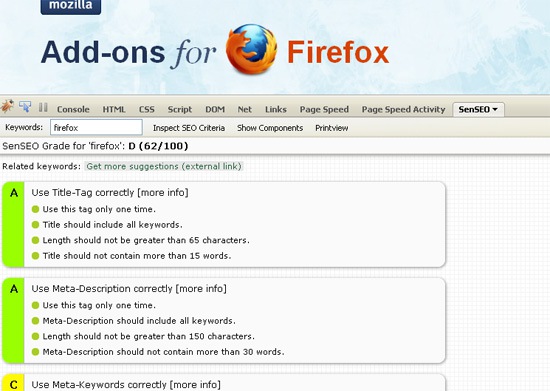
SenSEO is a Firebug FireFox addon (this means you have to install FireBug to use it) checking important on-page-SEO criteria and calculating a grade of how good the current site fulfills these criteria.

The tool adds one extra tab to FireBug window which allows to inspect the current page.

The first thing to do is to identify a keyword (or a key phrase) to inspect the page against it. Just type in the search box and click “Inspect SEO Criteria.”

The tool will run an analysis and return a generalized report where
  • A green color of the label means your page passed the test;
  • An orange color means there is a waning;
  • A red color indicates a failed test;
  • A grey color shows the element wasn’t checked.
SEN-SEO
The tool checks the following page elements:

Title Tag

The general recommendations:
  • Use this tag only one time.
  • Title should include all keywords.
  • No more than 65 characters in it.
  • Title should not contain more than 15 words.

Meta Description

General recommendations:
  • Use this tag only one time.
  • Meta Description should include all keywords.
  • No more than than 150 characters.
  • Meta-Description should not contain more than 30 words.

Meta Keywords

  • Use this tag only one time.
  • Use only relevant keywords which can be found in the content.
  • No more than 10 keywords.
  • Keywords should be comma separated.

Headline Tags

General recommendations:
  • Use headlines to structure your content.
  • Use H1 only one time.
  • H1 should include all keywords.
  • Use H2 and H3 tags.

Page Content

Suggested recommendations:
  • Images should always have alternative texts.
  • Keyword density for visible content should be 5%-7%.
  • Keep the links to a reasonable number (fewer than 100).
  • Offer unique content on your page.
  • Make sure your code is semantic and valid.
  • Optimize page load time of your site.

Path

Recommended:
  • Try to keep the path short.
  • Don’t use dynamic parameters.
  • Use hyphens instead of underscores to separate words.
  • Words in the path should be lowercase.
  • Path should not go deeper than 3 levels (I’d say this one is questionable).
I’d say there are few questionable recommendations but this is what the machine can do: for example, the tool won’t be able to evaluate how “catchy” your title is but it will be able to identify how many keywords you used in it.
You can also click through to “Show components” tab to see the list of all SEO-relevant elements of the page:
SEN-SEO

8 Marketing Twitter Chats to Check Out

A Twitter chat is a scheduled “group chat” on a specific topic, where Twitter users interact and engage with one another at a certain time by adding a trackable hashtag to the end of all their tweets. Twitter chats are a great way to meet other marketers interested in the same area as you, learn about a topic of interest, as well as build your following. Here is a list of 8 upcoming marketing Twitter chats to check out.

1. Social Media Collaboration

Discuss the evolution of social media and how social media technology is transforming collaboration. Every Wednesday from 1-3, #smchat

2. Discussing Blogs & Best Practices
The business of blogging: get advice and chat about best practices. Every Sunday from 9-10 PM, #blogchat

3. Integrated Marketing Communications

Co-moderated by Beth Harte of MarketingProfs and Anna Barcelo, chat about integrated marketing communications and how to get all the forms of marcom to “work together” effectively. Every Wednesday from 8-9 PM ET, #imcchat

4. Personal Branding

You are your own brand! Chat about building your own brand (and actually build it at the same time). Every Wednesday from 11-12 PM ET, #brandchat

5. Using the Kaizen Method in Social Media

Chat about using the Kaizen Method to improve social media marketing. Not familiar with Kaizen for social? Neither am I, so I’ll be there next Friday. Every Friday from 12-1 PM ET, #kaizenblog

6. Conversion Rate Optimization

Full disclosure: this is my company’s chat. But it’s worth listing. The first conversion chat of its kind, CROchat will discuss the best ways to improve online conversions. Every Thursday from 1-2 PM ET, #crochat

7. Journalists, Bloggers, and PR Pros

Rub elbows with newbie and veteran journalists, bloggers, and PR pros. Every Monday from 8-11 PM ET, #journchat

8. Healthcare Marketing

Chat with other marketers in the healthcare industry. Every Friday from 1 PM-2 PM ET, #hcmktg

Bing & Yahoo Soon To Support Canonical Tag

More than a year since the three major search engines united to announce the canonical tag, neither Bing nor Yahoo formally support it. But that could be changing soon.

Speaking during the “Ask the Search Engines” session at SMX West on Thursday, reps from both search engines said they’re in the process of supporting rel=canonical right now.

Bing’s Sasi Parthasarathy told attendees that canonical tag support should be in place by the end of March or early April. Arnab Bhattacharjee of Yahoo said they’re currently rolling out support of the tag, but cautioned that Yahoo will only use it “as a hint” regarding a web page’s original/primary URL.

Back in October, Google went a step further and announced its support of the canonical tag across different domains. On Thursday, Parthasarathy said Bing has no current plans to follow suit, while Bhattacharjee said Yahoo is exploring the possibility of cross-domain canonical tag support.

Solving Website Indexing Problems

Crawling and indexing issues can really put a damper on your efforts to rank well for a variety of competitive and non-competitive terms.  Solving indexing issues is definitely an important step towards increasing your keyword ranking footprint. And, the more real estate you own by solving those issues, means you’re taking the next steps in realizing your long-tail efforts.

Before I start with a problem site, I take a few measurements.  Whenever you’re trying to solve a problem, you need to figure out where you’re starting from to make sure you’re helping and not hurting your efforts. I start by pulling a variety of data:
  1. Note the number of submitted and indexed pages from Google Webmaster Central. Generally, you need to submit a sitemap to get this data, and if you’re having indexing problems,  this can really help. That being said, I don’t always submit an XML sitemap to Google. There are times to do it, and times to not worry about it. If I haven’t submitted a sitemap to Google Webmaster Tools, I do a site:domain.com query in Google and look at the number of pages listed initially. By paging through all of the results of the site: query, you’ll see that number reduce as you get to the “end.”  This is the true number of pages Google has in the index showing as query results.
  2. Run an SEMRush report to measure how many organic top-20 rankings I have.
  3. Use a crawling program to pull a realistic page list from my site.  Once I have this list I move through and eliminate any pages I don’t want in the index and figure out how I have or should have eliminated them, either by no index tags, roboots.txt exclusion, or parameter exclusion in Webmaster Tools (see more about parameter exclusion below).
NOTE: If my number of indexed pages matches my total page count pretty closely, I’m not really looking at a problem. The reality is – the larger the site, the more problems I generally find.

After I’ve pulled the baseline data, I look at all of my URLs and start comparing them to the list of indexed pages, and note the ones that are not indexed. Once I have a true grasp on the pages that are not in the index, I start navigating the site to those pages. I move through the site to the un-indexed pages and try to determine why they’re not being crawled. As you perform this step on your own site, look at the links, the navigation, urls, and navigation as you go through.

Generally speaking, I can solve the problems with indexing by finding remedies for at least one of the following problems:
  • Robots.txt file excludes that page/folder by mistake. For whatever reason, you may haveexcluded a folder or section of the site during design or testing, and forgot to remove that restriction in your robots.txt file. This is probably the easiest thing to check and fix,  and if you’re really lucky, that’s all it takes.
  • URLs contain excluded parameters. As with the robots.txt file, you can tell Google to ignore specific parameters if those parameters contain duplicate content.  One indexing issue may be3 caused by asking Google to exclude a parameter you actually wanted included.  Check your webmaster tools account under site configuration, settings, Parameter Handling.
  • Content that is inadequate or duplicate of other pages. Many sites contain duplicate content. In some cases, this is inevitable and even okay. The key to controlling duplicate content issues is to tell Google which page you want them to read, and how to get there. Use your robots.txt and parameter handling to tell Google which pages to ignore, and make sure the bots can get into the page you want them to index easily. Not all pages with content problems are duplicate; sometimes the content is just inadequate for ranking. The goal of content is to tell the user and the search engine what that page is about. If there’s no text on the page, or very little, the search engines don’t know how to rank that page. Having a page title and a meta description isn’t enough; the content on the page has to support the keywords in your titles and descriptions or you might as well not even have them.
  • Not enough inbound links to trickle interest deep into the site. Links are the bread and butter of search engine rankings. If you don’t have a healthy number of links coming into your site, there’s not enough link “juice” to trickle down into those interior pages. Ideally, you’ve build a good number of quality links into interior pages of the site to help push that juice deep into the site. Keep in mind, the larger the site, the more quality links you need to support high rankings. While bringing links into a site is important, being careful not to bleed a ton of page rank with off-site links is also important. Consider your website to be like a kitchen colander, the more holes it has (outbound links) the faster the juice drains out.
  • No link to that page exists on an indexed/cached page.  Having either a good contextual link or navigational link to those deep pages is key to getting the search engine boxes in there.  Believe it or not, sometimes links gong to deep pages are graphical or buttons, and in many cases those are not being followed by the bots. Although this sounds like a simple thing to check, depending upon the number of un-indexed URLs you’re digging through it can take a lot of time to review.
  • Navigation that cannot be indexed. Every once in awhile I run across navigation that is built in flash or other solutions that don’t provide indexable links to interior pages. Honestly, you can solve this by building contextual links to your interior pages, but I would probably look at an overhaul off the site to help with this problem. Good websites have indexable and contextual navigation links, in my opinion.
Figuring out  and fixing your indexing issues is definitely worth the time you invest into it, but it also takes a variety of approaches. Start with the easy steps, and progress into the hardest ones to complete. I listed the steps above in order of effort involved to check and solve, so start at the top and work your way down. Once you’ve found your issue, start watching for improvement in the metrics you baselined at the beginning of your efforts.

Yahoo Updates Desktop Search Marketing Tool

During SMX West this week, Yahoo announced an update to its Yahoo Search Marketing Desktop tool for managing PPC campaigns. If you weren’t at the show to see it yourself, this Yahoo blog post details some of the upgrades that are now available:
  • Bulk editing: Easily make mass changes to settings such as status, match types and budgets within an intuitive interface; increase or decrease multiple keyword bids; and export your view of keywords, ads, ad groups and campaigns into Excel for use however you wish.
  • Campaign transfer: Import your third-party campaign data in one easy step.
  • Keyword research: Use our keyword suggestion engine to find and add new, relevant keywords to your campaigns; get URL-based keyword suggestions to increase your keyword relevance and improve your performance; and export the keyword suggestions into Excel to share this information or to add tracking URLs.
  • Find, replace and search: Find and replace text in ads, keywords, ad groups and campaigns; search for specific campaigns, ad groups, ads, or keywords in your account; or search for information in any of the account tabs.
  • Account performance statistics: Retrieve status and statistics for your account’s impressions, clicks, CTR, cost, ad quality scores and other information. 

Bing, Yahoo Discussing Future Of Yahoo Site Explorer

One more piece of news from the “Ask the Search Engines” session at SMX West on Thursday: Yahoo and Bing are in the midst of discussions to decide the future of Yahoo’s popular Site Explorer SEO tool.

Yahoo’s Arnab Bhattacharjee told conference attendees that the two companies are now going through discussions on how to transition from being competitors to the new situation where Bing will power Yahoo’s algorithmic search results, and that Site Explorer is part of those discussions.

Sasi Parthasarathy of Bing perhaps offered some reassurance when he said that users come first — what is most important to users will determine what products stay.

Parthasarathy said they hope to have an announcement soon.

Bing Maps Rolls Out Its Largest Image Update

Bing Maps has rolled out what Microsoft is calling its “largest amount of new imagery ever in terms of square kilometers.” Apparently that represents 6.7 million square kilometers.

There’s new aerial and Bird’s Eye imagery across many countries on several continents. The full list is below.

Picture 38
Picture 39
The Bing Maps World Tour shows the updates on the map.