Friday, December 25, 2009

Factors to be Consider in Competitor Analysis


Competitor Analysis Factors List


  1. Title Tag   -    60 - 70 Characters 
  2. Meta Description / Meta Keywords    -   150 - 200 Characters
  3. Body Content - It Must Be Unique.
  4. Heading Tag   -  h1, h2, h3, h4, h5 and h6.
  5. ALT Tags and Anchor Links  -  Must place Targeted  Keywords 
  6. Google Page Rank   -  You should take it as major consideration
  7. Keyword rich Domain  -  Its Very Helpful If URL is having keyword.
  8. Page Visibility    -   Look And feel, Structure of the website.
  9. Linking Structure   -  Navigation with in the website must be simple & u shuold connect al the pages from single page directly or indirectly.
  10. External Links    -   It should be very less.
  11. Link Popularity   -   Total Back Links in Google, Yahoo, MSN/Bing.
  12. Age Of Web Site  -  Older Domain Will Give Good Results.
  13. Server Speed   -  Now Its Placing Major role in the SEO, You need to maintain your website load very fast.
  14. Readability Level Of Web Page  -   User Readable Content, English must be simple.
  15. Back Links in google   -   More Number of back links gives good Results
  16. Site Map   -  You Need to place both xml and html. XML fro Search engine purpose/ html is for Users.
  17. HTML Validation Of Web Page To W3C Standards   -  It Shows the site International Standards.
  18. Dead Links   -  You must remove all Dead links from Your site
  19. Keywords  -  What Type of keywords using your competitor.
  20. Keyword Density  -   2% - 3% Of the Content.
Resource List:
http://www.seocentro.com/tools/seo-tools.html
http://www.submitexpress.com/tools.html
http://www.websiteoptimization.com/services/analyze/
http://www.iwebtool.com/speed_test
http://juicystudio.com/services/readability.php
http://validator.w3.org/
http://www.dead-links.com/
Use This Add-on In Firefox.
https://addons.mozilla.org/en-US/firefox/addon/3036

Friday, December 18, 2009

Introducing Google’s Own URL Shortener

The order of battle for Google this week seems to be on URL shorteners. This has been quite a trend on Twitter and Facebook with various third-party URL shortener sites offering this kind of service. But while others offer it as a stand-alone service, Google is taking the URL shortening thingie on a different approach – via Feedburner and Google Toolbar.
Screen shot 2009-12-15 at 5.30.12 AM
As mentioned by the a post from the Official Google Blog, Google’s URL Shortener is offering a service based on the following:
  • Stability: Google’s scalable, multi-datacenter infrastructure provides great uptime and a reliable service to our users.
  • Security: As we do with web search, shortened URLs are automatically checked to detect sites that may be malicious and warn users when the short URL resolves to such sites.
  • Speed: At Google we like fast products and we’ve worked hard to ensure this service is quick. We’ll continue to iterate and improve the speed of Google Url Shortener.
To use Google’s URL Shortener, you need to have either Google Toolbar. When you share a website or blog via the Toolbar and you selected Twitter, the link will automatically be shortened when posted as a tweet. It works similar to other URL shortener that you have already used in Twitter before. The shortened URL always begin with http://goo.gl/


For Feedburner, the URL shortener feature offers something else aside from letting you share links. You can try this out by going to Feedburner Publicize Tab’s Socialize service. Then add the Twitter account to which you would like to post items from your Feed.  After doing this, you can either start sharing all your feeds to Twitter or customize which feeds you want to share to Twitter and how exactly you want them to look like when you send them as a tweet.
Google said that URL shortener is currently being tested yet. Hence it was rolled out as a feature of Google Toolbar and Feedburner. But  they are planning to make it available as a stand-alone product once they’ve proven it to be useful. I’m pretty sure it will soon be available on a wider audience pretty soon.

Bing Beats Google in November Search Volume Growth

Latest comScore data for November search volume is showing a slightly unexpected result. For the second time Bing managed to beat Google in terms of total US core search volumes, while Yahoo’s search volume continues to go down.So while the total US core search volume increased from 13.2% in October to 17.8% Y/Y in November, Microsoft sites domestic core search market share increased by .4% from 9.9% in October to 10.3% in November. Likewise, Microsoft sites domestic core search volume  for October-November increased by 38.2% from Q3’s  25.8%. Comparing it with October’s core search volume, it is also up from 30.8% to 46.0%.


For Google, domestic core search market slightly increased from 65.4% to 65.6% in November. Core search volume also increased from October’s 17.4% to 21.8%. In the domestic core search for the first two months of Q4, Google’s search volume decreased from 21.1% in Q3 to 19.6% in Q4.


As for the remaining search engine:
    * Yahoo! domestic core search market share dropped to 17.5% in November from 18.0% in October. Yahoo! grew November core search volume by 1.1% Y/Y, up from down 0.7% Y/Y growth in October. Yahoo!’s first 2 months of 4Q domestic core search volume growth of 0.2% Y/Y trails 3Q’s 11.6% Y/Y growth.
    * Microsoft sites domestic core search market share increased to 10.3% in November from 9.9% in October. Microsoft sites grew November core search volume by 46.0% Y/Y, up from 30.8% Y/Y growth in October. Microsoft sites domestic core search volume was up 38.2% Y/Y in the first two months of 4Q, ahead of 25.8% Y/Y growth in 3Q.
    * Ask Network domestic core search market share dropped slightly to 3.8% in November from 3.9% in October. Ask grew November core search volume by 10.8% Y/Y, up from 4.2% Y/Y growth in October. Ask Network domestic core search volume was up by 7.4% Y/Y in the first two months of 4Q vs. 4.5% Y/Y growth in 3Q.
    * AOL November domestic core search market share declined to 2.8% from 2.9% in October. AOL November core search volume declined by 13.7% Y/Y vs. a 12.8% Y/Y decline in October. AOL domestic core search volume was down 13.2% Y/Y in the first two months of 4Q vs. a 15.4% decline in 3Q.
Check out the SEO Tools guide at Search Engine Journal.
Bing Beats Google in November Search Volume Growth
• Email to a friend 
• Article Search 
• Related 
• View comments 
• Track comments 
• [Listen to this article] 
• [Rate 'Bing Beats Google in November Search Volume Growth']
Iran Election Tops Twitter Trends 2009


After Hitwise’s Top Search Term and Top Visited of 2009, it’s now Twitter’s turn to release its Top Twitter Trends of 2009. Since Twitter is considered as the major source of real-time and up-to-date information, its trending topics would enable us to understand what was happening around the world as well as show us how people everywere can be united in their concern for what is happening in the world.


This year’s most popular topic on Twitter is the Iranian elections. This topic were the most used keywords, hashtags and phrase and have proliferated on Twitter’s public timeline all throughout the year. Aside from the hashtag #iranelection, topics suc as Iran and Tehran were also considered when #iranelection were deemed the top trending topic on Twitter.


Other topics which made it to the top include Michael Jackson for people-related topics, Harry Potter for movies, American Idol for TV Shows, Super Bowl for Sports, Google Wave for Technology (woot!), and #musicmonday for hashtags.


And here is the complete list of Top Trending Topics on Twitter in 2009:
News Events
1. #iranelection
2. Swine Flu
3. Gaza
4. Iran
5. Tehran
6. #swineflu
7. AIG
8. #uksnow
9. Earth Hour
10. #inaug09
People
1. Michael Jackson
2. Susan Boyle
3. Adam Lambert
4. Kobe (Bryant)
5. Chris Brown
6. Chuck Norris
7. Joe Wilson
8. Tiger Woods
9. Christian Bale
10. A-Rod (Alex Rodriguez)
Movies
1. Harry Potter
2. New Moon
3. District 9
4. Paranormal Activity
5. Star Trek
6. True Blood
7. Transformers 2
8. Watchmen
9. Slumdog Millionaire
10. G.I. Joe
TV Shows
1. American Idol
2. Glee
3. Teen Choice Awards
4. SNL (Saturday Night Live)
5. Dollhouse
6. Grey’s Anatomy
7. VMAS (Video Music Awards)
8. #bsg (Battlestar Galatica)
9. BET Awards
10. Lost
Sports (Teams, Events, Leagues)
1. Super Bowl
2. Lakers
3. Wimbledon
4. Cavs (Cleveland Cavaliers)
5. Superbowl
6. Chelsea
7. NFL
8. UFC 100
9. Yankees
10. Liverpool
Technology
1. Google Wave
2. Snow Leopard
3. Tweetdeck
4. Windows 7
5. CES
6. Palm Pre
7. Google Latitude
8. #E3
9. #amazonfail
10. Macworld
Hash Tags
1. #musicmonday
2. #iranelection
3. #sxsw
4. #swineflu
5. #nevertrust
6. #mm
7. #rememberwhen
8. #3drunkwords
9. #unacceptable
10. #iwish

Saturday, December 12, 2009

Google Caffeine and the New Ranking Factors

Google Caffeine is the name given to Google's "Next Generation" search engine, which it will use to rank and index all the pages on the wonderful world wide web. According to all indications, this is not just another one of Google's infamous Updates, but a major "Overhaul" of its index and algorithm - the complex formula and calculations Google uses to rank all web pages, including yours. 

If that doesn't sound ominous enough, according to Matt Cutts (Google Spokesperson) one database is already showing Google Caffeine, and the full blown version will be released after the holidays. The reasoning behind this - Google doesn't want to upset webmasters and site owners during the lucrative holiday buying season. In the past, other major Google Updates have come around this time of the year, most notably the "Florida Update" which severely affected many web sites and webmasters.


Recently, Google has been more aware and much more generous to webmasters by being more open and forthcoming in regards to how it indexes its pages. This time around, webmasters were even given access to a beta version of Caffeine which Google released last summer ('09) where webmasters could check to see how well their keywords and site would fare in this new search index. This beta site (www2.sandbox.google.com) has now been taken down by Google. 

Like any professional search engine marketer who works online, I was constantly checking my sites and keywords in Google's new search engine. I have drawn some conclusions from what I have observed, but please be aware it is often very foolish to draw conclusions and make predictions from a small sampling of results. You can end up with egg on your face very quickly, especially when you consider Google is probably still making adjustments and refinements on Caffeine as it analyzes the results. 

However, there are certain ranking factors that even Google is telling us about, mainly "Site Speed" or how fast your site loads will play a part in how its ranked. We have also heard a lot about "Broken Links" and if your page or site has them, then it will probably be ranked lower. Of course, linking out to "Bad Neighborhoods" will probably still not be a good practice, if you want higher rankings within Google. 

It should not come as a shock or a surprise, that "Over-All Page Quality" will play a greater role in how well your page ranks. Keep in mind, Google is like any other company putting out a product, if that product doesn't have a high standard of quality, it reflects badly back on everybody concerned. Google's SERPs (Search Engine Results Pages) are the key to all their online revenue, they must do everything in their power to keep that product fast, relevant, current and above all high quality.

Therefore, expect "OnPage Factors" to play a much greater role in Google Caffeine. Quality unique content, page design, good navigation, title, meta tags, description, keyword density, alt tags, page views, bounce rate, traffic numbers, time spent on page, and the number of social bookmarks may play an increased role in achieving high rankings. A perfectly optimized keyworded page, with the keyword in the title, description, meta tags, alt tags, on the page... will probably get you ranked higher in Caffeine, as well as most search engines on the web.


This may be pure speculation on my part, but one of the areas Caffeine will be addressing or incorporating is "Social BookMarking", that is the number of social bookmarks a page receives will determine how high it is ranked. I also believe one of the major reasons these bookmarks will become much more important has to do with the whole nasty issue of link buying.

Now, the integrity of Google's index is not in question, but any savvy marketer or webmaster knows any individual or company with deep pockets and huge resources can buy their way into the top spot. Despite Google's attempt to stop it, link buying and keyword positioning, is a thriving industry on the web. Rightly or wrongly, money and unlimíted resources will get you or your company to the top in organic search, regardless of which search engine you're targeting.

All moral and ethnical issues aside, the small webmaster and/or online marketer is stuck right in the middle, with Google on one side and these major multinational competitors on the other. Looming on the horizon is Google Caffeine, a new sheriff in town!

What New Rules Will This Sheriff Bring?

The major question here is this: has the importance of backlinking been downplayed in this new index in favor of the keyworded domain and onsite content and optimization? Has there been a major shift to listing more quality content rather than relying on the number of backlinks a site is receiving, even from important related themed sites? The major problem and question to Google is this: if links can be bought, how do you keep your organic results democratic and fair, which was the original intention of Larry Page and Sergey Brin when they started Google in 1998.


One Possible Solution is Social Bookmarking

Will we see an ever growing importance of social bookmarks and links in this new index. It is quite easy to buy 1000 links, but getting 1000 or 10,000 "re-tweets" is a little more difficult. Similarly, getting two or three thousand "diggs" may be a little harder to pull off. Same goes for Del.icio.us bookmarks, Facebook fans... well you get the picture. Will Google's use of these new social sites make Caffeine faster, more relevant, more current and most importantly of all, can it bring some democracy back into their index?

Of course, nothing in Google's new index will be that cut and dry, that black and white. Other ranking factors such as age of site, past history and reputation, traffic numbers, authority branding... will all play a role in whether your site gets listed on that all important first page. However, on page factors may play a greater role - title, meta tags, description, keyword density, alt tags, page views, bounce rate, time spent on page, and the number of social bookmarks may play an increased role in achieving high rankings. Website speed or how fast your site loads may also be a new ranking factor.

Underlying this whole issue is the fact which many experienced webmasters/marketers already know, Google's SERPs are not a one-trick pony anymore. For very lucrative (monetized) keyword phrases, Google's results are broken up into Five categories... Info listings, Video listings, News Listings, Shopping Listings and Corporate Listings. Forget Caffeine, this is probably the fairest move Google has made in the last few years to make its SERPs more democratic.

Another even more puzzling issue for me concerning Google Caffeine is how much emphasis or ranking power will it place on "Keyworded Domains", domain names which have your keyword or keyword phrase in them. Will these domains be ranked higher? Webmasters and marketers for years have been telling us we should always pick domain names which have our major keywords in them. Just common sense really, someone searching for "brown widgets" will more likely than not find that item at a domain called brownwidgets(dot)com or brownwidget(dot)com. The major SEO reasoning, all your backlinks will inherently have your searched keyword in the URL, thus bringing it up in the rankings.

Yahoo, Microsoft Close Search Deal

It’s somewhat ceremonial, but also an important milestone: Yahoo and Microsoft have announced the finalization and execution of the search deal that was first announced in late July.
The companies issued this statement:
“Microsoft and Yahoo! believe that this deal will create a sustainable and more compelling alternative in search that can provide consumers, advertisers and publishers real choice, better value, and more innovation.
“Yahoo! and Microsoft welcome the broad support the deal has received from key players in the advertising industry and remain hopeful that the closing of the transaction can occur in early 2010.”
While the deal still faces regulatory approval, today’s announcement means Microsoft and Yahoo can now move forward with their integration plans. Officials in Canada and Australia have already signed off on the agreement.

Yahoo Launches Ad Interest Manager

Yahoo has just rolled out its Ad Interest Manager which according to Yahoo is a new consumer tool which aims to make online advertising, particularly interest-based more transparent.  This, according to Yahoo is one way of building up user trust. The Ad Interest Manager site lets you see a concise summary of your online activity on Yahoo’s content network, so much so that you can determine your level of exposure to interest-based ad served by Yahoo Ad Network.
Screen shot 2009-12-07 at 8.05.44 PM
Anne Toth, Yahoo VP for Policy and Head of Privacy, said that Ad Interest Manager will provide Yahoo users/visitors transparency into how Yahoo’s interest-based advertising works as he emphasized that users can opt-out of Yahoo’s  interest-based ad targeting.
“Yahoo! is committed to providing consumers with increased transparency and control when they are online. Ad Interest Manager will show users what interests we think they have, and also let them edit and change those interests to reflect the most up-to-date information.”
Specifically, Yahoo’s Ad Interest Manager Tool :
  • Provides a central point where Yahoo! visitors can assert even greater control over their online experience.
  • Gives visitors an unparalleled view into the information used to deliver interest-based advertising.
  • Shows the visitor both Yahoo!’s educated guesses about their interests and a summary of observations, along with other information they have provided.
  • Provides a list of specific interest categories that Yahoo! has placed a user into and lets people turn those categories off.
  • Allows people who don’t want to see interest-based ads to turn them off entirely.
If you want to opt out of this program, check out the Ad Interest Manager site. Be sure to allow cookies from Yahoo and you must be logged in to your Yahoo account too.

Google Analytics Rolls Out More Great Features

Google continues to improve  its Analytics service by introducing some more great features namely – annotations, custom variables, new tracking code setup wizard and a new version of the Google Analytics API.In brief, here’s what each of these new features will let you do on your Google Analytics account.
googleanalyticsannotatiosn
Annotations – Lets you leave shared or private notes right on the over-the-time graph of any Google Analytics account which you have been granted access to. This is useful for company analytics account which is being shared among several members of the company. Each of these members can leave comments whenever a significant spike or downturn is experience by the company’s website as recorded by Google Analytics.
Custom Variables in Advanced Segments – Lets you create advanced segmentation based on any key, value or a combination of all custom variables. You can see this advance segment across all your Analytics report.
Custom Variables in Custom Reports – lets you create custom reports with any of the key or value dimensions that are associated with any custom variable. This is useful for seeing how a custom variable segment behaves on Google Analytics’ metrics.
New Analytics Tracking Code Setup Wizard – automatically generates appropriate tracking code based on the setup options you specify.
New Google Analytics API – new features will be announced later this including support for advanced segmentation.

Google Caffeine: how will it affect the rankings of your web pages?

Google Caffeine is the name given to Google's next algorithm update that is going live after the holidays. It seems that Google Caffeine will be more than Google's regular updates. It will probably be a major overhaul of the calculations that Google uses to rank web pages.
Caffeine


What is going to change?

Of course, Google hasn't revealed the details of Google Caffeine yet. However, the new index has been live on some test servers and some Google employees also talked about the next index. The following factors might play a larger role in Google's next index:
  • Website speed: if you have a slow loading website, it might not get high rankings on Google.

  • Broken links: if your website contains many broken links, this might have a negative impact of the position of your web pages in Google search results.

  • Bad neighborhoods: Linking to known spammers and getting a lot of links from known spammers isn't good for your rankings in Google's current algorithm. The negative impact of a bad neighborhood will probably be even worse with Google Caffeine.

  • The over-all quality of your website: Google's new algorithm probably will take a closer look at the over-all quality of your website. It's not enough to have one or two ranking factors in place.

    You'll probably need good optimized content, a good website design with a clear navigation, good inbound links, a low bounce rate, etc. The number of social bookmarks might also play an increased role.
Factors like the age of a website, its past history, authority etc. will still play a role in Google's new index. However, the effect of the different factors on your rankings will shift.
How can you adjust your web pages to Google's new Caffeine index?
Although Google's Caffeine update hasn't been release yet, there are some things that you can do to increase the chances that your website will get good rankings in Google's new index:
  • Remove all spam elements from your web pages. Anything that might be considered spam can and will have a negative effect on the position of your web pages sooner or later. This includes text that has nearly the same color as the background, cloaking and fully automated linking systems.


  • Check your website design and the navigation of your website. Your website should have a professional look and feel. The navigation should be easy to understand and your web pages should easily be parseable by search engine spiders. You can test this with the search engine spider simulator in IBP (Select Tools > Search Engine Spider Simulator in IBP's main window).


  • Get links from social bookmark websites. Social bookmark links already play a role in Google's current algorithm and that role might increase.


  • Check your links. You shouldn't link to websites that look like spammers. It's better to focus on selected quality links instead of as many links as possible.
Google Caffeine is going to be released after the holidays. If you follow the tips above, your website will be in a good position when Google's new index will be online.

Website Traffic Generation Planning and Methodologies

Real Estate internet marketing is like any other kind of marketing, you're trying to reach a niche market and must plan accordingly. You have to start by identifying your target market in order to develop your message conveying exactly the kind of high value business proposition which your niche will respond to.

The first steps are to:

     1) Identify your target market; start with geo targeting and work with the demographics from there.

     2) Decide how you want to be perceived by this target market and decide how you'll foster this
         perception.

     3) Identify and refine your value proposition.

 Once you've done this, the next step is to develop and distribute your value proposition, making sure that your value proposition is perceived by your target market exactly as intended. In marketing, shaping consumer perception isn't just the most important thing: it's everything.

You have to start by positioning yourself to be perceived in a specific way; from here, you'll need to maintain, develop, grow or alter this market position as you deem necessary.

The real challenge is putting these principles into action:

Driving Traffic

There are some important principles of traffic generation you need to understand in order to be successful at bringing visitors into your website.

There are both principles and rules of traffic generation; principles have to do with your approach to the task and the rules are the practical nuts and bolts of driving traffic. You need to have an understanding of the larger picture before you can successfully put the practical techniques into action.

What you'll usually see a lot of is the techniques alone. While this is still valuable information, you probably won't get far with these techniques if you aren't versed in the underlying principles of traffic generation.

These are the most important principles of traffic generation:
• Traffic generation isn't a black art - it's something which largely relies on common sense and methods which can be replicated with consistent results.

• The reason people usually fail in their traffic generation efforts is that they don't truly commit to making traffic generation techniques a fully integrated part of their business strategy.

• You need to create a plan for driving traffic. Think of it as a road map; follow it, but remember that it's not carved in stone. Your plan can and should evolve to reflect your real life experience and results.
 • Continually test and track the results of your traffic generation efforts - and adjust your plan accordingly.

• Set goals for yourself and as you meet them, raise the bar; traffic generation is a process, not a single objective.

• Don't be discouraged if you don't see results immediately.

• Remember that driving traffic begins with building your site - Why is this? Because your site should be built from the ground up with visitors in mind. Look at other sites in your industry to gain an understanding of patterns of visitor behavior.
See what these other sites are doing; don't hesitate to take a page from your competition's playbook if you see something which is working for them.

This is where things can become challenging; it's something like standing in Grand Central Station at rush hour with a megaphone, trying to be heard above the noise of the crowd. The goal here is to get the attention of your target market and get them to come to your site.

All business is arbitrage. You're taking something which is cheap (to you, at least) and exchanging it for something of higher value - buy low, sell high.
 For example, SEO and other free traffic generation strategies essentially trade your time for traffic which is of higher value to you; this value may be measured directly in monetary terms or in other means (for instance, as signups to a list). The same is true of paid methods of driving traffic like PPC advertising; you're paying what you deem to be a small amount for something else which you see as more valuable.

If you've been reading carefully so far, you may have noticed that I haven't said a word about being indexed by the search engines; that's because this falls under the heading of techniques, not the principles of traffic generation. While you do of course want to be indexed, this isn't your primary objective - and it's something which will happen naturally as you work to drive traffic using other strategies.

Don't lose sleep over the search engine crawlers; they will come sooner or later. Remember that even once your site is indexed, there's no assurance that visitors will follow. Focusing on being indexed is losing sight of the forest for the trees. This will happen anyway as a side effect of using other traffic generation methods. What you should be focused on is getting targeted traffíc to your site. For instance, if you exchange links with another site (or even a directory) relevant to your industry, the search engine crawlers will follow these links when indexing this other site and voila! Your site will be indexed.

What you need to do is to let the web know that your site is there while simultaneously driving targeted traffíc. The best way to do so is to create links to your site from other sites; not only do these result in your site being indexed, but back links are great SEO and of course, they can generate traffic directly through visitor clicks.

Resource for Checking Your SEO Content Readability

There was an interesting idea in the post I stumbled across last week that the readability level may affect your rankings because…
from a logical standpoint, having reading level as a ranking factor among the search engines just makes sense. It’s a good way to match the right content with the right audience.
I never did any testing to confirm that, nor was readability check ever part of my SEO process but it does make sense. So in case you ever need to find out how readable your content is, let me offer you a one-stop overview of readability level checkers and comparison tools.

Readability Level Tests

Readability test name
Parameters to take into account
The score corresponds to…
Flesch–Kincaid readability test
total words versus total sentences; total syllables versus total words
U.S. grade level
Coleman-Liau Index
Characters versus words; Sentences versus words
U.S. grade level
Automated Readability Index
characters per word; words per sentence
U.S. grade level
Gunning fog index
words per sentence; complex word per total number of words (complex = words with three or more syllables with some exceptions like proper names or words with common suffixes -es, ed, etc)
U.S. grade level
SMOG
Number of polysyllables (three or more syllables excluding proper names) versus number of sentences
years of education needed to completely understand a piece of writing
A handy tip: if you are not in the USA (like myself) and it takes some serious effort to translate the US grade system, U.S. grade level 1 corresponds to age 6, and in general adding 5 to the grade level gives an estimate of the typical reader’s age.
The page I was playing with to try readability level checkers: NYTimes article. So let’s take a look at readability tools:

Free Readability Level Checking Tools

Readability tool
Type
Readability test(s) the tool is based on
Parameters taken into account
Issues
Fog
online
Gunning fog index
Number of words, number of sentences
Includes proper names
SMOG
online
SMOG test
Number of polysyllables, number of sentences
-
Flesh
desktop
Flesch–Kincaid readability test
total words versus total sentences; total syllables versus total words
-
Readability score
online
Flesch-Kincaid Grade Level, Gunning-Fog Score, Coleman-Liau Index, SMOG Index, Automated Readability Index
-
-
Edit Central
online
Flesch reading ease score, Automated readability index, Flesch-Kincaid grade level, Coleman-Liau index, Gunning fog index, SMOG index
-
-
Read-able
online
Flesch reading ease score, Automated readability index, Flesch-Kincaid grade level, Coleman-Liau index, Gunning fog index, SMOG index
-
Includes proper names
Online readability test
online
Coleman Liau index,
Flesh Kincaid Grade level, ARI (Automated Readability Index), SMOG
-
-
uicy Studio Readability Test
online
-
-
[I described some of the tools in more detail below]

Fog

Fog tool (as the name suggests) uses Gunning fog index to calculate the text reading level. The best things about the tool are:
  • It highlights the “complex” words (those that have more than 3 syllables in blue);
  • Marks separate sentences.
This looks really useful for visualizing “difficult” spots in your text to make it clear if you need any edits:
Fog Test

Readability score

Readability score is a nice way to compare all the listed readability tests (Flesch-Kincaid Grade Level, Gunning-Fog Score, Coleman-Liau Index, SMOG Index, Automated Readability Index):
Readability tool

Edit Central

Edit Central is another handy tool that compares a number of readability tests, shows useful stats and also underlines complex words:
Edit Central

Juicy Studio Readability Test

Juicy Studio Readability Test displays some really useful page copy stats including average length of a sentence, complex words, etc:
Readability test

Google Chrome for Mac, Linux Available Now

As an early Christmas gift to us Mac users who have been waiting for so long, Google has finally outed Chrome for Mac (beta).  As a bonus, Google has also released Chrome for Linux and activated Chrome Extensions for Chrome users in Windows platform. If you’re a Mac user and you haven’t downloaded Chrome Beta for Mac, you should – right now.
Screen shot 2009-12-09 at 3.53.28 AM
Google Chrome for Mac (Beta) brings the clean and simple design and of  course the lightning speed of Google Chrome that Windows users have been enjoying for the past couple of months now.  Like what the Google Blog said, Chrome for Mac loads fast, as in really fast.  In terms and look and feel, Chrome for Mac (Beta) is different of course from Chrome on Windows. It’s more  like having a toned-down version of Safari.
Some of the basic features of Chrome for Windows are already in Chrome for Mac, although advanced features such as bookmark sync, extensions, bookmark manager are yet to be incorporated. Browser skins are already available.
Overall, Chrome for Mac looks pretty good. It’s still in beta so expect some glitches along the way, although so far I haven’t encountered any. Hopefully  more advanced features would come along the way.
You may download Google Chrome for Mac (Beta) from here.
Aside from releasing Google Chrome for Mac (Beta), Google also made Chrome for Linux (Beta) available for Download with support for the 300 cool Chrome extensions which are also available for use on Google Chrome for Windows installation.

Google Penalties – Questions and Answers by Ross Dunn

A picture of a brick wall with barred windows and the words "YOU in GoogleJail" - "How to get out on good behaviour"


Question 1) My site has been penalized by google coz of paid post and links, which left my site with a PR 0, do you have any suggestions for that?”
Ross Dunn: Yes, the best way to go is to have all of the paid posts and links removed; if that has not happened already. Then once you are certain you are no longer infringing on Google’s guidelines, go into your Google Webmaster Tools account and submit a request for reconsideration of your website; if you can’t find the area to do that, then just do a quick search in the help area and you will find it.
Unfortunately there is no guarantee this will get you back into Google’s graces and there is also no telling how long Google will take to even get to your request, however, it is an excellent first step. The next step is to build your site into a powerhouse of excellent information by creating a blog or getting more active in the one you have. This involves posting original, high quality content that provides potential readers with something of value – be it simply an enjoyable read or useful tips. The act of building your site’s reputation through new quality content will help your odds of getting back into Google’s graces considerably.
Question 2) “I am eager to know if we go for URL removal request and make changes to site and then again submit link to google.Does it faster way to get out from penalization?”
Ross Dunn: No, although I can’t say I have tried such an option, my opinion is that removing your URL will not speed anything up because Google will retain the historical profile of the domain – including its transgressions.
Question 3) “What are other penalties that could still exist? Like content duplication, same meta tags for all pages, bad neighborhood, etc. If you have any resources that provides information on “Google Penalties” than it would be great to share with SEO community.”
Ross Dunn: Content duplication is not met with a penalty per se unless the site in question is 100% duplicate content at which point it might as well be penalized since Google will have little or no interest in it. There are a few exceptions to that such as news aggregate websites which are, by definition entirely duplicate-content-driven.
As for duplication of Metas and Titles… that is just going to harm you in terms of on-page optimization but it will not incur any sort of Google penalty unless, of course, the tags are full of SPAM but that should be a given to most novice SEOs.


Bad neighborhoods is an entirely different thing altogether because it really depends what you mean by that. If you have links predominantly from “bad neighborhoods” then it is quite possible Google will go beyond just negating the benefit of the links to actually penalizing your site because it will appear as though you are trying to game Google’s trust algorithms. If you mean being hosted on a server where you share the ip address with some bad neighborhoods… well that is a little more difficult to prove but I expect it can be a problem.


If you have any more questions please do not hesitate to contact me via our contact form or request a quote for some consulting to get your Google penalty turned around and your site back on the path to top search engine rankings.

The Importance of HTML Sitemaps

In my opinion an HTML sitemap is one of the most important tactics you can use to distribute your link juice efficiently within your site. Yet many bloggers and webmasters neglect it. In this article I will explain how the HTML sitemap works, and also give you a hot tip you can use to boost your search engine optimization.

First things first, what is an HTML sitemap? It is an actual page of your website that outlines the complete structure of your site, and that links to all the important pages on your site.

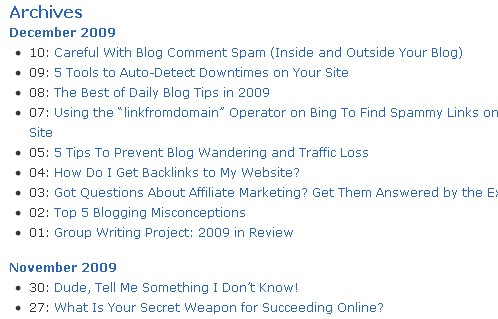
If you want to see an example, check the Archives section of my blog. I call it “Archives”, but that is nothing more than an HTML sitemap, because it outlines the structure of all the posts I have published  there month by month, and it also links to all of them.

html sitemap

Now it is important to not confuse an HTML sitemap with an XML one. An XML sitemap also outlines the structures of your site, but the  XML format is understood by search engine bots only. If you visit an XML sitemap you will just see a bunch of code.

XML sitemaps are useful if you are having crawling or indexation problems on your site. That is, if search engine bots are not visiting or indexing your pages correctly. If you are not having such problems, however, having an XML sitemap is not essential.

The HTML sitemap, on the other had, can be very useful no matter what. First of all because it is valuable for human visitors, as it allows them to find any page within your site quickly. Second, and most important, HTML sitemaps represent a very efficient way to distribute your link juice among the pages of your site.

Ideally you want to have all the pages linking to the HTML sitemap and the HTML sitemap linking back to all the pages (you can exclude non important pages like the privacy policy or contact page if you want). One way to accomplish this is to put a link to the HTML sitemap on the main navigation menu or on the footer of your site.

Finally, here is the hot tip that I promised: getting external backlinks pointing to your HTML sitemap can be very good to your search engine optimization. Why? Because that link juice will pass directly to all the pages on your site. If you get a backlink pointing to an internal page (e.g., a blog post) it will need to pass through at least one hop before it passes juice to other pages. Links to the HTML sitemap, on the other hand, pass juice directly to all other pages on your site.

The next time you do a guest post, therefore, consider pointing the byline link to your HTML sitemap instead of your homepage.

Monday, December 7, 2009

Link Week 8 Tips To Make PPC Work With Link Building Efforts

In this crazy digital era where even people like my poor old gospel-singing father look online for almost everything (usually guns and cashews), you really need to understand how to use as many types of advertising as possible in order to improve your efforts and expand your reach. Since link building is all over the SEO news right now, it’s being touted as the “fix” that will open the doors of the site to vast wealth and bring loads and loads of converting traffic.

However, like with any form of marketing, nothing should truly stand alone. If you’re just doing paid ads, you should consider link building. If you think that having lovely titles is enough to rank well, perhaps you should consider getting into social media. The key today is to embrace all sorts of different ideas and market yourself in the ways that matter to your audience, while using everything you have learned from one format to do better in another. Thus, we’ll talk about how to make PPC and link development work together, instead of at cross-purposes, which I’ve seen all too often.

1. Create linkable content on your site


This ups the chance of a PPC conversion turning into a good link. Remember, a PPC user may not just stay on the landing page. Your entire site should have great and enticing content on it.

2. Create “sticky” landing pages


Make sure your landing page for PPC is “sticky” enough to generate inbound links from the people who click on an ad, go to your site, then link to it  for whatever reason (great content, fantastic user experience, amazing product, etc.) This is no different from any other “content is king” idea, but sometimes PPC ads just aren’t written, or maintained, with link building in mind. Maybe the person in charge of the ads has no clue about the fact that your PPC landing page does have the power to garner a link, so always point it out. Any visibility is a chance to get a link, period. Don’t waste it.

3. Make your copy memorable


Create PPC copy that people will remember, even if they don’t click right now. They may be back later, and they may even give you a link. PPC copy is a lot like Twitter tweets in that you need to say a lot in a small amount of space, or no one’s going to care. Now’s the time to get your main keywords out there, tell a user why he or she should click, and make the connection that will stick in someone’s mind.

4. Visualize your anchor text


Think of how you would word your ideal anchor text for the landing page and include those words in your ad. I’m sure that you know what your most important keywords are, but many people don’t actually put those words in the actual ad. If your desired anchor text for a link is “wholesale flowers” then don’t just add it as a keyphrase that will trigger the ad to be shown. Use it in the title and/or the ad description. The more exact connections you make, the higher the chance of getting something good (like a link) out of it later.

5. Build up internal page visibility


The beauty of sending a PPC user to a landing page and not the home page is that you get a chance to generate a link to a subpage. This is an opportunity not to be missed. Depending upon your site, deep links can be very, very difficult to get without a lot of hard work. If there are internal pages that aren’t generating decent links but they’re important to you, create some ads landing on those page, and perhaps you’ll start seeing links show up soon.

6. Don’t be deceptive


Yes, this should go without saying, but too often, I’ve clicked on an ad that wasn’t at all what I was looking for, but due to some clever copy, I thought it would be. Not only does this waste money, it wastes time and it irritates users. The only link you’re getting out of deception is going to be one that trashes your name, most likely. Although that might be part of a natural link profile…just don’t do it.

7. Make use of the capability for quick testing


In general, PPC changes are super fast and paid ads make an excellent arena for testing purposes. Test different PPC content to see what converts, and carry this over into your link building efforts through content changes, new page names, and so forth.

8. Use your PPC analytics


PPC platforms give you analytics, so use them to figure out which phrases convert. Converting phrases make darned good anchor text. Try to alter your content to boost your visibility for those terms organically, as well. Don’t take converting copy lightly – perhaps you can figure out what’s causing the conversions and replicate it on other pages.

At the risk of alienating individuals who rely on PPC for their business, it is sometimes used as a band-aid that covers up all the poor SEO and lack of content on a site. Even if you can’t rank organically, you can still buy advertising space. Successful online marketing is about taking all the available chances to get your name out there. If people know where to find you, they may link to you. It’s very simple. All paid ads send a user to a page on your site that is a chance to not only convert, but to generate a link.

There’s a lot that you can apply to both PPC and link building through use of the other, so if you’re not making use of these arenas in conjunction with one another, perhaps you should consider it.

Website Speed - Google's New Ranking Factor. Check if Your Site is Fast Enough.

There's been a lot of news heading our way from Google recently. First they unveil the test version of a new search architecture called Google Caffeine. Then Caffeine goes live on one data center to be fully rolled out right after the coming holidays. And now we get to know that Google is about to inject a new ranking factor into the algorithm – site speed. This is huge news for anyone with a website so let's take a closer look.

The news came from Matt Cutts, head of Google's anti-spam team. In an interview to WebProNews Matt said:

“If you're a fast site, maybe you should get a little bit of a bonus. If you really have an awfully slow site, then maybe users don't want that as much”
What this means is that Google will be pushing faster sites higher in the search results, whereas slower sites will find it harder to rank.

When does speed factor go into play?

There's no official statement from Google yet as to when site speed will be introduced as a ranking factor. It seems reasonable for Google to roll out the new factor together with Google Caffeine which goes live in early 2010. The whole Caffeine update is mostly about speed: indexing speed, speed of generating search results and the overall experience of fast search. So it makes sense for Google to introduce the speed ranking factor in Caffeine.

In fact it doesn't really matter when exactly Google starts using the speed factor. What matters is whether you'll be ready for the game changer. Since we've got the early news, there's enough time for you to check your site's load time and make the necessary changes before the shift in the algo takes place. And here's how you can do it.

Is your website fast enough?

Obviously, website speed can't be treated as an absolute metric. The average site load time will largely depend on the niche. For example photo stocks and video sites will generally take more time to load then, say, news blogs and text-oriented websites. So, site speed is a relative metric that can only be applied to competing sites in one niche. You shouldn't really bother to become the fastest site on the planet. What you really should care about is whether your site's loading speed catches up with the competition.

Check Your Site's Speed

It's only been a couple of days since we heard the news about the whole speed factor thing and there's already a special tool out there that lets you check your site's loading time and compare it against the 10 top ranked websites for your keywords. It's WebSite Auditor, an onpage optimization tool by Link-Assistant.Com

This SEO tool is designed for onpage optimization and top 10 analysis. It allows you to analyze top 10 ranked websites for your niche so that you can get a better idea why these guys rank on top and what onpage optimization tactics you can borrow from them to make your content work better. The new version of the tool also lets you run a quick speed test to see how your website stacks up to the competition (this feature is available in the free version of the tool).

I ran a sample check for site-reference.com using the keyword "search engine optimization articles" and here're the results.


As you can clearly see the loading time of site-reference.com is almost 40% faster than the competition's average. It does lose a bit to a couple of websites on the list but the overall site's performance is excellent. It means that the coming change should give site-reference.com a push in the rankings.

And what about your site?
Test your site speed and check whether you're ready for the new ranking algorithm. Download this free on-page optimization tool and find out whether it's time to speed up your website.

Google Says Spamming Other Sites Can Lower Site Ranking

The Google Webmaster Blog has this short post explaining how abusing sites’ comment fields by putting up comment containing links to the poster’s site can actually hurt both sites’ ranking. That is of course if the comments posted are actually not related to the post or gibberish. In short, non legit comments whose objective is to raise the poster’s site ranking. If you have done this before to boost your site’s ranking, and your site was penalized by Google. Here’s what you need to do.
If you used this approach in the past and you want to solve this issue, you should have a look at your incoming links in Webmaster Tools. To do so, go to the Your site on the web section and click on Links to your site. If you see suspicious links coming from blogs or other platforms allowing comments, you should check these URLs. If you see a spammy link you created, try to delete it, else contact the webmaster to ask to remove the link. Once you’ve cleared the spammy inbound links you made, you can file a reconsideration request.
To avoid comment spam from hitting your sites, here are what you need to do:
  • Disallow anonymous posting.
  • Use CAPTCHAs and other methods to prevent automated comment spamming.
  • Turn on comment moderation.
  • Use the “nofollow” attribute for links in the comment field.
  • Disallow hyperlinks in comments.
  • Block comment pages using robots.txt or meta tags.
If you currently own a site with tons of comment spams hitting you daily, you can also follow those steps.
And here’s a reminder from Google that we all should have known by now – original content and some search engine-friendly optimization is still the best way to get a better site ranking on Google search, since the web community will only link to your site through your great content.

Why Twitter? 10 Great Uses for Twitter

"What is Twitter?" is the most popular question I get about Twitter, and "Why Twitter?" is definitely the most popular follow-up question. Even once you understand that Twitter has grown beyond a micro-blogging service to become a social messaging platform, it can still leave you wondering why you might want to use it.

We have cell phones and text messaging and social networking and blogging. So why Twitter?

There are many great business uses for Twitter, like sending out news briefs or advertising the latest job opening, but believe it or not, there are even more personal uses for Twitter.

Here are a few popular ways to use Twitter:

1. Microblogging

This one is obvious, but in the rush to put Twitter to other uses, many people forget its first use as a micro-blogging platform. And it is still one of the best uses. It's easy to make a quick tweet telling the world what you are doing, how good your morning coffee tastes or how bad your lunch went.

And it is a great way for friends and family -- even those halfway across the world -- to keep connected to your daily life.

2. Quick answers

The idea of crowdsourcing has never been so quick! You can ask all sorts of questions to the Twitter universe, from what is the capital of Alaska to what people think of a particular brand of baby food. And the more friends you have, the more detailed answers you will receive.

There are even web services set up to take advantage of this feature, so if you don't have many followers, don't worry. Mahalo will help get your question answered quickly. Simply send your question to @answers.

3. Finding a job

Whether you just got laid off or you are sick of your current job, Twitter can help you get a new job. Not only can you announce to the world that you are looking for employment, but many companies post their job openings on Twitter.

Here is a guide to help you get started finding a job on Twitter.

4. Keeping up with the news

From newspapers to magazines to TV stations and cable news, it seems everyone is adopting Twitter as the coolest thing since sliced bread. The coolest part is that it makes Twitter a great way to keep track of news.

Want to keep up with the news, but don't wan to clutter up Twitter? You can use a Twitter client like TweetDeck. And the neat thing about TweetDeck is that it is available for the iPhone too.

5. Arrange a lunch with friends

Twitter can be very useful for arranging a time and place to get together. It's like a conference call with text messaging. So, if you have a regular lunch date with a group of people, or just want to arrange a get together, Twitter can be a great way to nail down a time and place that works for everyone.

Like following the news, it can be handy to have your friends in their own group if you have a lot of followers.

6. Helpful outbursts, or in other words, screaming your rage

We've all had one of those days, whether it was someone pulling in front of us in traffic, or getting served the wrong type of coffee, it is sometimes these little things that can put us in a bad mood for the rest of the day.

The sagely advice is to let it out, but to who? It's not like most places of employment have a handy punching bag, and it's probably not smart to vent to your boss. That's where Twitter can be really helpful because it lets you rage to millions of people. And you might just get some sympathy tweets out of it too.

Just remember to watch the language.

7. Keep up with your favorite team

Twitter's search feature can be a great way to track trends or keep up with a particular subject. And if you are a fan of sports, it can be a great way to really connect with the team. Not only are many sports players on Twitter, but you have the media and millions of fans to keep you updated on the latest and greatest.

Can't get to a TV when your favorite team is on? Just follow the tweets on Twitter. Not only will you get regular score updates, but you'll get some fun color commentary to go along with it.

8. Find out what people really think about the latest movie

Similar to keeping up with your favorite team, you can also use the search feature to check out what the buzz is on the latest release at the theaters. Sure, you could check what the critics have to say, but their opinion isn't always in line with what people actually think of the film.

Twitter can be a great way to find out if the movie is a bomb or a bust, so you don't have to waste your money on a real dud.

9. Becoming involved with politics

Barack Obama laid down the blueprint, and politicians are increasingly turning to social media sites like Twitter. Not only is this providing a great way for politicians to get the word out, but it is allowing them to stay connected to their constituents. What better way to tell your senator what you think about a key vote than to send him or her a tweet?

But politics on Twitter goes far beyond just following politicians. The Iran election crisisshowed what a political force Twitter could be as it not only allowed Iranian citizens to break through the walls Iran hoped to keep up around the events, but also let people from around the world show their support by turning their profile pictures green.

10. Fun and Games

One of the most recent activities that is becoming popular on Twitter is the use of third-party games to interact with Twitter accounts. For example, Spymaster allows you to create your own spy ring using your followers as spies. You generate money for your spy ring by completing tasks either solo or in real-time with other spymasters.

Google Adwords Top Hints, Tricks and Mistakes

Control spending with the daily budget

We see this time and time and time again with people hitting their daily budget every single day. They often mistake this to mean that their campaign is going well, and they must have done a good job and things are ticking along nicely. What this generally means is that their ads are hitting the daily budget quickly, and then stop showing. They are leaving free traffic on the table. We generally in this occasion will edge the daily budget higher, and the keywords CPC lower, until we are still now spending the same amount per day on average, but are getting much cheaper clicks, and overall a lot more traffic for the same daily spend.

Too many keywords in one Adgroup

If you wish to have the highest possible CTR and quality score, you need to be either getting your keywords into the ad copy, or having ads that are super relevant for the particular keywords in the campaign.

When you have a category, or group of keywords in an Adgroup hat aren't performing as well, pull them out and put them in their own ad group with their own specific ads that you can test. You will improve the quality score and CTR at the same time.

Not split testing multiple ads

The 3 online rules to online marketing are:

1. Test
2. Test
3. Test

Always make sure you are playing king of the hill with your ads. You can do this by setting up 2 ads in each ad group. Then in your campaign settings you can either allow Google to optimize delivery, or evenly distribute traffic.

SNEAKY TIP #1
Personally the way I do this is with 3 ads and then evenly split traffic. 2 ads are the control, and the 3rd ad is the new ad trying to beat the existing one. This means 66% of the traffic goes to the original control, or winner... and 33% goes to the new ad I have just written. Another benefit of this method is that after some traffic has passed through, you can tell if your data is statistically relevant when you see the CTRs on the 2 control ads are the same, or very close. You can then tell if your new 3rd ad is a winner or not.

Not utilizing image ads

Google is expanding their business, and you are expanding yours. Take advantage of all their advertising networks. This includes image ads. Not as many people are doing it as the normal text ads, so the competition is less, and they can greatly help with companies that are trying to brand. You are getting your brand before eyes, and not necessarily having to pay for it. You can also generally have calls to action on your image ads, that Google will not allow in their text ads.

SNEAKY TIP #2
Set your ads up on a CPC basis and on the large banner images drive traffic to a phone number. You will not have to pay anything to Google for a customer that saw your image ad and immediately phoned the number.

Allowing auto bids for the content network

Take control of your advertising. If you allow Google to charge you top dollar they generally will. Set separate bids for you content traffic, as generally traffic from this source isn't actually looking for your service... they just stumbled upon your ad. So normally conversions for this type of traffic will be lower.

Not cutting the fat

Initially you should be building a large keyword list and then driving your first clicks to that. All along you should be tracking, and conversion tracking where possible needs to be implemented. Once you have collected your initial data, you can make the decision of which keywords are working and which ones aren't. Just cutting those keywords that don't convert can make a previously non-profitable campaign super profitable.

Making changes too early

So you think you have found a winner with your new ad? Well not necessarily. If you put our money lucky #13 on a roulette table, and lets say in the first 4 rolls it came up 3 times (lucky you). Does that now mean in the future that 13 is going to come up 75% of the time?

You can only make decisions about these types of things once you have collected enough data. So let things run there course before you make any further changes.

My sneaky technique #1 makes this easier, but there are also tools online to check whether you have enough data to be statistically relevant. Don't make changes until you know 100%.


Not recording what they have changed

It's all fine and dandy to continually be beating your control ad in the beginning, but if you consistently want to make improvements down the track recording what you have done already is critical. The consequence of this is wasting time and money to test things that you have already done in the past, but you wouldn't remember because you don't have it saved anymore. Even I was guilty of this in the early days. I would write a new ad by editing an old one. What you should do is delete the old one and create a new one. Google is nice enough to save the ones you have deleted so you can always go back and look at them and their data. They can even offer inspiration as you may see an idea but perhaps it wasn't executed properly. So always make sure you leave a trail of what you have done, and keep moving forward.

Not using website optimizer

Split testing your ads is only half of the puzzle. If you really want to make the most of your pay-per-click, you need to improve your site and advertising together. Improving the page visitors come to will improve your quality score, your conversion ratio, and your cost per conversion all at the same time. Converting traffic at a higher rate also means you can pay more per click and continue to takeover and dominate your market. So make sure you are testing and improving your site and your ads.

Getting a good conversion rate, also lets you battle it out with Adwords newer features, like their conversion optimizer which allows you to set a cost-per-action bid, and is smart enough to track when your conversion is best, so you are only displaying ads during that time of the day.