
As social media continues to grow at an exhilarating pace, it can become challenging for marketers to balance the time-consuming demands of today’s social media marketing landscape with their career’s core focus. Whether you’re a full-time social media marketer whose main responsibility is to manage social media campaigns, a brand-side marketer who dabbles in social media throughout the day, or a consultant who networks with others in the industry, it’s important to streamline your social media initiatives as much as possible, in order to save time & stay focused. Here are 5 musts for boosting the efficiency of social media marketing in the workplace.
1. Check in at increments
“Check in” at periodic increments throughout the day, but don’t let it consume your day. It’s easy for a one minute check-in to become 10 minutes of reading Tweets & links. If you’re not a full-time social marketer, schedule time in the morning, at lunch, and at the end of the day to “check in” on your favorite social networks. And if you are a full-time social marketer, check in at hourly increments. When you need to knock out a larger scale project, tune out the social chatter – except for any key, “emergency-scale” tweets. Those other tweets & updates can wait. Really.
2. Schedule tweets in advance
If you’re sharing content that’s not time-sensitive – i.e. articles, ideas, or commentary, schedule your Tweets in advance with a tool like SocialOomph. You can schedule Tweets once a day (or once a week), and then check in at a few increments throughout the day to engage with your following.
3. Focus on the most important tweets
If you’re a brand-side or full-time social media marketer, stay on top the most important & relevant Tweets by monitoring key phrases with RSS feeds. Tools like NewsFire can notify you in real time when someone Tweets about your brand. Obviously, if you’re @Starbucks, you’ll want to refine brand Tweets even further, or use an online reputation tool like Trackur.
4. Segment your social media universe
Thought leaders, real-life friends, and colleagues: there are many ways to segment your Twitter universe. By segmenting your list into different relationships, you can follow work or industry-related Twitter friends during working hours, and more “fun” Tweeps, like @aplusk & @theonion after hours. Twitter’s own list functionality & apps like Tweetdeck make it really easy to sort your relationships, and focus on the right ones at the right time.
5. Multi-task when you can, but don’t repeat updates
There are a lot of tools out there that can pull your Tweets and launch them to other networks. While those seem helpful on the surface, you have to remember your audience & the type of content & frequency that works on each network. While short, quick 140-character updates are welcome on Twitter, your Facebook fans can grow tired of those updates quickly, and would prefer less frequent updates of rich content, such as videos, contests, and photos. So instead of repeating the same exact updates on your different social networks, use a tool like HootSuite to launch network-specific updates from one master account.
While all the growth & potential surrounding social media marketing is certainly exciting, it can become a bottomless pit of wasted time. But by staying focused on the right audience and streamlining as much as possible, you can be sure ALL of your marketing initiatives get the love they deserve.
Saturday, February 27, 2010

3 Best Ways to Test Your Website Design in FireFox
I am no web designer (I have neither time nor talent to learn web design), however for SEOs it is essential to know some basic tools and tips to test a website design when it is delivered.
Thus this post is not intended to share some advanced tips for web developers: instead it lists three quick ways to test a web design in FireFox:
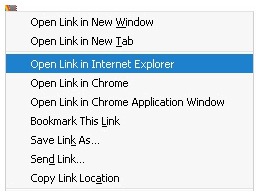
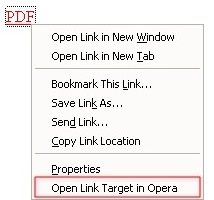 OR: install one combined addon: Browser view plus is an experimental addon that lets the user load Firefox links, bookmarks, or pages in Internet Explorer, Google Chrome or Chrome Application Window, Safari, Opera, or any other external browser. It also allows to change context menu text, language, or selected browsers, at any time, without restarting Firefox.
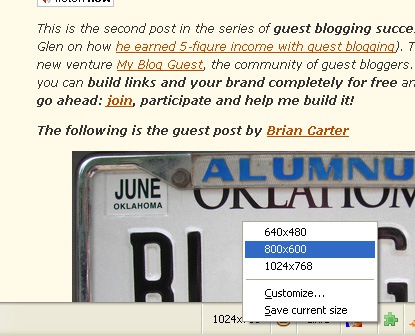
This addon allows you to view and change the screen resolution from your browser status bar:
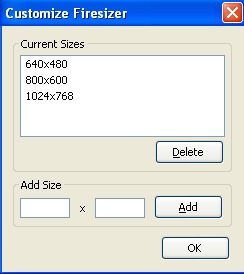
 You can of course customize the set of available resolutions via a small handy dialog:
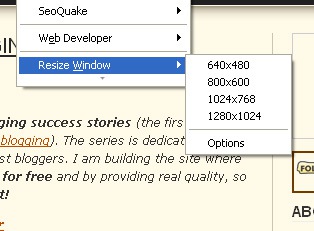
 Yet Another Window Resizer
This is a similar to the above one but it allows to resize the browser window from the right-click context menu (so it’ just a matter of taste which one you prefer to use):
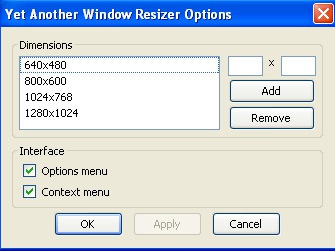
 Its options also allow to customize the sets of available resolutions:
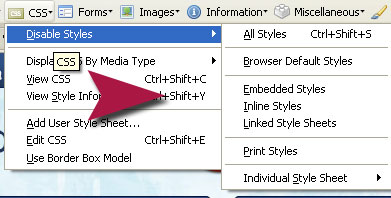
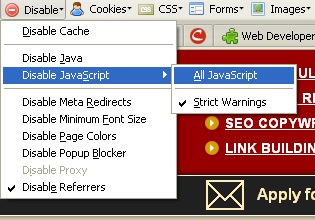
You can disable JavaScript or CSS styles right from the toolbar options to make sure all elements of your page are easily accessed by all people and search engines.
Disable CSS:
 Disable Javascript:
Thus this post is not intended to share some advanced tips for web developers: instead it lists three quick ways to test a web design in FireFox:
1. Check how a website looks in other browsers
There are a number of FireFox addons that allow to view the current page in an alternative browser:- Chrome View;
- IE view (or this handy IE button);
- Safari view;
- Opera view
2. Check how a website looks in different resolutions
FiresizerThis addon allows you to view and change the screen resolution from your browser status bar:
This is a similar to the above one but it allows to resize the browser window from the right-click context menu (so it’ just a matter of taste which one you prefer to use):
3. Check how a site works with CSS and JavaScript disabled
For this one you won’t need any extra addons: just the old good Web Developer plugin we all love:You can disable JavaScript or CSS styles right from the toolbar options to make sure all elements of your page are easily accessed by all people and search engines.
Disable CSS:
Friday, February 26, 2010
It’s A Fatal Mistake To Copy Successful Web Sites
At a search engine marketing conference, several of us gave a session on website usability topics ranging from usability and SEO to site architecture and requirements gathering. Afterward, there was time for questions by the audience. Someone asked, “Why don’t we all just copy Amazon.com?” I replied, “Never, ever copy what Amazon does.” The audience responded with surprise, thinking I was not a fan of Amazon.
Not true. The reason you don’t want to copy a successful site like Amazon is that their website requirements are not likely to be the same as your site requirements. Their users may have different characteristics than your site visitors. Their customers’ needs may be completely different. You don’t have the user, traffic analysis and usability testing data they’ve collected over the years that they use as a base for their user interface, information architecture and content delivery.
Your website is unique
Today, with blog templates or content management system software being the design foundation for many sites, web page layouts are fairly consistent and come with no surprises. We’ll find two or three columns, a header, footer, sidebar navigation and a picture or two. The logo typically goes into the top upper left corner. It would be unusual to find a page beginning with a copyright year, privacy policy and company address. Arriving to a solo column page with no header would be odd.
One wonders what creativity we’ve lost out on because we’re afraid to change the status quo. Usability folks like to promote consistency and user habits for design considerations. This is because anytime we are forced to re-learn where items are customarily placed, it slows us down. There is a risk of user confusion. We’re told that it takes only a few seconds to lose your visitor, so why take any chances?
Many web designers have been creating product navigation menus the way Amazon has been doing it, believing that if Amazon’s way is making them a profit, it ought to do the same for their sites too. Why wouldn’t this work?
Understanding mental models
Amazon has expert knowledge of their customers’ mental model. This means they know how their visitors search and browse their site. They know what their users want to find, or learn, before they add an item to the cart. They know how what words are chosen most often to locate certain products, so their information architects can then create their entire information architecture based on user language, keyword choices, and traffic patterns.
When someone says they will make your website easier to use, ask them what mental model they are referring to. Are they going to make it easier for search engines to crawl and rank it? This is a searcher mental model and one an SEO is more likely to be focused on. An information architect wants to know the mental model of your target users. What are your customer needs? What types of behaviors can you expect from them? Many websites have different user paths on one website.
For example, colleges provide different types of information for students, parents, alumni, staff and teachers. Each type of person has a different mental model, with their own needs and expectations. A common mistake is to design identical user paths for everyone, ignoring the specific financial, emotional and practical needs of each user group. Remember that your website is unique. The better you understand what motivates and interests your site visitors, the more competitive your site will be.
Findability and manageability
Information architecture supports findability and usability. It can also support organic SEO practices related to on-page content and word usage. One area that Amazon has helped to pioneer is user management of information. Their customers are recognized by the use of cookies and purchase history. There are different user types for them to track. Some people are affiliates. Some arrive for the first time because they received a gift certificate. Others are regular customers, so Amazon has a chance to study the kinds of products they like. Amazon users can manage their own wish lists, accounts, leave book reviews, send gifts and follow author blogs. Do you know your site visitors this well?
Information architects use terms such as taxonomies and semantics to help describe what they do. Simply put, they organize categories of information into something that makes logical sense. A usability oriented person is interested in the same thing because words can create momentum or promote frustration.
For example, which one of these category links is the best choice to find online specials?
Interestingly, the website that uses these category links has all of its customer service information at the very bottom of the homepage, lumped into a box as if an afterthought. What message does this send to customers? Was any user testing performed? Apparently not. However, there was attention put on the searcher mental model as far as search engine queries go. Unfortunately, the site owner learned that search results did not equal conversions. In their case, they required both a rebuilt information architecture as well as usability adjustments to increase and support conversions.
A 360 degree team effort
Your website is and should be the manifestation of your own vision. Sure, it’s fun and helpful to study other websites. But those sites should inspire you to try new ideas or even have the courage to think outside the box. Surround yourself with those who have the technical skills to implement your vision. These people will be your project managers, search engine marketers, social media marketers, information architects, usability and user experience consultants, web designers and developers. Ask them questions about where they acquire their inspiration. Test site designs on people. Research, with and without search engines, the language and terms your site visitors use to find your products or services. Be sure to write out your specific site requirements and business goals. Write guidelines to be sure everyone on your team sticks to the game plan.
And know that nobody understands your customers better than you do. Not even Amazon.
Not true. The reason you don’t want to copy a successful site like Amazon is that their website requirements are not likely to be the same as your site requirements. Their users may have different characteristics than your site visitors. Their customers’ needs may be completely different. You don’t have the user, traffic analysis and usability testing data they’ve collected over the years that they use as a base for their user interface, information architecture and content delivery.
Your website is unique
Today, with blog templates or content management system software being the design foundation for many sites, web page layouts are fairly consistent and come with no surprises. We’ll find two or three columns, a header, footer, sidebar navigation and a picture or two. The logo typically goes into the top upper left corner. It would be unusual to find a page beginning with a copyright year, privacy policy and company address. Arriving to a solo column page with no header would be odd.
One wonders what creativity we’ve lost out on because we’re afraid to change the status quo. Usability folks like to promote consistency and user habits for design considerations. This is because anytime we are forced to re-learn where items are customarily placed, it slows us down. There is a risk of user confusion. We’re told that it takes only a few seconds to lose your visitor, so why take any chances?
Many web designers have been creating product navigation menus the way Amazon has been doing it, believing that if Amazon’s way is making them a profit, it ought to do the same for their sites too. Why wouldn’t this work?
Understanding mental models
Amazon has expert knowledge of their customers’ mental model. This means they know how their visitors search and browse their site. They know what their users want to find, or learn, before they add an item to the cart. They know how what words are chosen most often to locate certain products, so their information architects can then create their entire information architecture based on user language, keyword choices, and traffic patterns.
When someone says they will make your website easier to use, ask them what mental model they are referring to. Are they going to make it easier for search engines to crawl and rank it? This is a searcher mental model and one an SEO is more likely to be focused on. An information architect wants to know the mental model of your target users. What are your customer needs? What types of behaviors can you expect from them? Many websites have different user paths on one website.
For example, colleges provide different types of information for students, parents, alumni, staff and teachers. Each type of person has a different mental model, with their own needs and expectations. A common mistake is to design identical user paths for everyone, ignoring the specific financial, emotional and practical needs of each user group. Remember that your website is unique. The better you understand what motivates and interests your site visitors, the more competitive your site will be.
Findability and manageability
Information architecture supports findability and usability. It can also support organic SEO practices related to on-page content and word usage. One area that Amazon has helped to pioneer is user management of information. Their customers are recognized by the use of cookies and purchase history. There are different user types for them to track. Some people are affiliates. Some arrive for the first time because they received a gift certificate. Others are regular customers, so Amazon has a chance to study the kinds of products they like. Amazon users can manage their own wish lists, accounts, leave book reviews, send gifts and follow author blogs. Do you know your site visitors this well?
Information architects use terms such as taxonomies and semantics to help describe what they do. Simply put, they organize categories of information into something that makes logical sense. A usability oriented person is interested in the same thing because words can create momentum or promote frustration.
For example, which one of these category links is the best choice to find online specials?
- Closeout Sale
- Gift Ideas
- International
- New Releases
- Top Sellers
- Today’s Sales
Interestingly, the website that uses these category links has all of its customer service information at the very bottom of the homepage, lumped into a box as if an afterthought. What message does this send to customers? Was any user testing performed? Apparently not. However, there was attention put on the searcher mental model as far as search engine queries go. Unfortunately, the site owner learned that search results did not equal conversions. In their case, they required both a rebuilt information architecture as well as usability adjustments to increase and support conversions.
A 360 degree team effort
Your website is and should be the manifestation of your own vision. Sure, it’s fun and helpful to study other websites. But those sites should inspire you to try new ideas or even have the courage to think outside the box. Surround yourself with those who have the technical skills to implement your vision. These people will be your project managers, search engine marketers, social media marketers, information architects, usability and user experience consultants, web designers and developers. Ask them questions about where they acquire their inspiration. Test site designs on people. Research, with and without search engines, the language and terms your site visitors use to find your products or services. Be sure to write out your specific site requirements and business goals. Write guidelines to be sure everyone on your team sticks to the game plan.
And know that nobody understands your customers better than you do. Not even Amazon.
Google Adds “Nearby” Local Search To Options Panel
Google has expanded the choices in its Search Options panel with today’s announcement of a tool to refine searches by location.
After doing a search and opening the “Show Options” panel, you’ll see a new link labeled “nearby.”

Clicking that link leads to a few refinement options: You can use the default location Google has for you, or type in a custom location for your search. The other option is to select between City, Region, or State-level searches, as shown below.

In these images, I’ve already done a local search on the term “seattle restaurants.” This new search refinement doesn’t really do much in a situation like this. The businesses that are listed in the “7-pack” didn’t change in my testing; the only changes were to some of the organic listings when I switched from city to region to state.
n Google’s blog post, it uses examples such as “things to do on St. Patrick’s Day” and “food blogs” — more generic terms are clearly how this option is meant to be used.
Much like Google’s decision last year to show local results on non-local queries, this new search refinement could impact how people search. With several easily-clickable links on the screen, searchers could no longer need to repeat searches with new queries, such as going from “seattle luxury car dealer” to “bellevue luxury car dealer” to “tacoma luxury car dealer,” etc. One-word search queries are reportedly up by 17% in the past year, and this location refinement may reinforce that trend … if, in fact, people are actually using Google’s Search Options panel.
After doing a search and opening the “Show Options” panel, you’ll see a new link labeled “nearby.”
Clicking that link leads to a few refinement options: You can use the default location Google has for you, or type in a custom location for your search. The other option is to select between City, Region, or State-level searches, as shown below.
In these images, I’ve already done a local search on the term “seattle restaurants.” This new search refinement doesn’t really do much in a situation like this. The businesses that are listed in the “7-pack” didn’t change in my testing; the only changes were to some of the organic listings when I switched from city to region to state.
n Google’s blog post, it uses examples such as “things to do on St. Patrick’s Day” and “food blogs” — more generic terms are clearly how this option is meant to be used.
Much like Google’s decision last year to show local results on non-local queries, this new search refinement could impact how people search. With several easily-clickable links on the screen, searchers could no longer need to repeat searches with new queries, such as going from “seattle luxury car dealer” to “bellevue luxury car dealer” to “tacoma luxury car dealer,” etc. One-word search queries are reportedly up by 17% in the past year, and this location refinement may reinforce that trend … if, in fact, people are actually using Google’s Search Options panel.
Google Advertises Chrome … On Bing!
It’s not unusual for other search engines like Yahoo, Bing or Ask to advertise on Google. But I’ve never seen Google run an ad on another search engine until now.
I did a search this evening on Bing for Google Chrome. To my surprise, there was an ad right at the top of the page advertising Chrome, apparently from Google:
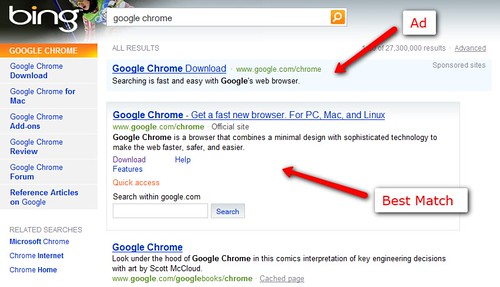
What’s that big box below the ad? That’s Bing doing a special “Best Match” unit. It’s completely editorial and not connected with the ad. But above it is definitely an ad — that’s why it says Sponsored Listing.
I also see the ads if I search for just chrome or browser
:

And at Yahoo, I’ve spotted an ad appearing for google chrome, though it’s for Google’s personalized home page, not for Chrome:

There’s a chance someone else might be running these ad, of course. But I don’t know of any Google Chrome affiliate programs out there, which means there’s little incentive for anyone else but Google to be doing this. But I’m checking with Google and will update, if it really isn’t from them.

I did a search this evening on Bing for Google Chrome. To my surprise, there was an ad right at the top of the page advertising Chrome, apparently from Google:
What’s that big box below the ad? That’s Bing doing a special “Best Match” unit. It’s completely editorial and not connected with the ad. But above it is definitely an ad — that’s why it says Sponsored Listing.
I also see the ads if I search for just chrome or browser
:
And at Yahoo, I’ve spotted an ad appearing for google chrome, though it’s for Google’s personalized home page, not for Chrome:
There’s a chance someone else might be running these ad, of course. But I don’t know of any Google Chrome affiliate programs out there, which means there’s little incentive for anyone else but Google to be doing this. But I’m checking with Google and will update, if it really isn’t from them.
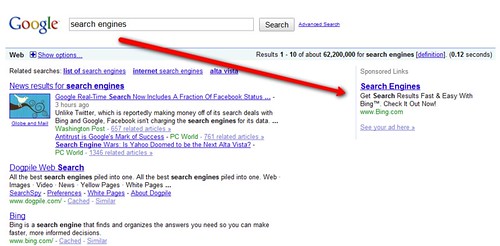
Postscript: Google confirms that they are indeed placing these ads, that they’re always looking for ways to promote their products. Google also said they’ve run search-targeted ads on other search engines before this. As for Chrome, they’ve done ads in other places such on Hulu, for example.Below, some examples of Bing advertising on Google, for bing and search engines:
Google Caffeine May Be Months Away & You Can’t See It
While some webmasters anxiously wait for Google to roll out its Google Caffeine search infrastructure any day now, Google says it may not happen for “months.” What’s more, the IP address of the one data center where Caffeine was said to be available may have changed, and Google is no longer saying where users can see Caffeine search results. Here’s the latest on Google’s “next-generation architecture.”
When Will Caffeine Launch?
A Google spokesperson tells Search Engine Land that Caffeine is still live at only one data center, and says “we expect to roll it out to all data centers over the coming months.”
That’s a far different story than before. In early November, Google’s Matt Cutts wrote a blog post saying that “the full Caffeine roll out will happen after the holidays.” It’s now two months since the holidays, and Google is talking about Caffeine’s launch in months, not days or even weeks.
What happened?
“We run lots of tests with this big a change to our infrastructure,” the Google spokesperson says. “We want the new system to meet or exceed the abilities of our current system, and it can take time to ensure that everything looks good.”
Here at Search Engine Land, it seems like we get emails every week from readers telling us they think Caffeine is live. And some recent Google news coverage seemed to suggest maybe it was. For example, in this week’s Wired magazine piece, author Steven Levy writes about Caffeine in the past tense, as if it’s already launched:
Where Can I See Caffeine Now?
You can’t. Or maybe you can. Google doesn’t seem to want anyone to know. Caffeine is still live at the same data center it’s always been, but that doesn’t mean you can see it.
“The data center remains the same,” Google tells us, “but different IP addresses can map to different data centers at different times due to how Google manages its traffic. Because of how Google employs custom load-balancing, there is not a single IP address that will always reach the Caffeine data center. For example, one IP address might still send half of its traffic to the Caffeine data center and half of its traffic to a different data center.”
In late November, Matt Cutts confirmed that Caffeine was available about 50% of the time at this IP address: 209.85.225.103. But that 50% figure may not necessarily be the case today. “It varies from day-to-day as the we push various binaries and data out,” Google says.
And when we asked if that same IP address currently points to the data center where Caffeine is live, Google’s spokesperson told us, “I don’t have a specific IP address I can share.”
Final Thoughts
This is quite a change from last August, when Google first announced Caffeine. Pre-announcing a change to its search infrastructure was newsworthy enough; the fact that Google also set up a developer sandbox at www2.sandbox.google.com and asked for user feedback was groundbreaking as a webmaster outreach measure.
By early November, Google had retired the sandbox where anyone could test the new results. And now Google doesn’t even want webmasters to know which IP points to the Caffeine date center as we all wait for Caffeine to roll out … which might not happen for months.
When Will Caffeine Launch?
A Google spokesperson tells Search Engine Land that Caffeine is still live at only one data center, and says “we expect to roll it out to all data centers over the coming months.”
That’s a far different story than before. In early November, Google’s Matt Cutts wrote a blog post saying that “the full Caffeine roll out will happen after the holidays.” It’s now two months since the holidays, and Google is talking about Caffeine’s launch in months, not days or even weeks.
What happened?
“We run lots of tests with this big a change to our infrastructure,” the Google spokesperson says. “We want the new system to meet or exceed the abilities of our current system, and it can take time to ensure that everything looks good.”
Here at Search Engine Land, it seems like we get emails every week from readers telling us they think Caffeine is live. And some recent Google news coverage seemed to suggest maybe it was. For example, in this week’s Wired magazine piece, author Steven Levy writes about Caffeine in the past tense, as if it’s already launched:
“The most recent major change, codenamed Caffeine, revamped the entire indexing system to make it even easier for engineers to add signals.”It’s possible that something was lost in translation between the time Levy spoke with Google about Caffeine and the article was published. But even Matt Cutts himself spoke about Caffeine in the past tense when quoted last October in a BusinessWeek interview:
“Caffeine was primarily an infrastructural change. That was a huge undertaking over many months from the crawl and indexing team.”Despite all that, Google says Caffeine isn’t live on Google.com — it’s still only at one data center. But that doesn’t mean you can easily see it for yourself.
Where Can I See Caffeine Now?
You can’t. Or maybe you can. Google doesn’t seem to want anyone to know. Caffeine is still live at the same data center it’s always been, but that doesn’t mean you can see it.
“The data center remains the same,” Google tells us, “but different IP addresses can map to different data centers at different times due to how Google manages its traffic. Because of how Google employs custom load-balancing, there is not a single IP address that will always reach the Caffeine data center. For example, one IP address might still send half of its traffic to the Caffeine data center and half of its traffic to a different data center.”
In late November, Matt Cutts confirmed that Caffeine was available about 50% of the time at this IP address: 209.85.225.103. But that 50% figure may not necessarily be the case today. “It varies from day-to-day as the we push various binaries and data out,” Google says.
And when we asked if that same IP address currently points to the data center where Caffeine is live, Google’s spokesperson told us, “I don’t have a specific IP address I can share.”
Final Thoughts
This is quite a change from last August, when Google first announced Caffeine. Pre-announcing a change to its search infrastructure was newsworthy enough; the fact that Google also set up a developer sandbox at www2.sandbox.google.com and asked for user feedback was groundbreaking as a webmaster outreach measure.
By early November, Google had retired the sandbox where anyone could test the new results. And now Google doesn’t even want webmasters to know which IP points to the Caffeine date center as we all wait for Caffeine to roll out … which might not happen for months.
16 Free Online Link Building & Development Tools
In order to rank #1 on major search engines such a Google, Yahoo! and Bing, a link builder needs to know the back link profiles of their competitors and industry allies. Having this kind of knowledge makes link building easier, more efficient and most all more effective.
The tools listed below will not only help you discover your competition's backlink profiles but will also provide ways to obtain relevant back links yourself.
TOOL #1 - Backlink Watch - The Backlink Watch Tool a very simple way to check a website's back link URL's, anchor text and total OBL's (outbound links) on the same page as that link.
TOOL #2 - Analyze Backlinks - Another gold mine for exploring a competitor's back links. This one provides more valuable options that allow you to filter out same domain URL's and to search for factors such as target keyword mentions surrounding the links.
TOOL #3 - Yahoo Site Explorer - Not really a linking tool, but you could quickly check a site's inlink count and it's top 10-1000 back links. Although this tool isn't much more better than the previous 2, it does show the title of the linking pages and allows you to track you own websites if signed in and verified ownership of site.
TOOL #4 - Google Search (link:yoursite.com) - No different than the one above except for the fact that the number of back links according to Google's search engine is ALWAYS considerably lower than Yahoo!'s results. But the links that made it to Google's results are assumingly affecting the search rankings.
TOOL #5 - Alexa Backlink Checker - You can see total domains linking to a website and which domains they are. This Alexa tool also provides other great website data.
TOOL #6 - Bad Neighborhood Text Link Tool - Great way to see what type of links a website accumulates, whether it be yours or a potential link partner.
TOOL #7 - SoloSEO Link Search Tool - Quite possibly the easiest way online to find relevant back links, that are fairly easy to obtain.
Web Confs Backlink Tools - Webconfs has over 20 SEO tools to offer. But these are their best link building tools.
TOOL #8 - Webconfs' Back link Anchor Text Analysis - Compare the top ranking site's text links to yours. Is there a difference?
TOOL #9 - Webconfs' Back link Builder - Enter a keyword. Copy whole list(s), paste into excel. Filter.., or, get to work.
TOOL #10 - Webconfs' Backlink Summary - A quick summary similar to the results delivered by Analyze Backlinks & Backlink Watch.
TOOL #11 - SEO for FireFox Plugin - Besides being able to provide you with on-demand access to data of the top ranking site's instantly, the SEO for Firefox Tool also provides a great feature that highlights nofollow links (in red), so it's easy to identify which inlinks count and which don't.
TOOL #12 - Google Webmaster Tools - Besides getting the best perspective of your website through the eyes of Google, the Google Webmaster Tools also tells you the links they've found, and their anchor text.
TOOL #13 - Link Harvester - This tool is toward the end of the list because it provides the type of data far beyond what the basic linker needs. Nonetheless, it's a oldie, but goodie.
TOOL #14 - Search Combination Tool by We Build Pages - Not really a link building too at all. But adding phrases like "resources", "links", "favorite sites", "suggest url", etc. could add some fun to it.
TOOL #15 - Recip Links - A tool that spiders a site (or list of sites) and checks to see if they are links to a specified domain.
TOOL #16 - Link Appeal Tool - Is a link from your website really worth it? Find out with this tool how valuable your website is based on several factors. Aim to get links from sites of higher value than yours.
The tools listed below will not only help you discover your competition's backlink profiles but will also provide ways to obtain relevant back links yourself.
TOOL #1 - Backlink Watch - The Backlink Watch Tool a very simple way to check a website's back link URL's, anchor text and total OBL's (outbound links) on the same page as that link.
TOOL #2 - Analyze Backlinks - Another gold mine for exploring a competitor's back links. This one provides more valuable options that allow you to filter out same domain URL's and to search for factors such as target keyword mentions surrounding the links.
TOOL #3 - Yahoo Site Explorer - Not really a linking tool, but you could quickly check a site's inlink count and it's top 10-1000 back links. Although this tool isn't much more better than the previous 2, it does show the title of the linking pages and allows you to track you own websites if signed in and verified ownership of site.
TOOL #4 - Google Search (link:yoursite.com) - No different than the one above except for the fact that the number of back links according to Google's search engine is ALWAYS considerably lower than Yahoo!'s results. But the links that made it to Google's results are assumingly affecting the search rankings.
TOOL #5 - Alexa Backlink Checker - You can see total domains linking to a website and which domains they are. This Alexa tool also provides other great website data.
TOOL #6 - Bad Neighborhood Text Link Tool - Great way to see what type of links a website accumulates, whether it be yours or a potential link partner.
TOOL #7 - SoloSEO Link Search Tool - Quite possibly the easiest way online to find relevant back links, that are fairly easy to obtain.
Web Confs Backlink Tools - Webconfs has over 20 SEO tools to offer. But these are their best link building tools.
TOOL #8 - Webconfs' Back link Anchor Text Analysis - Compare the top ranking site's text links to yours. Is there a difference?
TOOL #9 - Webconfs' Back link Builder - Enter a keyword. Copy whole list(s), paste into excel. Filter.., or, get to work.
TOOL #10 - Webconfs' Backlink Summary - A quick summary similar to the results delivered by Analyze Backlinks & Backlink Watch.
TOOL #11 - SEO for FireFox Plugin - Besides being able to provide you with on-demand access to data of the top ranking site's instantly, the SEO for Firefox Tool also provides a great feature that highlights nofollow links (in red), so it's easy to identify which inlinks count and which don't.
TOOL #12 - Google Webmaster Tools - Besides getting the best perspective of your website through the eyes of Google, the Google Webmaster Tools also tells you the links they've found, and their anchor text.
TOOL #13 - Link Harvester - This tool is toward the end of the list because it provides the type of data far beyond what the basic linker needs. Nonetheless, it's a oldie, but goodie.
TOOL #14 - Search Combination Tool by We Build Pages - Not really a link building too at all. But adding phrases like "resources", "links", "favorite sites", "suggest url", etc. could add some fun to it.
TOOL #15 - Recip Links - A tool that spiders a site (or list of sites) and checks to see if they are links to a specified domain.
TOOL #16 - Link Appeal Tool - Is a link from your website really worth it? Find out with this tool how valuable your website is based on several factors. Aim to get links from sites of higher value than yours.
Thursday, February 25, 2010
Google Real Time Search Now Shows Updates From Facebook Fan Pages
Google’s Real Time Search has gained a new data source, updates from Facebook fan pages. Google had announced a deal to list this information back in December, and now it’s finally being implemented. Google has tweeted the news.
See our detailed guide, Google Launches Real Time Search Results to understand how Google Real Time Search works, where it appears and how to use it. Facebook fan page updates now appear within those results, which include all of these sources:
With Facebook, it’s important to note that it is only Facebook fan page updates that are included. Things that are shared on fan pages by fan page owners — such as links, status updates, photos and vidoes — can now be found in Google Real Time Search. However, comments made by non-owners on fan pages will not be included. Nor will updates that are made on personal pages. Our Google & Bing’s Unequal Facebook Status Update Deals article explains more about this. And while Bing is getting more data than Google, as covered in that article, it has yet to make any of it findable.
Want to see some of the Facebook content. Try this link. That configures Google Real Time Search to show only updates from Facebook, as you’ll see here:
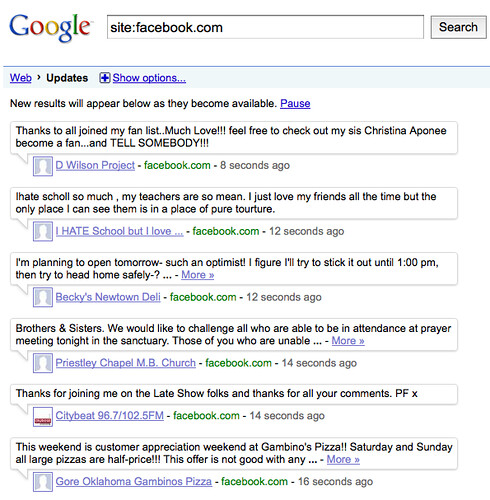
From that link, you can add more words to narrow your search to particular topics that appear in Facebook fan page updates. For example, here’s a search for updates about the Olympics that come from Facebook fan pages:

You can see that the first update is from the Global Laugher Network fan page, as I’ve pointed at below:

This is also a good time for search marketers and marketers in general to think again about Facebook, if you haven’t already. More and more Facebook content has been made visible to search engines over the years. Also in that time, fan pages were added but still aren’t used by some. Google’s move makes having Facebook fan pages even more essential. Without one, you’re missing out on a chance to be found within yet another area, Google’s real time results.
And hey, speaking of fan pages, a reminder. You can follow Search Engine Land on its own Facebook fan page. I also maintain my own page here.
Postscript (4:45pm PT): I’ve been watching Google Real Time Search results closely since the launch. So far, I don’t see any Facebook fan page updates making it into Google’s real time box in its regular results. I’m sure they’ll come, however. They do show when you drill-down into real time results.
For example, consider this search for public schools:
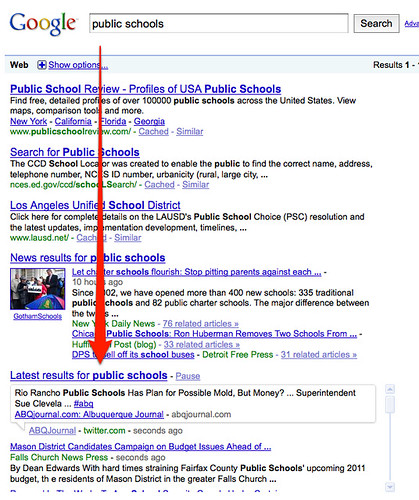
After monitoring for a good 10 minutes, no Facebook updates appeared in the real time box. But if you click on the link above the box, the full results did have a Facebook update:

As I said, I’m sure Facebook visibility will improve as the launch matures. Ironically, despite us having posted this article to our our Facebook Fan Page:

You still can’t find that update in Google Real Time Search:

See our detailed guide, Google Launches Real Time Search Results to understand how Google Real Time Search works, where it appears and how to use it. Facebook fan page updates now appear within those results, which include all of these sources:
- Twitter tweets
- Google News links
- Google Blog Search links
- Newly created web pages
- Freshly updated web pages
- FriendFeed updates
- Jaiku updates
- Identi.ca updates
- TwitArmy updates
- Google Buzz posts
- MySpace updates
- Facebook fan page updates
With Facebook, it’s important to note that it is only Facebook fan page updates that are included. Things that are shared on fan pages by fan page owners — such as links, status updates, photos and vidoes — can now be found in Google Real Time Search. However, comments made by non-owners on fan pages will not be included. Nor will updates that are made on personal pages. Our Google & Bing’s Unequal Facebook Status Update Deals article explains more about this. And while Bing is getting more data than Google, as covered in that article, it has yet to make any of it findable.
Want to see some of the Facebook content. Try this link. That configures Google Real Time Search to show only updates from Facebook, as you’ll see here:
From that link, you can add more words to narrow your search to particular topics that appear in Facebook fan page updates. For example, here’s a search for updates about the Olympics that come from Facebook fan pages:
You can see that the first update is from the Global Laugher Network fan page, as I’ve pointed at below:
This is also a good time for search marketers and marketers in general to think again about Facebook, if you haven’t already. More and more Facebook content has been made visible to search engines over the years. Also in that time, fan pages were added but still aren’t used by some. Google’s move makes having Facebook fan pages even more essential. Without one, you’re missing out on a chance to be found within yet another area, Google’s real time results.
And hey, speaking of fan pages, a reminder. You can follow Search Engine Land on its own Facebook fan page. I also maintain my own page here.
Postscript (4:45pm PT): I’ve been watching Google Real Time Search results closely since the launch. So far, I don’t see any Facebook fan page updates making it into Google’s real time box in its regular results. I’m sure they’ll come, however. They do show when you drill-down into real time results.
For example, consider this search for public schools:
After monitoring for a good 10 minutes, no Facebook updates appeared in the real time box. But if you click on the link above the box, the full results did have a Facebook update:
As I said, I’m sure Facebook visibility will improve as the launch matures. Ironically, despite us having posted this article to our our Facebook Fan Page:
You still can’t find that update in Google Real Time Search:
PPC Marketing vs Facebook Advertising
Google is the Bad Egg of Internet Marketing & M-L-M. With so many accounts slapped and closed down for good, Top Gurus are turning to Facebook Advertising as a far superior option for cheap targeted traffíc.
Don't Put your Eggs in One Marketing Basket
Savvy Pro marketers like our members aren't panicking - we've always had a back up plan on the go. Our advice has been simple - don't put all your eggs in one basket - especially Google's! If you're using Pay Per Click Advertising, then make sure you also have some SEO going on - to generate organic traffic.
It takes a lot of hard work to get your site ranked through organic traffic - writing articles, forum posts, blogs, squidoo lenses, hub pages, video marketing - to build up your online presence and expertise for your chosen niche keywords.
Organic takes time. So if you don't have the patience and want to generate lots of traffic fast, PPC is a good to have as part of your marketing model.
But internet marketers and PPC experts are absolutely fed up with the arrogance of Google. So if we're not doing Google Adwords for our marketing, where do we get the masses of traffic we are still able to generate on a daily basis?
Adding Content Rich Social Marketing into the Mix
If you want free traffic, you usually have to spend masses of your time with manually writing copy and creating podcasts and video marketing. So really it's not free at all - time is money and all that. Hiring a copy writing group to create niche content can become quite expensive.
So all this organic SEO friendly traffic takes time to build up and requires consistent daily effort. This is good to add to your marketing mix but won't give you fast traffic.
What's super important too is that organic SEO content is ultimately still controlled by the search engines, so Google still has power over how you get seen by your prospects.
How hard is it these days to do enough clever keyword research to get your unique niche and rank on page one of Google. Almost impossible - especially if you're one newbie trying to compete with the big gurus in internet marketing or M-L-M network marketing arena.
What Marketing Strategies to Use that Beat Google Adwords Fair and Square?
What company is fair and sane, loves affiliates and direct marketers? What company attracts nearly 40 billion views a month and the traffic is uber quality and dirt cheap? Who is this company? Well, it's your friendly neighbourhood.... Facebook!
Facebook is the only company that Google actually acknowledges is a real competitor to them. Facebook is currently showing up as having four hundred million active members - that makes it 5 times the size of Google!!!
Yet Facebook ads represent just 5% of the advertising done on Google.
Now don't be thinking Facebook is just for youngsters! Insidefacebook.com published its statistics and show that only 11% of users are aged 13-17. While 33% are 18-25s, a whopping 18% are aged between 35 and 44. That's 100 million people! And a further 9% are aged 45-54 and 4% 55-65.
Don't spend another cent with Google till you've checked out Facebook Advertising.
Why Facebook is the New Face of Paid Advertising
Facebook is pretty much untapped compared to PPC advertising on Google, Yahoo or Bing.
It's truly a "sleeping giant", an ingenious source of traffic that is...
• much bigger than PPC
• less competitive than PPC
• more targeted than PPC
• less expensive than PPC
And what's more, Facebook's integrated personal profiles mean you can hone in on exactly the demographic you are trying to target - not just on keyword phrases, you can also target only Facebook members who are in particular age groups, regions and/or have specifically stated certain interest areas - it's simply awesome how deep you can get into Facebook - giving you massive choice and combinations.
Because of this, Facebook allows you to use the same ad in many different ways so you can really hit the hot spots of your users and their interests. Imagine being able to target by age, gender, film interests, AND keywords... you can really hit your message home.
So what this means in practice is that the clicks you get on your Facebook ad are immensely more targeted and convert far better and cost far less than what you'd achieve on Google Adwords.
If all that targeting isn't enough to convince you, here are some more benefits of using Facebook advertising:
There is a downside.
Facebook is hugely protective of its users. So you have to really study and follow their rules. And this will take you some time.
The general rule of thumb stems from what is called "permission marketing". So make sure you check this out so you don't get your account cancelled.
Don't Put your Eggs in One Marketing Basket
Savvy Pro marketers like our members aren't panicking - we've always had a back up plan on the go. Our advice has been simple - don't put all your eggs in one basket - especially Google's! If you're using Pay Per Click Advertising, then make sure you also have some SEO going on - to generate organic traffic.
It takes a lot of hard work to get your site ranked through organic traffic - writing articles, forum posts, blogs, squidoo lenses, hub pages, video marketing - to build up your online presence and expertise for your chosen niche keywords.
Organic takes time. So if you don't have the patience and want to generate lots of traffic fast, PPC is a good to have as part of your marketing model.
But internet marketers and PPC experts are absolutely fed up with the arrogance of Google. So if we're not doing Google Adwords for our marketing, where do we get the masses of traffic we are still able to generate on a daily basis?
Adding Content Rich Social Marketing into the Mix
If you want free traffic, you usually have to spend masses of your time with manually writing copy and creating podcasts and video marketing. So really it's not free at all - time is money and all that. Hiring a copy writing group to create niche content can become quite expensive.
So all this organic SEO friendly traffic takes time to build up and requires consistent daily effort. This is good to add to your marketing mix but won't give you fast traffic.
What's super important too is that organic SEO content is ultimately still controlled by the search engines, so Google still has power over how you get seen by your prospects.
How hard is it these days to do enough clever keyword research to get your unique niche and rank on page one of Google. Almost impossible - especially if you're one newbie trying to compete with the big gurus in internet marketing or M-L-M network marketing arena.
What Marketing Strategies to Use that Beat Google Adwords Fair and Square?
What company is fair and sane, loves affiliates and direct marketers? What company attracts nearly 40 billion views a month and the traffic is uber quality and dirt cheap? Who is this company? Well, it's your friendly neighbourhood.... Facebook!
Facebook is the only company that Google actually acknowledges is a real competitor to them. Facebook is currently showing up as having four hundred million active members - that makes it 5 times the size of Google!!!
Yet Facebook ads represent just 5% of the advertising done on Google.
Now don't be thinking Facebook is just for youngsters! Insidefacebook.com published its statistics and show that only 11% of users are aged 13-17. While 33% are 18-25s, a whopping 18% are aged between 35 and 44. That's 100 million people! And a further 9% are aged 45-54 and 4% 55-65.
Don't spend another cent with Google till you've checked out Facebook Advertising.
Why Facebook is the New Face of Paid Advertising
Facebook is pretty much untapped compared to PPC advertising on Google, Yahoo or Bing.
It's truly a "sleeping giant", an ingenious source of traffic that is...
• much bigger than PPC
• less competitive than PPC
• more targeted than PPC
• less expensive than PPC
And what's more, Facebook's integrated personal profiles mean you can hone in on exactly the demographic you are trying to target - not just on keyword phrases, you can also target only Facebook members who are in particular age groups, regions and/or have specifically stated certain interest areas - it's simply awesome how deep you can get into Facebook - giving you massive choice and combinations.
Because of this, Facebook allows you to use the same ad in many different ways so you can really hit the hot spots of your users and their interests. Imagine being able to target by age, gender, film interests, AND keywords... you can really hit your message home.
So what this means in practice is that the clicks you get on your Facebook ad are immensely more targeted and convert far better and cost far less than what you'd achieve on Google Adwords.
If all that targeting isn't enough to convince you, here are some more benefits of using Facebook advertising:
• Facebook is also great for newbies. It's really easy to use and to set up your campaigns. If you can send an email, you can do Facebook ads.Following the Facebook Rules
• Facebook ads work in any market and will give a far better ROI than PPC, even for affiliate marketing.
• Facebook advertiser competition is minimal right now, so now is the time to tap into this massive source of traffic.
• Your ad in Facebook can include not only titles and descriptions but also images, which you can't do with PPC ads.
• Facebook ads leave little wastage because you can seek out ultra targeted members who are likely to respond to your offer.
There is a downside.
Facebook is hugely protective of its users. So you have to really study and follow their rules. And this will take you some time.
The general rule of thumb stems from what is called "permission marketing". So make sure you check this out so you don't get your account cancelled.
6 Ways to Extract All Links from the Current Page
Seeing what a web page links out to is one of the major steps of SEO diagnostics process.
This way you can see which internal pages are given more emphasis to, which anchor texts are used for both internal and external links; you can identify some red flags of possibly paid links, research the site “neighborhood”, etc.
This post lists 6 tools to help you run the analysis of all links used on a page:
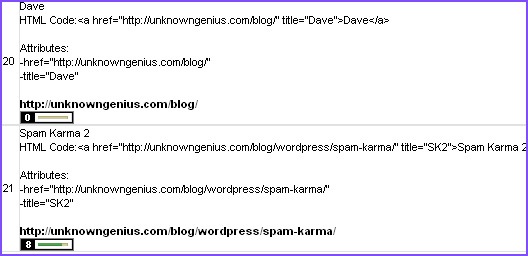
Only 5 requests per hour are allowed for a free (and unregistered) user. The tool works pretty smoothly. The options include extracting links together with:
This is a basic but useful tool that extracts links from pages, displays them in a handy table including each link URL and link text (for image link it won’t show anything).
The best thing about it is that it allows to extract links to CSV file:

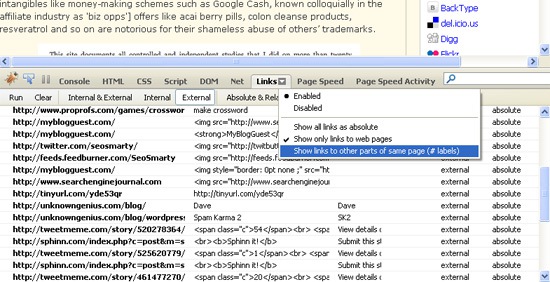
The addon generates the report containing all on-page links used on the current page grouped in 6 categories:
This one extract links based on their position on a page.

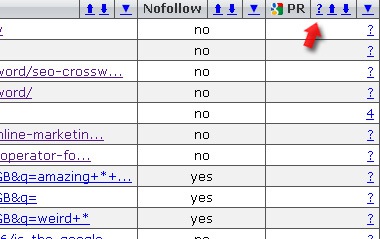
This one shows the wealth of linked page SEO stats:
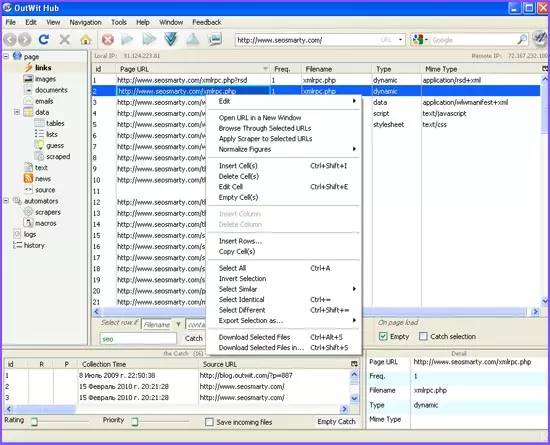
OutWit Hub is a powerful web page info extractor that can also extract links. It has many advanced abilities and can be configured in multiple ways (including support for the custom scraper). The basic default link scraper:
This way you can see which internal pages are given more emphasis to, which anchor texts are used for both internal and external links; you can identify some red flags of possibly paid links, research the site “neighborhood”, etc.
This post lists 6 tools to help you run the analysis of all links used on a page:
(Some details and screenshots can be found below)
1. IWebTool Link Extractor
(Web based)Only 5 requests per hour are allowed for a free (and unregistered) user. The tool works pretty smoothly. The options include extracting links together with:
- Title / anchor text of each one;
- Full address;
- All the attributes (including of course nofollow);
- Google PageRank of the linked page (this one doesn’t seem to work properly):
2. Link Extractor
(Web based)This is a basic but useful tool that extracts links from pages, displays them in a handy table including each link URL and link text (for image link it won’t show anything).
The best thing about it is that it allows to extract links to CSV file:
3. FireLink Report
(Firebug addon)The addon generates the report containing all on-page links used on the current page grouped in 6 categories:
- Internal and external
- Internal only;
- External only;
- Absolute and relative;
- Absolute only;
- Relative only:
4. SEM tools link extractor
(FireFox addon)This one extract links based on their position on a page.
5. SEOquake link extractor
(FireFox addon)This one shows the wealth of linked page SEO stats:
- Google PR;
- # of results for SITE: search for the linked domain;
- # of links to the page (via Yahoo! SiteExplorer);
- Domain age (via Web Archive);
- Delicious bookmarks of the URL; etc
6. OutWit Hub link extractor
(FireFox addon)OutWit Hub is a powerful web page info extractor that can also extract links. It has many advanced abilities and can be configured in multiple ways (including support for the custom scraper). The basic default link scraper:
- Extracts links;
- Sorts internal links from external ones;
- Offers quite a few various filtering options.
How to Use Google Analytics on Your Facebook Fan Page
Looking to integrate your analytical data and tracking across your site, blog and now even your Facebook Fanpages? It appears that the UK’s WebDigi Dev team has figured out a pretty easy way to use Google Analytics on your Facebook Fan Page. With SEJ’s Facebook Page having over 4,000 users and lots of cool comments and voting going on, adding Google Analytics to track referrals or time on site will be quite awesome.
We launched our Facebook fan page earlier this month and as with all Facebook pages only Facebook Insights program is available to page administrators. Facebook Insights shows demographic details and interactions on your pages BUT limited to show information of fans only. It is far less sophisticated and comprehensive when compared to the free Google Analytics. One of the limitations of Facebook Fan pages is that you can only run limited Javascript on it and Google Analytics needs Javascript code included to correctly track visitors. We have successfully managed to get ALL functions of Google Analytics working on our Facebook fan page (including visitor statistics, traffic sources, visitor country, keyword searches with all other powerful reporting & maps overlays etc).
We launched our Facebook fan page earlier this month and as with all Facebook pages only Facebook Insights program is available to page administrators. Facebook Insights shows demographic details and interactions on your pages BUT limited to show information of fans only. It is far less sophisticated and comprehensive when compared to the free Google Analytics. One of the limitations of Facebook Fan pages is that you can only run limited Javascript on it and Google Analytics needs Javascript code included to correctly track visitors. We have successfully managed to get ALL functions of Google Analytics working on our Facebook fan page (including visitor statistics, traffic sources, visitor country, keyword searches with all other powerful reporting & maps overlays etc).
Google Starts Indexing Facebook Pages Updates
Although both Facebook and Google has not yet announced this officially, some folks are reporting that status updates from Facebook pages will start showing up on Google search results today. Of course, this comes hot on the heels of Yahoo’s announcement of their content-sharing deal with Twittter.
And so the race to become a real-time search engine is starting to heat up. Google of course was ahead of the game as it incorporated Twitter updates to search results as early as December last year. While recently, it has also started incorporating MySpace status updates.
But while Google’s deal with Twitter and MySpace includes status updates of members, the deal with Facebook is limited only to status updates of Facebook pages. Of course this is understandable since Facebook has a much closer ties with Microsoft Bing.
And in case you’re not aware Facebook pages are basically accounts used for marketing and advertising purposes of consumer brands so, there’s really not much real-time in this regard since those Facebook pages are rarely updated after all.
Makes me wonder right now, as to when Google will incorporate updates coming from Google Buzz to search results. Although I’m not really hoping that they would.
And so the race to become a real-time search engine is starting to heat up. Google of course was ahead of the game as it incorporated Twitter updates to search results as early as December last year. While recently, it has also started incorporating MySpace status updates.
But while Google’s deal with Twitter and MySpace includes status updates of members, the deal with Facebook is limited only to status updates of Facebook pages. Of course this is understandable since Facebook has a much closer ties with Microsoft Bing.
And in case you’re not aware Facebook pages are basically accounts used for marketing and advertising purposes of consumer brands so, there’s really not much real-time in this regard since those Facebook pages are rarely updated after all.
Makes me wonder right now, as to when Google will incorporate updates coming from Google Buzz to search results. Although I’m not really hoping that they would.
Wednesday, February 24, 2010
Yahoo, Twitter Agree On Content Sharing Deal
Twitter seems to be getting on every search engines lately. It has already struck deals with both Microsoft and Google whereby Twitter streams will be integrated into search result pages. And now, it just agreed on a content sharing deal with Yahoo.
According to Jim Stoneham, VP of communities for Yahoo via a report by LATimes, the deal will allow users to take material from both sites without having to leave either one. This means that Twitter feeds will be accessible on Yahoo’s various content sites. Users will also be able to update their Twitter status and share content from Yahoo in their Twitter feed. Of course, on the search side, public Twitter updates will be displayed as part of Yahoo search results.
Both Yahoo and Twitter are yet to announced the deal formally. So until then, enjoy the Yahoo tweet-less search results while the deal has not yet materialized.
According to Jim Stoneham, VP of communities for Yahoo via a report by LATimes, the deal will allow users to take material from both sites without having to leave either one. This means that Twitter feeds will be accessible on Yahoo’s various content sites. Users will also be able to update their Twitter status and share content from Yahoo in their Twitter feed. Of course, on the search side, public Twitter updates will be displayed as part of Yahoo search results.
Both Yahoo and Twitter are yet to announced the deal formally. So until then, enjoy the Yahoo tweet-less search results while the deal has not yet materialized.
Tuesday, February 23, 2010
How To Make Twitter a Top 10 Traffic Source
Twitter is comprised of people who love to share information. If you can properly inform and engage this audience you'll be mastering word-of-mouth promotion and increasing traffic to your website.
For us, Twitter is our third largest source of website traffic, behind organic Google searches and direct website traffic.
Tips from an expert
Mequoda's own Amanda MacArthur will be hosting the upcoming Twitter for Publishers 2010 webinar on March 16th. For all you Twitter users, plus those still considering it and wondering why it's important, she has some very useful information on how to make Twitter one of your top 10 traffic sources.
According to Amanda, if you want Twitter to be one of your top ten traffic sources, all you have to do is use Twitter, and use it effectively.
"Build your audience and followers on Twitter with relevant news and helpful anecdotes and it'll easily be your single largest source of traffic next to search engines. Create content, push content, and the traffic will come."
Start using the platform often and it's ability to generate traffic will happen.
Another Twitter tip
Amanda outlined ways of generating followers and thus, generating traffic. "In order to get people to follow you, you need to follow other people. Try going to Search.Twitter.com and looking up keywords relating to your business. Find people that are asking questions that you can answer, or saying something you can comment on."
Engaging and retaining followers on Twitter will increase your overall traffic and make Twitter one of your top 10 traffic sources. Learn more of these valuable secrets from Amanda on how smart publishers are using Twitter.
Follow these people and respond to them because about 40% of the people you follow will follow you back. Later on if you feel like un-following people that aren't following you back, you can use a tool like Refollow.com to do so.
Amanda stressed the need to be proactive. She stated, "The point behind Twitter is that you can't wait for people to come to you. You need to find people to follow and talk to them so that they'll follow you back."
Promote for your Twitter account and other social networks
Use your articles, email newsletters, and website space to build a base of followers that already like you.
The more people that follow you, the more people will click your links, and the more traffic will come from these sources.
For people who don't read email or RSS feeds, Twitter is the best way to reach them without being interruptive.
What you should do as a Twitter user in order to increase traffic
To fully take advantage of the communication lines Twitter has created, one must pay attention to the balance in tweets. Marketing through social media has to be carefully done since many users aren't looking for advertisements. As Amanda mentioned, begin following others and commenting on their tweets. As your list of followers grows, you can then focus more on the content you are tweeting.
How are you using Twitter?
As an admirer of the medium, I'd love to hear your strategies behind using Twitter. Post your response on our blog. The most creative response will get highlighted in a tweet to our followers.
For us, Twitter is our third largest source of website traffic, behind organic Google searches and direct website traffic.
Tips from an expert
Mequoda's own Amanda MacArthur will be hosting the upcoming Twitter for Publishers 2010 webinar on March 16th. For all you Twitter users, plus those still considering it and wondering why it's important, she has some very useful information on how to make Twitter one of your top 10 traffic sources.
According to Amanda, if you want Twitter to be one of your top ten traffic sources, all you have to do is use Twitter, and use it effectively.
"Build your audience and followers on Twitter with relevant news and helpful anecdotes and it'll easily be your single largest source of traffic next to search engines. Create content, push content, and the traffic will come."
Start using the platform often and it's ability to generate traffic will happen.
Another Twitter tip
Amanda outlined ways of generating followers and thus, generating traffic. "In order to get people to follow you, you need to follow other people. Try going to Search.Twitter.com and looking up keywords relating to your business. Find people that are asking questions that you can answer, or saying something you can comment on."
Engaging and retaining followers on Twitter will increase your overall traffic and make Twitter one of your top 10 traffic sources. Learn more of these valuable secrets from Amanda on how smart publishers are using Twitter.
Follow these people and respond to them because about 40% of the people you follow will follow you back. Later on if you feel like un-following people that aren't following you back, you can use a tool like Refollow.com to do so.
Amanda stressed the need to be proactive. She stated, "The point behind Twitter is that you can't wait for people to come to you. You need to find people to follow and talk to them so that they'll follow you back."
Promote for your Twitter account and other social networks
Use your articles, email newsletters, and website space to build a base of followers that already like you.
The more people that follow you, the more people will click your links, and the more traffic will come from these sources.
For people who don't read email or RSS feeds, Twitter is the best way to reach them without being interruptive.
What you should do as a Twitter user in order to increase traffic
To fully take advantage of the communication lines Twitter has created, one must pay attention to the balance in tweets. Marketing through social media has to be carefully done since many users aren't looking for advertisements. As Amanda mentioned, begin following others and commenting on their tweets. As your list of followers grows, you can then focus more on the content you are tweeting.
How are you using Twitter?
As an admirer of the medium, I'd love to hear your strategies behind using Twitter. Post your response on our blog. The most creative response will get highlighted in a tweet to our followers.
What To Do If Your Facebook or Twitter Account is Hacked
Unfortunately, this scenario is a reality for all of us who use social networking -- it's not a matter of IF your Twitter or Facebook account will be hacked, but simply WHEN. I've been on the receiving end of messages from my friends whose accounts have been hacked. The message typically compliments me on some body part or requests me to click on a link to view a video of myself. Also, there are usually a number of misspellings in the message.
Be very careful when you get those kinds of messages, even when they are coming from trusted friends who would normally not engage in this type of behavior. Many of the messages are linked to a virus or some type of malware that either infects your computer or will gain access to your account and send all of your friends and followers spammy messages. If you do slip and click on one of these links, pay attention to what your virus scanning software tells you, especially if you get a security warning about a site.
If your Twitter account is hacked:
1. Visit Twitter's information page for problem resolution.
2. Log out of Twitter
3. Clear your browser cache (your browsing history and cookies and private info) and close down your browser.
For Internet Explorer: Go to Tools -- Internet Options, and then click on the "Delete" button under Browsing History. Check all of the boxes (except InPrivate Filtering data) and click on the "Delete" button.
For Firefox: Go to Tools -- Clear Recent History, and then click on the down-arrow next to "Details", check all of the boxes, and select "Everything" for the time range to clear.
4. Open a new browser window, log into Twitter, and change your password. You can also use the Twitter password reset feature to set a new password before logging in again.
5. Visit your settings page and check your Connections. Revoke access for any third-party application that you don't recognize.
6. Submit a support request to let them know you have taken all of the proper steps to reset your account and to request that your direct messaging capability be restored. You can also include info on any statuses that weren't posted by you in the body of the request.
7. Update your password in all of your third party applications as well. If a third party application (like Facebook, Twitterrific, Twhirl, etc.) is trying to use your old password to access your tweets, it will lock you out of your account.
If your Facebook account is hacked:
1. Visit Facebook's information page for problem resolution.
2. If you are still able to access your login email address, then use the "Forgot your password" link to prompt an email from Facebook with a password reset code. If you can't access your account, then use the link above.
3. Clear your browser cache (your browsing history and cookies and private info) and close down your browser as described above.
4. Your account could also have been phished/hacked by a phishing web site, worm, or malicious software. To ensure that all is safe again, refer to the "Warnings" section on Facebook.
Take care when using Twitter and Facebook. Trust your intuition, and if something doesn't look or feel right, ignore it or delete it before clicking on it. You will have probably saved yourself hours or headache in trying to restore a hacked account.
Internet Marketing Automation Coach Donna Gunter helps independent service professionals create prosperous online businesses that make more profit in less time. Would you like to learn the specific Internet marketing strategies that get results? Discover how to increase your visibility and get found online by claiming your FREE gift, TurboCharge Your Online Marketing Toolkit, at ==> http://www.TurbochargeYourOnlineMarketing.com
Be very careful when you get those kinds of messages, even when they are coming from trusted friends who would normally not engage in this type of behavior. Many of the messages are linked to a virus or some type of malware that either infects your computer or will gain access to your account and send all of your friends and followers spammy messages. If you do slip and click on one of these links, pay attention to what your virus scanning software tells you, especially if you get a security warning about a site.
If your Twitter account is hacked:
1. Visit Twitter's information page for problem resolution.
2. Log out of Twitter
3. Clear your browser cache (your browsing history and cookies and private info) and close down your browser.
For Internet Explorer: Go to Tools -- Internet Options, and then click on the "Delete" button under Browsing History. Check all of the boxes (except InPrivate Filtering data) and click on the "Delete" button.
For Firefox: Go to Tools -- Clear Recent History, and then click on the down-arrow next to "Details", check all of the boxes, and select "Everything" for the time range to clear.
4. Open a new browser window, log into Twitter, and change your password. You can also use the Twitter password reset feature to set a new password before logging in again.
5. Visit your settings page and check your Connections. Revoke access for any third-party application that you don't recognize.
6. Submit a support request to let them know you have taken all of the proper steps to reset your account and to request that your direct messaging capability be restored. You can also include info on any statuses that weren't posted by you in the body of the request.
7. Update your password in all of your third party applications as well. If a third party application (like Facebook, Twitterrific, Twhirl, etc.) is trying to use your old password to access your tweets, it will lock you out of your account.
If your Facebook account is hacked:
1. Visit Facebook's information page for problem resolution.
2. If you are still able to access your login email address, then use the "Forgot your password" link to prompt an email from Facebook with a password reset code. If you can't access your account, then use the link above.
3. Clear your browser cache (your browsing history and cookies and private info) and close down your browser as described above.
4. Your account could also have been phished/hacked by a phishing web site, worm, or malicious software. To ensure that all is safe again, refer to the "Warnings" section on Facebook.
Take care when using Twitter and Facebook. Trust your intuition, and if something doesn't look or feel right, ignore it or delete it before clicking on it. You will have probably saved yourself hours or headache in trying to restore a hacked account.
Internet Marketing Automation Coach Donna Gunter helps independent service professionals create prosperous online businesses that make more profit in less time. Would you like to learn the specific Internet marketing strategies that get results? Discover how to increase your visibility and get found online by claiming your FREE gift, TurboCharge Your Online Marketing Toolkit, at ==> http://www.TurbochargeYourOnlineMarketing.com
Monday, February 22, 2010
Reciprocal Linking. An Unbiased Analysis.
Reciprocal linking is without doubt one of the most disputed subjects in the SEO community. The reason for this is because they simultaneously can greatly contribute to your link network and also damage it pretty seriously.
One thing is certain though, Google is getting better by the semester in finding and demoting low quality link exchanges to zero and even negative values.
Search engines have not declared war to link reciprocation but rather to the unnatural linking patterns meant solely to increase the number of links and consequently, enhance rankings.
There are 2 directions to follow
1. Build reciprocal links by going beyond you niche limits. This will benefit you short term but once practicing these obscure exchanges chances are you'll get penalized.
2. Staying in your field; although it takes more time to find and initiate quality link exchanges opportunities, keeping the relevancy level high will empower your sites position in that niche's organic listings.
Still, keep in mind that it takes time to build a presence online and brand yourself. The good news is you build a solid foundation for selling your product or service.
After securing a considerable number of quality links pointing to your site, it's advisable to diversify your linking sources and even include some low quality ones; and there is no easy alternative then reciprocal links.
This tactic it's beneficial as it enables you to build relevancy for your website by extensively using targeted keywords as anchor texts.
Junky back links are not a thing to worry about as long as you don't return the favor.
A white hat method for link exchange is reciprocal promotions, where each linking partner promotes content referencing the other party on their own website.
From a marketing perspective reciprocal links are especially valued for being an efficient medium for brand promotion. Still, if you can obtain a one way back link the better.
Then again, this statement is contradicted by our incorrigible human nature that constantly cries the "what's in it for me" exception.
To make this human behavior work for you, you must gratify them with some top-notch content that they feel they must reference and discuss and debate around it, on social platforms, with blog posts, etc.
Another, more subtle approach to promoting your content is to present it among other relevant resources. This gains you credibility and impels the recipient to take note of your suggestions.
As 99% of automated link requests are simply ignored resume using such link scouting tools only to researching. Once a link exchange opportunity is spotted address the webmaster in person.
When to Drop Reciprocal Links as a strategy
Once you start getting involved with the reciprocal linking networks, consider this:
1. The featured websites in these back link catalogues have at best 0 PageRank. Reciprocating with these low quality,( most importantly) irrelevant websites is easily spotted by Google.
2. At best, these sites reach 10 pages in length, giving them no chance of ranking even in markets with low to no competition at all.
One thing is certain though, Google is getting better by the semester in finding and demoting low quality link exchanges to zero and even negative values.
Search engines have not declared war to link reciprocation but rather to the unnatural linking patterns meant solely to increase the number of links and consequently, enhance rankings.
There are 2 directions to follow
1. Build reciprocal links by going beyond you niche limits. This will benefit you short term but once practicing these obscure exchanges chances are you'll get penalized.
2. Staying in your field; although it takes more time to find and initiate quality link exchanges opportunities, keeping the relevancy level high will empower your sites position in that niche's organic listings.
Still, keep in mind that it takes time to build a presence online and brand yourself. The good news is you build a solid foundation for selling your product or service.
After securing a considerable number of quality links pointing to your site, it's advisable to diversify your linking sources and even include some low quality ones; and there is no easy alternative then reciprocal links.
This tactic it's beneficial as it enables you to build relevancy for your website by extensively using targeted keywords as anchor texts.
Junky back links are not a thing to worry about as long as you don't return the favor.
A white hat method for link exchange is reciprocal promotions, where each linking partner promotes content referencing the other party on their own website.
From a marketing perspective reciprocal links are especially valued for being an efficient medium for brand promotion. Still, if you can obtain a one way back link the better.
Then again, this statement is contradicted by our incorrigible human nature that constantly cries the "what's in it for me" exception.
To make this human behavior work for you, you must gratify them with some top-notch content that they feel they must reference and discuss and debate around it, on social platforms, with blog posts, etc.
Another, more subtle approach to promoting your content is to present it among other relevant resources. This gains you credibility and impels the recipient to take note of your suggestions.
As 99% of automated link requests are simply ignored resume using such link scouting tools only to researching. Once a link exchange opportunity is spotted address the webmaster in person.
When to Drop Reciprocal Links as a strategy
Once you start getting involved with the reciprocal linking networks, consider this:
1. The featured websites in these back link catalogues have at best 0 PageRank. Reciprocating with these low quality,( most importantly) irrelevant websites is easily spotted by Google.
2. At best, these sites reach 10 pages in length, giving them no chance of ranking even in markets with low to no competition at all.
3. Not only does their copy sounds as hype from a mile away but they're also built in the spam religion with keyword stuffing in the title and description tags, etc.
4. All things being said, common sense will tell you that you do not need these artificial linking schemes to get good rankings.
4. All things being said, common sense will tell you that you do not need these artificial linking schemes to get good rankings.
Reciprocal links are valuable, but not on their own. They must be included into a coherent link building campaign.
Thursday, February 18, 2010
Off Page SEO Techniques
Off page SEO Techniques are very important for any website, blog or otherwise that wants to harness the power of organic traffic from the big search engines like Google, Yahoo and Bing.
Search Engine Optimization (SEO) is a process that includes a number of elements to insure a more favorable position for your website in search engine result pages like those of Google, Yahoo and Bing. The success of your online marketing is greatly enhanced when you can boost the ratio of your organic traffic to 80%. This traffic is free and very valuable.
There are two kinds of SEO, on page and off page SEO techniques. We will only discus off page SEO techniques in this article. Off page SEO are the things you need to do to get a higher page rank (PR) and a good position in the search engines like Google for your website after you launch the website.
What are the off page SEO techniques? Off page SEO techniques are always connected to building your link popularity. Link popularity represents the number of back links or links back to your website from other websites. To check your website's current link popularity, go to Link Popularity and use the free tool to check your website's link popularity. The higher your link popularity, the higher your page rank (PR) will be. To build your link popularity you need to raise the number of websites that link back to your website.
There are a number of off page SEO techniques:
1. Email
Email webmasters that are responsible for websites similar to yours in content and ask them for a link that you will reciprocate. There are sites that have a page full of links and the links are not relevant to each other as far as content is concerned. Link Farms can damage the reputation of your website with Google instead of helping it. These link farms are easy to join and get links on but this is not advisable. Link schemes are not approved by Google and before you take what may appear to be an easy route for getting back links you should read information on Google's site about illegitimate linking methods, this will assure you of more success with Google. Some companies will create a number of bogus sites to get lots of reciprocal links but as Google changes their algorithms these sites will lose popularity and could even be blacklisted.
2. Content
The best way to conduct your off page SEO techniques then is to insure that you have unique, highly informative content. When you have great content other webmasters will want to link to your site. If they just copy and paste your content on their website that is a violation of intellectual property copyright laws. Make people want to link to your website. This is the best of all off page SEO techniques to grow the number of websites linking to yours.
3. Article Marketing
There are hundreds if not thousands of article directories on the Internet. You can submit articles to these sites and for every submission, you will be allotted a resource box in which you can introduce yourself and share a link to your website. Some of these article directories have high page ranks. If your articles are accepted, they will be included in their pages. Having a website with high PR linking to yours goes a long way in increasing your page rank. Additionally, if you will submít just one article to a thousand directoríes, you'd have a thousand pages linking to your website! Sounds like a daunting task? There are services detailed on my blog that you can use for monthly fees or software that is automated.
4. Forum Marketing
There are online communities that are dedicated to the subject of your website. Find those forums, join them and become part of the community. It is important to become a part of the community and not just post something irrelevant to the topic. You will be seen as a spammer just there to post a link and you could be banned from that forum. In the forum you will be able to have a signature box that will accompany every post or comment that you make in the forum. In your signature box, you can have a link to your website. For every post you make, you will have a link to your website.
5. Craigslist
Craigslist is a well-known classifieds website with a PR7. A PR7 score is very high! Having a link on a website with a PR7 will give a boost to your website. To have a link on Craigslist go to the site, choose the category that is relevant to your website, post your advertisement with your link of course and see what happens. It doesn't matter if anyone reads your ad. The object is to have a link to your website on Craigslist. Your ad will expire so you should have a way to remind yourself to post there on expiry to maintain a constant link.
6. Partners
Look for partners who are willing to include your site in their pages. The easiest way to do this is to use the free tool at Webconfs.
7. Triangular Linking
Google does not like reciprocal linking, but triangular linking is one way of getting around this limitation. Look for webmasters who will work with you on this one. Webmaster A posts a link to Webmaster B's website. Webmaster B posts a link to Webmaster C's website. Webmaster C posts a link to Webmaster A's website. It is the same principle as reciprocal linking, but the search engine spiders are not programmed to identify this type of linking.
Search Engine Optimization (SEO) is a process that includes a number of elements to insure a more favorable position for your website in search engine result pages like those of Google, Yahoo and Bing. The success of your online marketing is greatly enhanced when you can boost the ratio of your organic traffic to 80%. This traffic is free and very valuable.
There are two kinds of SEO, on page and off page SEO techniques. We will only discus off page SEO techniques in this article. Off page SEO are the things you need to do to get a higher page rank (PR) and a good position in the search engines like Google for your website after you launch the website.
What are the off page SEO techniques? Off page SEO techniques are always connected to building your link popularity. Link popularity represents the number of back links or links back to your website from other websites. To check your website's current link popularity, go to Link Popularity and use the free tool to check your website's link popularity. The higher your link popularity, the higher your page rank (PR) will be. To build your link popularity you need to raise the number of websites that link back to your website.
There are a number of off page SEO techniques:
1. Email
Email webmasters that are responsible for websites similar to yours in content and ask them for a link that you will reciprocate. There are sites that have a page full of links and the links are not relevant to each other as far as content is concerned. Link Farms can damage the reputation of your website with Google instead of helping it. These link farms are easy to join and get links on but this is not advisable. Link schemes are not approved by Google and before you take what may appear to be an easy route for getting back links you should read information on Google's site about illegitimate linking methods, this will assure you of more success with Google. Some companies will create a number of bogus sites to get lots of reciprocal links but as Google changes their algorithms these sites will lose popularity and could even be blacklisted.
2. Content
The best way to conduct your off page SEO techniques then is to insure that you have unique, highly informative content. When you have great content other webmasters will want to link to your site. If they just copy and paste your content on their website that is a violation of intellectual property copyright laws. Make people want to link to your website. This is the best of all off page SEO techniques to grow the number of websites linking to yours.
3. Article Marketing
There are hundreds if not thousands of article directories on the Internet. You can submit articles to these sites and for every submission, you will be allotted a resource box in which you can introduce yourself and share a link to your website. Some of these article directories have high page ranks. If your articles are accepted, they will be included in their pages. Having a website with high PR linking to yours goes a long way in increasing your page rank. Additionally, if you will submít just one article to a thousand directoríes, you'd have a thousand pages linking to your website! Sounds like a daunting task? There are services detailed on my blog that you can use for monthly fees or software that is automated.
4. Forum Marketing
There are online communities that are dedicated to the subject of your website. Find those forums, join them and become part of the community. It is important to become a part of the community and not just post something irrelevant to the topic. You will be seen as a spammer just there to post a link and you could be banned from that forum. In the forum you will be able to have a signature box that will accompany every post or comment that you make in the forum. In your signature box, you can have a link to your website. For every post you make, you will have a link to your website.
5. Craigslist
Craigslist is a well-known classifieds website with a PR7. A PR7 score is very high! Having a link on a website with a PR7 will give a boost to your website. To have a link on Craigslist go to the site, choose the category that is relevant to your website, post your advertisement with your link of course and see what happens. It doesn't matter if anyone reads your ad. The object is to have a link to your website on Craigslist. Your ad will expire so you should have a way to remind yourself to post there on expiry to maintain a constant link.
6. Partners
Look for partners who are willing to include your site in their pages. The easiest way to do this is to use the free tool at Webconfs.
7. Triangular Linking
Google does not like reciprocal linking, but triangular linking is one way of getting around this limitation. Look for webmasters who will work with you on this one. Webmaster A posts a link to Webmaster B's website. Webmaster B posts a link to Webmaster C's website. Webmaster C posts a link to Webmaster A's website. It is the same principle as reciprocal linking, but the search engine spiders are not programmed to identify this type of linking.
Organic Search & Paid Search: Are They Synergistic Or Cannibalistic?
One aspect to search marketing that I feel doesn’t get enough attention and indeed is misunderstood by the SEO practitioner is the interaction between organic search and paid search.
For years when teaching SEO workshops, I touted the synergistic effect of being at the top of both organic and paid results. I would encourage attendees to invest in both SEO and PPC on the promise of symbiosis between the two marketing channels. I would cite research showing that you can increase the clickthrough rate of your #1 (organic) ranking if you also have a sponsored ad above it or in the right column, and that showing up twice on the same page in the results makes your #1 ranking get 20% more clicks.
I gave short shrift to the thought that engaging in both sides of search marketing could lead to an adverse effect, i.e. negative synergy — whereby your paid search program cannibalizes your organic search derived visits, or vice versa. That is, until just a couple weeks ago.
What shifted my thinking was a session at the recent Silicon Valley Search Engine Roundtable’s “Rockstar” conference (ironically named, given the “Covariopalooza” rock-themed customer conference that Covario put on earlier in the week!) Also ironic was the fact there was a presentation given by one of my company’s own “rock stars”, namely our Chief Analytics Officer Dr. Matthias Blume. The premise of the talk was how the organic and paid results interact and how flawed attribution modeling can misrepresent ROI, associating sales/conversions with the wrong marketing program (i.e. SEO when PPC should have gotten the credit, PPC when SEO should have gotten the credit).
The cannibalization of organic search by PPC is clearly demonstrated by the following (inadvertent) experiment where paid search was shut off completely for a time. As evidenced by the graph below, there’s an increase in organic traffic commensurate with the decrease in PPC derived traffic. (Note that measurement of this effect is confounded by other factors such as cyclical patterns, other marketing actions taken by both you and your competitors, the economy, the weather, and so on.)

How does this sort of thing happen? Consider a multi-touch situation where a first-time visitor enters via an organic listing but leaves without buying anything; the visitor returns days later via a paid listing, this time making a purchase. If your organization assigns 100% of the value of that transaction to the last click, then the paid listing gets the credit when in fact the organic listing did most of the heavy lifting. Conversely, if your organization’s policy is to recognize the first click, organic gets too much credit.
Consider also the opposite scenario where the paid click is the visitor’s first point of entry. Then later an organic click is what leads to the purchase. “Last click” would overstate the value attributable to SEO, “first click” would overstate the value attributable to PPC.
The best option would be to assign a portion of the value across all touchpoints, with greater emphasis on the first click.
The ROI of PPC is further exaggerated by the fact that URLs in paid ads are invariably tagged with tracking parameters, whereas organic listings are not. This is regardless of where in the buying cycle the user interacts with the paid listings. That’s because analytics packages tend to favor tracking parameters over the referrer (which is passed in the HTTP header) as an indicator of the lead source. Tracking parameters in organic URLs are, as you may already know, considered bad SEO practice: they lead to duplicate content and PageRank dilution.
Consequently, the SEO must rely on the referrer string to supply the visitor’s point of origin, despite the fact that it is the inferior measure. (Inferior for many reasons, not the least of which is the fact that privacy/security tools installed on the user’s PC such as Norton Internet Security wipe the referring URL from user’s requests yet thankfully leave tracking parameters intact.)
These attribution inaccuracies obscure what’s really going on: the paid listing is cannibalizing the organic listing, i.e. drawing searchers away from the organic listing which would have otherwise been clicked on. This can happen, for instance, when you have a particularly effective paid ad creative, e.g. that calls out in the ad copy that it’s the “Official Site.”
Matthias also made the point that there’s a greater degree of cannibalization (negative synergy) when there is a combination of the following: a high organic ranking, a strong brand, and when the paid and organic listings are similar to one another but differentiated from competitors. But by the same token, the cost per click is the lowest for search terms that fit those criteria. Matthias’ advice to the PPC specialist (and this is particularly applicable if those who are budget-limited): reallocate your paid search spend to maximize true ROI.
If your SEO work is stealing clicks away from your paid counterpart, you may be inclined to think that is a good thing. It will, after all, save on some click charges. Actually, it’s a wash. As alluded to in the previous paragraph, Google will make up the lost revenue by charging a higher cost per click as a consequence of a lower clickthrough rate and thus a lower Quality Score. So in the end, Google still makes its money.
Given all this, what actions should you, the SEO practitioner, take?
For one, get a better handle on the true ROI of organic search, at the keyword level. That requires computing the synergy. How? You could pause your ads on certain queries and then analyze the resulting plots akin to the one above. Or use Covario’s paid/organic synergy score (POSS) methodology. In this case, you ask your PPC counterpart to reduce his/her actual CPCs on keywords with high organic conversion and high paid cost by 60% — no need to pause the ads. In the process, by looking at conversion and synergy at the search query level, the PPC advertiser will also hone in on the most effective terms through better use of negative keywords and greater use of exact match.
Then use 1+synergy as a multiplier on the value as determined by click-based attribution. ROI = ((1+POSS)*value – cost) / cost. This doesn’t go as far as Covario’s “True Value of Display” methodology, but it’s vastly better than ignoring paid/organic interaction. In our research we measured synergy from -95% to +25%. That’s quite a range. Obviously you’ll want to favor ads with positive synergy over those with negative synergy (all else being equal).
Another set of dials you can turn is what is displayed in your paid search ad. Test calls-to-action, mentioning specific product features, branding, “official site”, etc. and measure the impact on synergy.
The ultimate goal should be optimizing your ad creative and rebalancing your company’s paid search spend based on the true, adjusted ROAS where synergy is taken into account.
For years when teaching SEO workshops, I touted the synergistic effect of being at the top of both organic and paid results. I would encourage attendees to invest in both SEO and PPC on the promise of symbiosis between the two marketing channels. I would cite research showing that you can increase the clickthrough rate of your #1 (organic) ranking if you also have a sponsored ad above it or in the right column, and that showing up twice on the same page in the results makes your #1 ranking get 20% more clicks.
I gave short shrift to the thought that engaging in both sides of search marketing could lead to an adverse effect, i.e. negative synergy — whereby your paid search program cannibalizes your organic search derived visits, or vice versa. That is, until just a couple weeks ago.
What shifted my thinking was a session at the recent Silicon Valley Search Engine Roundtable’s “Rockstar” conference (ironically named, given the “Covariopalooza” rock-themed customer conference that Covario put on earlier in the week!) Also ironic was the fact there was a presentation given by one of my company’s own “rock stars”, namely our Chief Analytics Officer Dr. Matthias Blume. The premise of the talk was how the organic and paid results interact and how flawed attribution modeling can misrepresent ROI, associating sales/conversions with the wrong marketing program (i.e. SEO when PPC should have gotten the credit, PPC when SEO should have gotten the credit).
The cannibalization of organic search by PPC is clearly demonstrated by the following (inadvertent) experiment where paid search was shut off completely for a time. As evidenced by the graph below, there’s an increase in organic traffic commensurate with the decrease in PPC derived traffic. (Note that measurement of this effect is confounded by other factors such as cyclical patterns, other marketing actions taken by both you and your competitors, the economy, the weather, and so on.)
How does this sort of thing happen? Consider a multi-touch situation where a first-time visitor enters via an organic listing but leaves without buying anything; the visitor returns days later via a paid listing, this time making a purchase. If your organization assigns 100% of the value of that transaction to the last click, then the paid listing gets the credit when in fact the organic listing did most of the heavy lifting. Conversely, if your organization’s policy is to recognize the first click, organic gets too much credit.
Consider also the opposite scenario where the paid click is the visitor’s first point of entry. Then later an organic click is what leads to the purchase. “Last click” would overstate the value attributable to SEO, “first click” would overstate the value attributable to PPC.
The best option would be to assign a portion of the value across all touchpoints, with greater emphasis on the first click.
The ROI of PPC is further exaggerated by the fact that URLs in paid ads are invariably tagged with tracking parameters, whereas organic listings are not. This is regardless of where in the buying cycle the user interacts with the paid listings. That’s because analytics packages tend to favor tracking parameters over the referrer (which is passed in the HTTP header) as an indicator of the lead source. Tracking parameters in organic URLs are, as you may already know, considered bad SEO practice: they lead to duplicate content and PageRank dilution.
Consequently, the SEO must rely on the referrer string to supply the visitor’s point of origin, despite the fact that it is the inferior measure. (Inferior for many reasons, not the least of which is the fact that privacy/security tools installed on the user’s PC such as Norton Internet Security wipe the referring URL from user’s requests yet thankfully leave tracking parameters intact.)
These attribution inaccuracies obscure what’s really going on: the paid listing is cannibalizing the organic listing, i.e. drawing searchers away from the organic listing which would have otherwise been clicked on. This can happen, for instance, when you have a particularly effective paid ad creative, e.g. that calls out in the ad copy that it’s the “Official Site.”
Matthias also made the point that there’s a greater degree of cannibalization (negative synergy) when there is a combination of the following: a high organic ranking, a strong brand, and when the paid and organic listings are similar to one another but differentiated from competitors. But by the same token, the cost per click is the lowest for search terms that fit those criteria. Matthias’ advice to the PPC specialist (and this is particularly applicable if those who are budget-limited): reallocate your paid search spend to maximize true ROI.
If your SEO work is stealing clicks away from your paid counterpart, you may be inclined to think that is a good thing. It will, after all, save on some click charges. Actually, it’s a wash. As alluded to in the previous paragraph, Google will make up the lost revenue by charging a higher cost per click as a consequence of a lower clickthrough rate and thus a lower Quality Score. So in the end, Google still makes its money.
Given all this, what actions should you, the SEO practitioner, take?
For one, get a better handle on the true ROI of organic search, at the keyword level. That requires computing the synergy. How? You could pause your ads on certain queries and then analyze the resulting plots akin to the one above. Or use Covario’s paid/organic synergy score (POSS) methodology. In this case, you ask your PPC counterpart to reduce his/her actual CPCs on keywords with high organic conversion and high paid cost by 60% — no need to pause the ads. In the process, by looking at conversion and synergy at the search query level, the PPC advertiser will also hone in on the most effective terms through better use of negative keywords and greater use of exact match.
Then use 1+synergy as a multiplier on the value as determined by click-based attribution. ROI = ((1+POSS)*value – cost) / cost. This doesn’t go as far as Covario’s “True Value of Display” methodology, but it’s vastly better than ignoring paid/organic interaction. In our research we measured synergy from -95% to +25%. That’s quite a range. Obviously you’ll want to favor ads with positive synergy over those with negative synergy (all else being equal).
Another set of dials you can turn is what is displayed in your paid search ad. Test calls-to-action, mentioning specific product features, branding, “official site”, etc. and measure the impact on synergy.
The ultimate goal should be optimizing your ad creative and rebalancing your company’s paid search spend based on the true, adjusted ROAS where synergy is taken into account.
Wednesday, February 17, 2010
Google Integrates MySpace to Search, But Not Proud of it
Google seemed to have quietly implemented MySpace Real-Time Search API just now. The announcement was actually made by MySpace so I checked out the Official Google Blog if there was any update about this but didn’t find any. Probably because it’s too early or maybe Google just don’t want to make a big fuzz about this?

Anyway, the MySpace folks are pretty much excited about it nonetheless. In fact, they claim that the integration is the first real-time integration of social networking platform to Google Search. Well perhaps they don’t consider Twitter as a social networking site so they might have missed the fact that Google has also integrated Twitter streams to search recently.
If you’re curious about it, you might want to try searching and find out if you will be getting live updates from MySpace users such as news, photos, and blog posts as part of the Google search results. MySpace streams will be displayed only if they were made public by MySpace members. MySpace contents that will be displayed as search results will be ranked based on the latest and of the highest relevancy to the subject of your searces.
Anyway, the MySpace folks are pretty much excited about it nonetheless. In fact, they claim that the integration is the first real-time integration of social networking platform to Google Search. Well perhaps they don’t consider Twitter as a social networking site so they might have missed the fact that Google has also integrated Twitter streams to search recently.
If you’re curious about it, you might want to try searching and find out if you will be getting live updates from MySpace users such as news, photos, and blog posts as part of the Google search results. MySpace streams will be displayed only if they were made public by MySpace members. MySpace contents that will be displayed as search results will be ranked based on the latest and of the highest relevancy to the subject of your searces.
Facebook is now the Second Most Popular Website in the U.S.
Well, we knew this was going to happen. With a high user engagement and a massive userbase build up, Facebook has just slipped pass through Yahoo to become the no.2 most popular website in the U.S. Latest data from Compete.com shows that Facebook is not only raking up userbase but user engagement as well as it had 133 million unique visitors last month.

Yahoo’s unique visitors were pegged at 132 million, while Google still sit on top. The data don’t include visitors from Yahoo.com’s subdomains and sub-sites while this does not apply to Facebook since it only have one main domain.
Now here’s another interesting point. While Facebook continues to surge ahead in terms of popularity, it is also raking up some statistics when it comes to monthly user engagement or attention. In January, 11.6% of all time spent online was spent on Facebook while only 4.25% for Yahoo and 4.1% for Google.
Site eyeballs have been Google’s perennial problem since although it manages to get more site visits, user engagement on the site continuous to slide down through the years. But who knows, maybe with Buzz, Google may be getting those much needed user engagement/attention this month.
If not, then it will only be a matter of time before Facebook possibly steals the number one spot from Google in terms of site popularity in the U.S.
Yahoo’s unique visitors were pegged at 132 million, while Google still sit on top. The data don’t include visitors from Yahoo.com’s subdomains and sub-sites while this does not apply to Facebook since it only have one main domain.
Now here’s another interesting point. While Facebook continues to surge ahead in terms of popularity, it is also raking up some statistics when it comes to monthly user engagement or attention. In January, 11.6% of all time spent online was spent on Facebook while only 4.25% for Yahoo and 4.1% for Google.
Site eyeballs have been Google’s perennial problem since although it manages to get more site visits, user engagement on the site continuous to slide down through the years. But who knows, maybe with Buzz, Google may be getting those much needed user engagement/attention this month.
If not, then it will only be a matter of time before Facebook possibly steals the number one spot from Google in terms of site popularity in the U.S.
Tuesday, February 16, 2010
Global Vs. Local: How To Let Google Know How To Treat Your Site
As the search engines rapidly move to offer more locally focused search results, those managing large global, single domain sites are facing more and more difficulties in getting them indexed, detected as local, then ranked in the local search results.
This is especially true with Google in English and Spanish speaking countries where it is getting difficult to find “global company” sites and products in the search results outside of the US.
I am seeing an increase in social media posts expressing frustration by searchers in markets like Australia, Singapore and India that they can’t locate companies outside of their markets unless they know the specific company or product name. A few even went as far to indicate they would stop using Google if this trend continued.
One of these comments was in response to a localization article I had written. An Australian posted that he was trying to use Google to find a high-end fly fishing rod from a specific US company, namely Orvis. He had read about their product in a magazine but could not remember the name of the company. No matter how he searched he could only locate Australian companies. He further indicated that this was becoming more common with many of the searches he had been doing. He was frustrated since global ecommerce had become the gateway to broader product choices not available in Australia.
On the other side are companies that had enjoyed being one click away from customers around the world. In the past few weeks I have received a number of questions from frustrated webmasters and desperate site owners about how to get their site back into Google local market search engines. With these questions often comes more confusion because of answers from “search experts” who are only guessing how to fix it or from engines and local agencies simply suggesting they use paid search.
I am less concerned about the companies that have a single language site who have the arrogance to believe that everyone in the world needs their products. It is the truly global companies like Apple, IBM and Nokia that sell in nearly every market around the world that are being hurt by this shift. These companies either have hundreds of sites or one very large site segmented to accommodate the multitudes of countries, languages and legal entities that represent the their multinational existence.
A typical local content detection filter hierarchy
Previously, local content detection was only a critical problem for queries in languages that were used by multiple countries such as English and Spanish. Recently, more problems are occurring with other languages like German, French and Arabic. For example, if you do a search in German, the primary result with be the best German language result that is also unique to the IP address of your location. If you enter a German language query in a German speaking IP address region like Germany, Austria or Switzerland you will see different results unique to your actual location. However, the same search done in the US or UK will simply result in the most relevant German language result regardless of location.
It seems to me that the most confusion is coming from search marketers struggling with understanding how Google’s local filters work. Let me try to clarify how they work and what companies should be doing to ensure they are getting the access to those markets they deserve.
Country code top level domain (ccTLD). The “cc” in “ccTLD” means country code and is based on the ISO 3166-1 standard which specifies a two letter code for every country in the world. If the site has a ccTLD like .co.nz then the engines will assume the content is for New Zealand. The same is true for someone using a .us domain. Content on this domain would be viewed as a United States centric site.
That is why most search experts will tell you to use the top-level domain for a particular country if you want to have a local site. Unfortunately, for both large and small companies, the expense and operational overhead is often cost-prohibitive to maintain multiple sites with unique ccTLDs.
Site server IP address location. When a site with a generic top level domain, such as .com, .net, etc., are not using a .ccTLD to associate to a country, the engines will use the IP address of the server hosting the site as a proxy for local designation.
This means someone with a .com address hosted in Germany would be considered primarily a German site. This is currently the main problem with multinational companies that use .com and then subdirectories for their country sites such as www.ibm.com/uk.
Note, that if you are using a ccTLD, Google does not factor in the server IP location as a secondary factor. This was recently confirmed in a Google Webmaster blog Q&A post on local site detection. The answer by the Google engineer caused a fair bit of confusion by those that did not read his response correctly. It is logical that if you are using a .fr domain the site content should be primarily associated with France and the location of the server would not be necessary.
The Google geographical targeting tool
A few years ago when Google launched this tool they saw a significant reduction in complaints from webmasters that they were not adequately represented in the local search engines—especially where they had a major market or physical presence. I have talked to a number of large and small companies in the past few months that either were not aware of this feature or had it set incorrectly.
To use it, simply create a Webmaster Tools account, then set up a sub account for each country. Go into the settings for each sub account and set the subdirectory location on the site to the appropriate country. For example, set .com/nz equal to New Zealand and everything in and under that /nz directory will be given the same weight as content hosted on a .co.nz domain.
Geographical proxy servers and local market links
I am seeing more chatter about using local market proxy servicing as an option for working around ccTLD and local hosting. This has been and option but it seems to be working less effectively in the past few months. Even with proxy servers you are still essentially hosting locally—but only a cached version of the site which is often not an option for an ecommerce company.
I have also seen an increase in promotion of link building services promising to get lots of links from ccTLD sites or sites hosted in a local market. The idea is to get the engines to think you must be locally relevant because local sites are linking to you. Be careful with this type of service since many of the links will not be from authoritative sites that are the only ones that seem to transfer local market link value.
How big is the potential problem?
Last year I reviewed the domain structures for the Global 1000 companies and found 85% are using .com/cc with a few even using cc.domain.com for their local sites. Further review of the IP locations found that many were hosted in the US or other central hubs with no company hosting 100 percent of their country sites in the local markets.
We have always thought of our websites as “global” since they are just a search result click away from a searcher in any country around the world. Unfortunately, that definition may not hold much longer since a multinational’s global site might actually be relegated to a single country without even knowing it.
I can only see this problem getting worse as the engines put greater emphasis on local content and the increasing demand of location-based results on mobile devices. I suspect the engines will start to do further refinements on what is truly local. If you have a global site or even a local site it would make sense to ensure you are monitoring the inclusion and ranking performance of your local content so you can take appropriate actions should Google not find your site globally relevant.
This is especially true with Google in English and Spanish speaking countries where it is getting difficult to find “global company” sites and products in the search results outside of the US.
I am seeing an increase in social media posts expressing frustration by searchers in markets like Australia, Singapore and India that they can’t locate companies outside of their markets unless they know the specific company or product name. A few even went as far to indicate they would stop using Google if this trend continued.
One of these comments was in response to a localization article I had written. An Australian posted that he was trying to use Google to find a high-end fly fishing rod from a specific US company, namely Orvis. He had read about their product in a magazine but could not remember the name of the company. No matter how he searched he could only locate Australian companies. He further indicated that this was becoming more common with many of the searches he had been doing. He was frustrated since global ecommerce had become the gateway to broader product choices not available in Australia.
On the other side are companies that had enjoyed being one click away from customers around the world. In the past few weeks I have received a number of questions from frustrated webmasters and desperate site owners about how to get their site back into Google local market search engines. With these questions often comes more confusion because of answers from “search experts” who are only guessing how to fix it or from engines and local agencies simply suggesting they use paid search.
I am less concerned about the companies that have a single language site who have the arrogance to believe that everyone in the world needs their products. It is the truly global companies like Apple, IBM and Nokia that sell in nearly every market around the world that are being hurt by this shift. These companies either have hundreds of sites or one very large site segmented to accommodate the multitudes of countries, languages and legal entities that represent the their multinational existence.
A typical local content detection filter hierarchy
Previously, local content detection was only a critical problem for queries in languages that were used by multiple countries such as English and Spanish. Recently, more problems are occurring with other languages like German, French and Arabic. For example, if you do a search in German, the primary result with be the best German language result that is also unique to the IP address of your location. If you enter a German language query in a German speaking IP address region like Germany, Austria or Switzerland you will see different results unique to your actual location. However, the same search done in the US or UK will simply result in the most relevant German language result regardless of location.
It seems to me that the most confusion is coming from search marketers struggling with understanding how Google’s local filters work. Let me try to clarify how they work and what companies should be doing to ensure they are getting the access to those markets they deserve.
Country code top level domain (ccTLD). The “cc” in “ccTLD” means country code and is based on the ISO 3166-1 standard which specifies a two letter code for every country in the world. If the site has a ccTLD like .co.nz then the engines will assume the content is for New Zealand. The same is true for someone using a .us domain. Content on this domain would be viewed as a United States centric site.
That is why most search experts will tell you to use the top-level domain for a particular country if you want to have a local site. Unfortunately, for both large and small companies, the expense and operational overhead is often cost-prohibitive to maintain multiple sites with unique ccTLDs.
Site server IP address location. When a site with a generic top level domain, such as .com, .net, etc., are not using a .ccTLD to associate to a country, the engines will use the IP address of the server hosting the site as a proxy for local designation.
This means someone with a .com address hosted in Germany would be considered primarily a German site. This is currently the main problem with multinational companies that use .com and then subdirectories for their country sites such as www.ibm.com/uk.
Note, that if you are using a ccTLD, Google does not factor in the server IP location as a secondary factor. This was recently confirmed in a Google Webmaster blog Q&A post on local site detection. The answer by the Google engineer caused a fair bit of confusion by those that did not read his response correctly. It is logical that if you are using a .fr domain the site content should be primarily associated with France and the location of the server would not be necessary.
The Google geographical targeting tool
A few years ago when Google launched this tool they saw a significant reduction in complaints from webmasters that they were not adequately represented in the local search engines—especially where they had a major market or physical presence. I have talked to a number of large and small companies in the past few months that either were not aware of this feature or had it set incorrectly.
To use it, simply create a Webmaster Tools account, then set up a sub account for each country. Go into the settings for each sub account and set the subdirectory location on the site to the appropriate country. For example, set .com/nz equal to New Zealand and everything in and under that /nz directory will be given the same weight as content hosted on a .co.nz domain.
Geographical proxy servers and local market links
I am seeing more chatter about using local market proxy servicing as an option for working around ccTLD and local hosting. This has been and option but it seems to be working less effectively in the past few months. Even with proxy servers you are still essentially hosting locally—but only a cached version of the site which is often not an option for an ecommerce company.
I have also seen an increase in promotion of link building services promising to get lots of links from ccTLD sites or sites hosted in a local market. The idea is to get the engines to think you must be locally relevant because local sites are linking to you. Be careful with this type of service since many of the links will not be from authoritative sites that are the only ones that seem to transfer local market link value.
How big is the potential problem?
Last year I reviewed the domain structures for the Global 1000 companies and found 85% are using .com/cc with a few even using cc.domain.com for their local sites. Further review of the IP locations found that many were hosted in the US or other central hubs with no company hosting 100 percent of their country sites in the local markets.
We have always thought of our websites as “global” since they are just a search result click away from a searcher in any country around the world. Unfortunately, that definition may not hold much longer since a multinational’s global site might actually be relegated to a single country without even knowing it.
I can only see this problem getting worse as the engines put greater emphasis on local content and the increasing demand of location-based results on mobile devices. I suspect the engines will start to do further refinements on what is truly local. If you have a global site or even a local site it would make sense to ensure you are monitoring the inclusion and ranking performance of your local content so you can take appropriate actions should Google not find your site globally relevant.
Link Week Blog Links That Bring Traffic, Not Trouble
If you’re one of those people who is opposed to blog links, then you’re not thinking of inbound links as a potential to send qualified traffic to your site, and that’s a serious marketing mistake. Occasionally one of our clients will state that they’d no longer like us to pursue blog links, and we argue until we’re blue in the face. Some keywords happen to lend themselves to blogs more than proper sites anyway, especially the really narrow niche ones.
Ever seen an entire authority website that is strictly devoted to creating kid-friendly crafts using rubber animal stamps that are made from recycled and reclaimed materials? No, neither have I. However, the narrow niche categories that people create blogs around continually surprises and amazes me. Blogs are easy to build, and many non-technical people have been able to share their passions with the world simply by building a very simple Wordpress blog, for example. Why ignore that community?
There are many theories about the link juice passed by blogs, so I won’t go into that here. Besides, I’m talking about traffic here, not juice. I’d take a link on a fantastic PR 2 blog post before I’d take one on the homepage of a PR 5 site that’s totally irrelevant to my niche. Sure, I might get more link juice from the site, but the potential for quality traffic is more important in many cases, though not all, as some people just want better rankings.
7 ways to tell if a blog is a good linking partner
1. It has fresh, regularly updated, unique content. A blog that exists as nothing else except a rehashing of other blog posts, or one that simply runs a feed of other people’s work, is not a quality linking partner.
2. It links to other relevant sites that are of equal footing in the niche. Whether in the blogroll or in the blog posts themselves, outbound links should be the same types of links that you’d pursue yourself. If there are 50 links in the sidebar and they’re on every page, I’d certainly not ask for one of those kinds of links. If the only links that you can see are totally irrelevant and a bit misleading, you might be better off going elsewhere. If the blogroll contains a few links to sites/blogs that are also of an acceptable quality and the posts link to a few relevant pieces of content, you may have a winner.
3. It’s not overloaded with banners and ads. While I understand the need to make money, I also recognize that many people won’t stay on a site that looks as if it exists just to make money. You may have great content, but it might never get seen because people are so turned off.
4. Its posts are indexed and rank well for keywords. If there are no technical reasons for older posts to not be indexed and they’re missing in action, this might not be a good choice. We’ve recently come across a few blogs that are totally blocked by the robots.txt files, and since they don’t exactly rank well, I’d not bother with those. It’s hard to get traffic when you don’t have any rankings.
5. The backlinks are good. This doesn’t mean that there are a billion of them, but the ones there should be from respectable sites. Look for non-blog niche sites that link out to the blog, for example. If the majority of a blog’s backlinks are from irrelevant, spammy sites, I’d move on.
6. There’s a visible community there. People are commenting and the blog authors are responding. Comments are more than “great point! I’ll be back soon!” When there’s a great dialog going on somewhere, people return to it, and other people keep coming to it. Those people see your link, right?
7. The blog has a presence in social media. While certainly not a dealbreaker, having a Twitter account or a Facebook fan page means that the blogger understands the value of marketing in those mediums.
Ever seen an entire authority website that is strictly devoted to creating kid-friendly crafts using rubber animal stamps that are made from recycled and reclaimed materials? No, neither have I. However, the narrow niche categories that people create blogs around continually surprises and amazes me. Blogs are easy to build, and many non-technical people have been able to share their passions with the world simply by building a very simple Wordpress blog, for example. Why ignore that community?
There are many theories about the link juice passed by blogs, so I won’t go into that here. Besides, I’m talking about traffic here, not juice. I’d take a link on a fantastic PR 2 blog post before I’d take one on the homepage of a PR 5 site that’s totally irrelevant to my niche. Sure, I might get more link juice from the site, but the potential for quality traffic is more important in many cases, though not all, as some people just want better rankings.
7 ways to tell if a blog is a good linking partner
1. It has fresh, regularly updated, unique content. A blog that exists as nothing else except a rehashing of other blog posts, or one that simply runs a feed of other people’s work, is not a quality linking partner.
2. It links to other relevant sites that are of equal footing in the niche. Whether in the blogroll or in the blog posts themselves, outbound links should be the same types of links that you’d pursue yourself. If there are 50 links in the sidebar and they’re on every page, I’d certainly not ask for one of those kinds of links. If the only links that you can see are totally irrelevant and a bit misleading, you might be better off going elsewhere. If the blogroll contains a few links to sites/blogs that are also of an acceptable quality and the posts link to a few relevant pieces of content, you may have a winner.
3. It’s not overloaded with banners and ads. While I understand the need to make money, I also recognize that many people won’t stay on a site that looks as if it exists just to make money. You may have great content, but it might never get seen because people are so turned off.
4. Its posts are indexed and rank well for keywords. If there are no technical reasons for older posts to not be indexed and they’re missing in action, this might not be a good choice. We’ve recently come across a few blogs that are totally blocked by the robots.txt files, and since they don’t exactly rank well, I’d not bother with those. It’s hard to get traffic when you don’t have any rankings.
5. The backlinks are good. This doesn’t mean that there are a billion of them, but the ones there should be from respectable sites. Look for non-blog niche sites that link out to the blog, for example. If the majority of a blog’s backlinks are from irrelevant, spammy sites, I’d move on.
6. There’s a visible community there. People are commenting and the blog authors are responding. Comments are more than “great point! I’ll be back soon!” When there’s a great dialog going on somewhere, people return to it, and other people keep coming to it. Those people see your link, right?
7. The blog has a presence in social media. While certainly not a dealbreaker, having a Twitter account or a Facebook fan page means that the blogger understands the value of marketing in those mediums.
Subscribe to:
Posts (Atom)


.jpg)
