Saturday, January 9, 2010

How to Promote Your Facebook Fan Page & Get Lots of Fans

The most effective, not really difficult to implement and quite obvious ways to promote your fan page:
Round 1: Create fresh content for people to want to join:

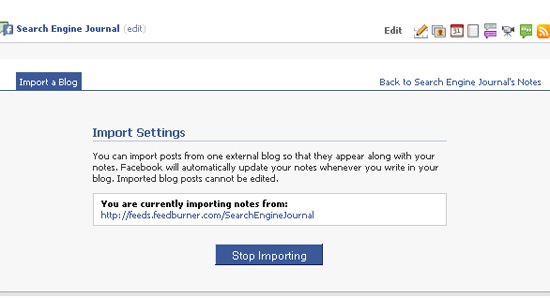
  • Aggregate your blog feed. Simply RSS allows to automatically update your fan page wall with your blog RSS. You may also want to import your blog feed to your fan page notes (for that go: “Edit page“, find “Notes” under “Application” and click “Edit“, then “Edit import settings” and at last provide your feed URL).
Promote Facebook fan page: import blog feed
  • Try Static FBML is another app to keep in mind: it adds advanced functionality to your Page using the Facebook Static FBML application. This application will add a box to your Page in which you can render HTML or FBML (Facebook Markup Language) for enhanced Page customization.
  • Add a personal note: Add your personal photos, personal welcome-videos are also great (create a short video welcoming your fans and describing what they can do on your page);
  • Provide a place for interaction/self promotion: Start a thread on your Discussion Board that allows your fans to promote their sites or inviting to share Twitter IDs and to follow each other.

Round 2: Invite your friends to join

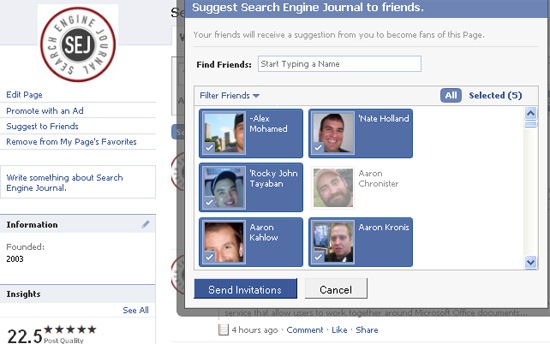
There’s no way to invite all your friends in bulk but you can spend a few minutes to select (all) your friends and send an invitation to them;


Promote fan page: invite friends
Now, once you are done, go ahead and ask your best friends to invite people as well

Round 3: Try social ads

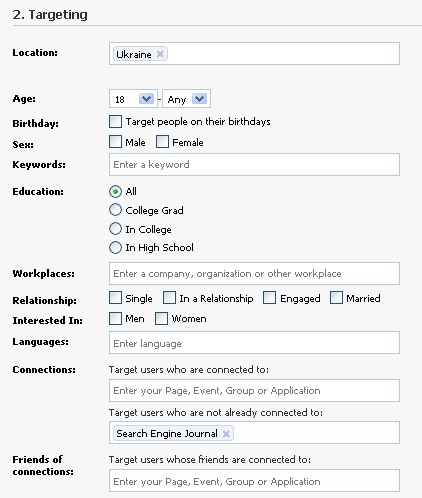
The best thing about Facebook advertising (well actually there are two: one is that you can pay as little as $1 per day to test it and the second one…) is that it can be very well-targeted (still, it won’t work for all niches and campaign types but sometimes it works quite well). The Facebook ad campaign can be targeted to:


  • Location;
  • Age group;
  • Sex;
  • Education;
  • Keywords;
  • Work place;
  • Relationship status;
  • Language;
  • Connections (fan page, event or group) – this means you can for example target fans of your competitor;
  • Friends’ connections:
Promote Facebook fan page: social ad

Round 4: Promote on Twitter

If you (or your friends) have solid following on Twitter, promote your Facebook fan page their.
Besides, you can link your page to your Twitter account by simply clicking this link:

Link Facebook page to Twitter
There you can select to share status updates, links, photos, notes, and events with your followers on Twitter, directly from your Facebook Page thus promoting it to your Twitter followers:
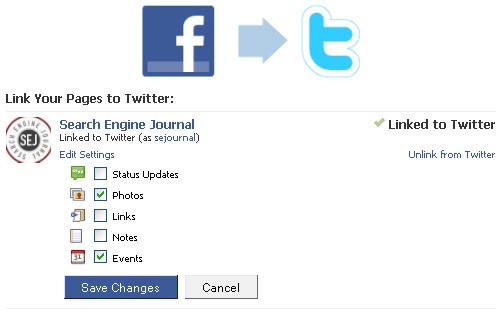
Promote fan page: Twitter

Round 5: Leverage your email contacts

Doing business and networking on the Internet, you are likely to have a huge number of contacts in your email address book, so why not take advantage of that:


  • Include your page URL in your email signature for business correspondence;
  • Include your page URL in your email signature for Customer support, customer status updates and other automated messages;
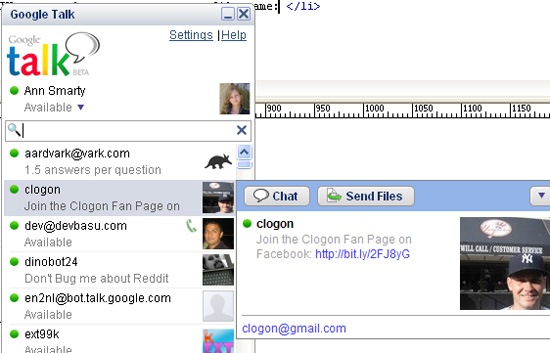
  • Leverage Gtalk status: let your facebook fan page URL display whenever your IM contact hovers over your profile name:
Promote Facebook fan page: Gtalk


Social Media Tips : Why Should I Help You?

When the clock struck midnight on January 1st, I began running. It was a 5k run in Philadelphia, along the Schuylkill River, to be more specific.
During this run, I passed a homeless man. Rather than running past him, I stopped. I gave him $100.
Later that day, I stopped to think in greater detail about that incident.
What was it that compelled me to engage him?
I think the answer to that question, in this case, should be fairly obvious.
The night was cold and rainy. No person should be outside and homeless, regardless of how they got there.
How does this story relate to my thoughts on many folks on Twitter?
Before I continue, please understand I am in no way making light of the homeless. I’m simply offering background as to what inspired the following thought:
Many individuals all around the social media world are simply asking for handouts.
Think about that for a second.
How many people do their best to be placed prominently in front of you, but really do very little to offer a value proposition?
How many individuals clamor daily about social media strategies, and the need for engagement, yet fail to offer an answer to the simple question of why you should contribute to their success?
I find more and more redundancy invading my personal space.
Less substance, less value, less originality, more noise.
While there is overwhelming concern about those that are not participating in social media ‘correctly’, there is a disproportionate lack of concern for those that are considered social media ‘geniuses’ and really offer minimal value.
If you’re going to be successful long term using social media, you must be certain that your product can back up your mouth.
With that in mind, follow along and below you’ll find a small list with tips to help you, or your product, offer a compelling value proposition.

10 Ways to Translate Social Media Success into Real World Success

1. Represent yourself, or your product, honestly.
While you may be able to lure people to you by appearing to be something you’re not, it leaves a bad taste.
2. Impact people in real life.
Until you leave a tangible impression on someone, keep in mind that you very well may be an untrusted, tiny little avatar just like everyone else.
3. View yourself as others view you.
Try to understand that people who don’t know you will view you exactly how you represent yourself. It may not be who, or what, you actually are, but it’s the virtual reality you must understand.
4. Be respectful of others.
Being respectful of others does not mean being afraid to unleash an ‘f-bomb’, if that’s who you are. Attacking others publicly is unnecessary and cowardly. Expressing yourself, however you see fit, is human. As long as you understand how your emotional outbursts will impact how you are viewed, it’s ok to let them fly.
5. Be unique.
The world has enough of the same. Be yourself, and you’ll be unique. If being yourself is not a good option, consider that a much deeper problem.
6. Don’t follow the pack.
The pack is the epitome of mediocrity. Strive to lead them, not be one of them.
7. Embrace your competitive advantages.
Just as it’s acceptable to recognize flaws, don’t be afraid to celebrate your assets. There is nothing wrong with being objective about yourself when it may be positive.
8. Listen to feedback and improve.
Don’t view criticism as an attack. View it as an opportunity to improve, or at least something to consider.
9. Stand your ground.
If you believe you are right, and have valid reasons for believing it, don’t back down to opinions.
10. Stay consistent with whatever path you choose.
People will begin to know you for what you appear to be. Changing yourself mid-stream will cause them to feel deceived or tricked. This goes along with being yourself.
These are only 10 ways to help make yourself, or your product, more attractive to the social media community.


30+ Self-Serve Ad Networks & AdSense Alternatives for 2010

Entrepreneur or SMB marketer drawing up an advertising budget for 2010? Try this massive list of over 30 ad networks I’ve compiled while browsing around the web. I’ve tried to focus on those that are SMB friendly with self-serve platforms. I’ve ignored CPA networks and tried to eliminate advertising aggregators, and the search engines.
Particular demographics / audiences
1. FARK.com – 18-28 year old men – Flat rate text links sold on a weekly basis (through a redirect; they’re not for SEO points)
2. Facebook – The biggest social network has hyper precise targeting. Don’t overdo it though, or you’ll end up like I did once, targeting merely 20 people.
3. PlentyOfFish – The web’s second largest free dating site has an self-service ad platform
4. MyAds on MySpace.com – Self serve banners like Facebook, with similar demographic targeting
5. AdEngage – A variety of formats focused on humor and games
6. Canoe Klix – French Canadian contextual CPC on premium French Canadian sites
7. Adknowledge.com – Social network ads published on social games
8. Click-Share – A variety of demographic targeting options are available, including some not seen elsewhere such as household income, children in household etc.
9. Chitika.com – A focus on monetizing SEO traffic has made them attractive to retail advertisers.
General – Most of these are available on a CPC basis, even if the ad format is banners
10. AdRoll.com – Offers help creating display ads, retargeting and other capabilities
11. BuySellAds.com – Blog banners, mostly 125×125
12. AdToll – Banners, peel-away and mixed banner/text ads.
13. Advertising opportunities at Amazon.com – Available for both products and services
14. FetchBack – The Retargeting Company
15. AOL’s AdSonar – Different targeting options, and selling text links  afaik. I’d link to AdSonar.com’s homepage but it just redirects to an AOL Advertising page, even though the site itself is up…
16. ContextWeb / ADSDAQ – Allows you to bid on traffic by category
17. Bidvertiser – Text and banner ads
18. Adbrite.com – Generalist network
19. AdReady – A competitor to AdRoll with similar banner making capabilities, but without the retargeting
20. Marchex – Boasting a portfolio of 100,000s of generic domain names, Marchex sells ads by click (self-serve) or by call (not)
News Media
21. AOL’s BidPlace SB – Banners on premium sites
22. MediaBids.com Print advertising auction
23. NYTimes – Starts at the exorbitant rate of $8 CPM. [Also requires you to drop the soap on entering...]
24. CBS Interactive – Similar rates as the NYT.
What surprises me about the NYT and CBS is that they don’t get that advertising is driven by efficiency, and publishers accepting some of the risk.
Twitter.com - Buy your message and link in someone’s tweet. Pretty self-explanatory. Some also offer “analytics,” though those offerings are all pretty light for now.
25. Twittad
26. BeTweeted
27. Be a Magpie (UK oriented)
28. Ad.ly
29. Sponsored Tweets
30. AdCause – Support charity with your ad dollars
31. TweetROI

Quick Scroll: Google Chrome’s Web Document Navigation Tool


Quick Scroll is a new little tool from Google for Google Chrome. It basically helps to navigate to the part of the document that you saw when clicking on Google search result.
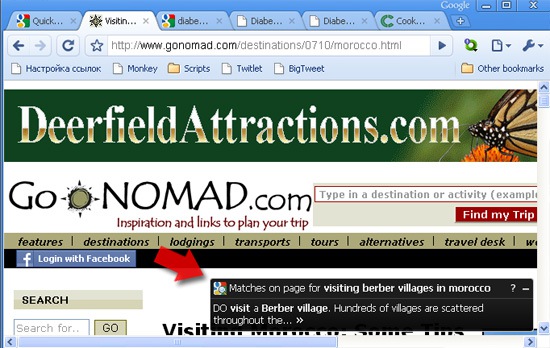
After you click on a Google search result, Quick Scroll may appear on the bottom-right corner of the page, showing one or more bits of text from the page that are relevant to your query. Clicking on the text will take you to that part of the page.
What it means is the following:
(1) The user searches Google to find something and clicks more or less relevant result;
(2) Having landed on the page, he sees it seems to be about the topic but he can’t find the exact place that caught his attention when being at SERPs;
(3) Here’s where the Chrome extension comes to rescue: it displays a little pop-up below the screen with the quote from the search result snippet;
(4) The user may click that quote and he will be taken to the exact place of the document used to create Google search result snippet.

Quick scroll
Note that the little window won’t appear always: for example you won’t notice the tool when the keywords from your search or the quote from the snippet are on top of the page or quite visible. The tool will only interfere when you are likely to need it.

Quick Scroll appears only when it’s likely to be useful, helping make sure it won’t get in your way when it’s not needed.
Why I thought that was a cool tool to share?
The most important reason why I thought Quickscroll is worth sharing here is that it demonstrates Google’s plans and experiments on introducing further navigation right within the document itself. First that was named anchors as additional page navigation aid, then “Jump to…” links below the clickable page title and now this.
I also stumbled across this thread about related Google patent – Artificial Anchor for a Document in the SERPs:

With systems and methods described herein, mechanisms are provided to generate or simulate links with artificial named anchors and to allow the browser to recognize the artificial named anchor and navigate directly to the desired specific part of the target webpage even when the author of the webpage has not created a named anchor at the specific part of the webpage.

5 Reasons to Learn Social Media

Have you ever noticed how many bloggers and social media marketers just tell people that they should go out try social media? How you shouldn’t worry about learning social it? That you’ll learn it on the fly and everything will be fine.
Well, I’m not one of those. It’s absolutely in your best interest to learn the basics of social media before risking your time and money.
Jumping into social media without at least learning the basics could be a major disaster. It probably won’t ruin your company. It probably won’t ruin you. But it will be a waste of time.
Why do I say that? Well an understanding of social media theory and fundamentals makes your strategy better. How, you ask? Well…
1. It Helps You Create a Starting and End Point
Taking the time to learn social media fundamentals gives you a starting point. It helps you decide where you are and hopefully where you should go.
If you don’t learn what the marketing technique is, how will you know what it’s capable of? How can you create goals and work towards them?
Taking the time to explore social media and soak up as much information as possible gives you a better understanding of what social media can do and how to create a plan.
2. Knowledge Leads to Fewer Mistakes
On social media, a misstep can spread just as fast as a good campaign and consumers can be less than forgiving. Learning how to interact and promote a business shouldn’t endanger the brand.
Start with baby steps. Minimize the likelihood of something to go wrong. Learn as much as you can about web culture and online customer service.
Online consumers expect something much different than offline customers. You should know how to deliver it.
3. Experience Comes With Time – Who Has the Time?
Remember the common phrase, “don’t reinvent the wheel?” – Well don’t do it.
Marketers have been testing and exploring social media theories and sharing them online. Why would you want to go through that powerful information and have to learn it on your own?
You can test and explore and research your content, but we know that more often than not list posts go viral. There’s no need for you to take the time to test and explore that.
Take advantage of other’s experiences to bolster your marketing. Don’t try to recreate or “re-find” what others have already shown works. Save your time for actual marketing.
4. Learning Keeps You From Getting Frustrated
Think back to your childhood. If you’re anything like me, than math class was a horror. I’d sit there trying to do a problem and just not knowing how. After a few minutes of trying, I’d get frustrated and give up. It wasn’t until someone taught me what to do and explained to me why it is that way that I began to enjoy math.
Social media is the same way. There are fundamentals and there are strategies that you should know and understand. Don’t allow frustration lead to you giving up. We know social media is a powerful marketing tool. Don’t let it go.
5. How Are You Investing In Something You Know Little About?
It all comes down to money. How are you supposed to decide how much to invest in social media if you don’t know what it can do?
Learn what you’ll need to invest, both time and money, before throwing resources at it. Have a plan and create a budget. This will help increase the likelihood of success.
Information is key. To have a positive social media strategy you need to know as much as possible. That means both in regards to social media knowledge as well as strategies and fundamentals.
How are others in your industry doing? Why did their campaigns work? How can you recreate their success without copying them verbatim? Is social media for you?

If you don’t understand these fundamentals or have this information you’re marketing with a disadvantage.

5 Google Wave Search Tips for Research, Trends & Tracking

Google Wave was officially launched in beta a couple of weeks ago and already plenty of people realize its potential usefulness.
I guess most of people reading SEJ have joined the party so far (tip: I got my invite by asking on Twitter, you can do the same if you haven’t yet), so I decided to start sharing my tips on how to get the most of Google Wave.
Today’s post is about using Google Wave for finding discussions related to your topic to gather more information, get inspired and track trends:

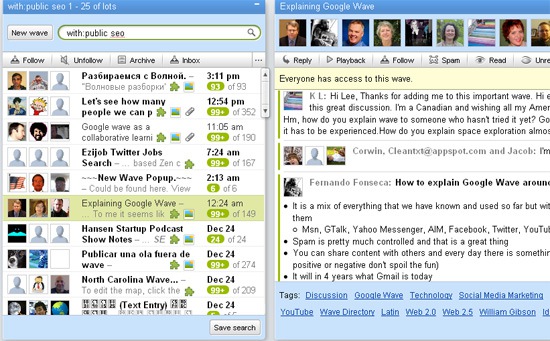
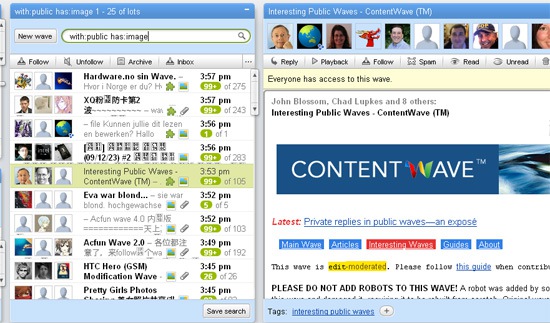
1. Public Wave Search 

[with:public]
The first operator you should be aware of: not only it is helpful for discovering new discussions to follow, but also it is a must to use in combination with other search operators listed below:

Google wave search: public

Keyword Search

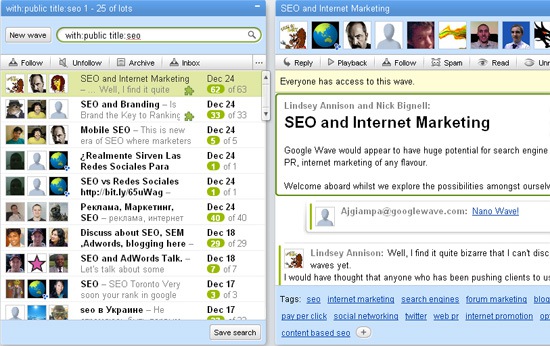
Use the following search operators in combination with the above one to discover waves relevant to your interests, topic your are researching, future post ideas, etc:

  • [about:keyword] – waves which have keyword anywhere.
  • [title:keyword] – waves which have keyword in the title.
  • [tag:tag name] — finds waves with the tag tag name.
Google wave search: keyword

3. Date Search

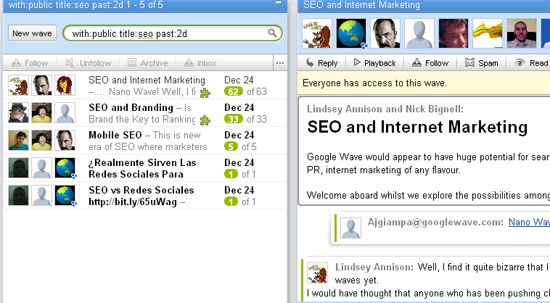
The following operators allow to find most recent waves (useful when you are researching some recently hot or new trend):

  • [past:date term], [past:year][past:month][past:week][past:day], [past:Ndays] (e.g. past 2 days);[past:Nd][past:Nweeks]; [past:Nw], etc – find waves from the past days, weeks, etc
  • [after:date term– finds all waves after a certain period.
Gogle wave search

4. Wave Attachments and Additional Content

If you want to find waves containing attachments, gadgets, etc, use the following operators:

  • [has:attachment] – finds waves with an attachment.
  • [has:document] – finds waves with an attachment which is a document.
  • [has:image] – finds waves with an attachments which is an image.
  • – finds waves with an attachment with caption containing keyword.
  • [filename:keyword] – finds waves with an attachment with filename containing keyword.
  • [mimetype:keyword] – finds waves with an attachment with mimetype containing keyword.
  • [has:gadget] – finds waves which contain a gadget.
  • [gadget:keyword] – finds waves which contain a gadget with name containing keyword.
  • [gadgeturl:keyword] – finds waves which contain a gadget with urls containing keyword.
  • [gadgettitle:keyword] – finds waves which contain a gadget with a title containing keyword.
Google Wave search: attachments

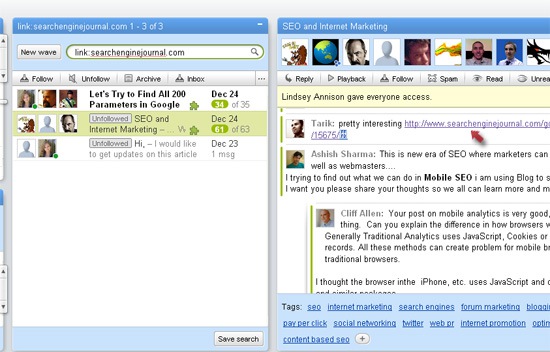
5. URL Search

[link:URL]
This one is going to get more and more popular once more and more waves are being created: it allows to find all waves linking to a particular page (I personally see the huge potential of this option in terms of the popularity research and comparison, some alternative backlink research, etc):

Google wave search: URL


Google Launches AdWords Professionals Search

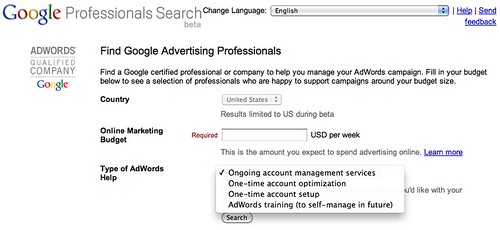
Tim Cohn spotted that the Google Advertising Professionals Search is now live. It can be accessed at adwords.google.com/professionals/search and lets you search for certified AdWords professionals based on location and budget.
Google Professional Search Beta
After you conduct a search, you can narrow your search even more by checking off additional services offered by the agencies in Google’s database. They include Online display advertising, Search engine optimization, Traditional advertising (print, TV), Web design, Website analytics, Affiliate programs, New media (mobile & social networks), Creative and design services, Call recording and tracking, Auto-optimization tools and Marketing consultancy.
Google has not yet announced this new beta search.

Google Analytics Adds New Features

Following October’s release of Google Analytics new features, Google has just released another set of very cool new features. Among them is “Annotations,” a tremendously useful new feature both to analysts as well as executives, who are usually not up to date on granular details about website activity.

The annotations feature basically allows users to make comments on graphs regarding events that happened on specific days. For example, have you ever used Snagit or some other screen capture utility to create an snapshot image like the one below to explain what happened on a specific analytics graph?

Snagit
Don’t get me wrong, I love Snagit and use it daily to present recommendations, redesign mockups and for anything that needs basic design. But the problem with it is that it creates static snapshots. You cannot just change the view from visits to conversion rates and have the comments still applied to the graph. And it is much harder to share.

The new annotations feature, by contrast, is highly dynamic. As defined on the Google Analytics blog:

Annotations complements existing anomaly detection by capturing the tribal intelligence of your company, which tends to be the most expensive and easily lost resource of all. A simple note from a colleague can save hours of real work (and frustration) for an analyst who is tasked to explain a usually dry set of numbers.

In other words, annotations can be created by anyone involved with the production and promotion of a website for everyone else to see. A few examples:

The PPC team can announce major changes to their campaigns.
The SEO team can annotate changes to the website so that results can be tracked over time.
The PR team can update dates of events, enabling the tracking of offline activities into Google Analytics more easily.
The media buying team can provide updates of major banner campaigns.
This should help promote teamwork, as everyone involved will be able to understand the whole picture and coordinate activities with other teams’ activities. And annotations will be very helpful to C-level executives too—now they will be able to have an overview of all marketing efforts and see at a glance how they are affecting the website. Here is a screenshot of how the new feature looks:
Annotations
Google also announced two additional features for Google Analytics. Custom variables can now be segmented through advanced segments and they are also available in custom reports. This adds even more power to current segmentation capabilities in Google analytics.

Google also released a new wizard to create and tweak the Google Analytics code, with a few advanced functions built in. Now it will be possible to configure the code for multiple domains, advanced campaign tracking, mobile tracking and others from inside Google Analytics. This will certainly save a lot of time for those who take on this somewhat daunting task.
Setup Wizard