Thursday, March 11, 2010

Google Adds Biking Directions to Maps

While you are pondering on the points made by Todd about online retirement, here’s a worthwile albeit healthy activity that you may want to consider – biking. And to help you navigate your way through U.S. cities on your bike, Google has just added useful biking directions and bike trail data to Google Maps.


Google has been gathering these bike trail data for quite some time now and now that they’ve gathered as much data as possible, these biking directions are now part of the Google Maps interface. These biking directions provide efficient routes and allow you to customize your trip, make use of designated bike lanes, calculate rider-friendly routes as well as customize the look of the Google Maps to suit  cycling activities.

Google has also added information about bike trails, lanes, and recommended roads directly onto Google Maps.  This will help you  get better sense of route and trails worth traversing if you’re into recreational ride.  You can check out the bicyling layer on the “more” button at the top of  a Google Map. This layer has three types of lines – dark green for dedicated bike-only trail, light green for a dedicated bike lane along a road and dashed green for roads recommended for biking but has not bike trail.

Google Maps currently has more than 12,000 miles of bike trails, and bike lane data for 150 U.S. cities. You may check out Google Maps biking directions here.

YouTube Mobile Now Serving Banner Ads

With the ever growing site traffic of  of  YouTube mobile site, it is not surprising that  Google will take advantage of this to serve advertisements.  In 2009, YouTube mobile’s site traffic increased by 160%. You can just imagine how good this site traffic will be in terms of potential for more ad clicks and brand campaign awareness.


So, YouTube has started serving ads, particularly banner ads on its mobile site’s home, search and browse pages. This is being rolled out to American and Japanese YouTube mobile websites, that is – m.youtube.com on your mobile phone’s browser.

According to Google, this is a great way for advertisers to reach YouTube viewers across multiple platforms. But for us users, this could become pretty annoying and additional data costs if we’re not on an unlimited mobile data plan. It’s a good thing if there’s always free Wi-Fi around.

But then, who are we to complain, right? After all, YouTube videos are free to consume. So, expect more banner ads from the likes of Sony, Kia and the others the next time you browse for the latest sensation on YouTube video. Hopefully, the ads won’t annoy you enough to look for an alternative mobile video site.

If you’re a brand campaign manager, you ought to know that those banner ad spots are sold on a full-day basis. You can extend your ad campaign run from the YouTube website to the mobile site. To know how you can go about this, visit this site.

Understanding the Basics of Page Rank

You've just built your website and you want to show up on the search engines. You start reading about SEO and one of the first things that jumps out at you is something called "Google PageRank." You know about the big dog of the search engines, but what is PageRank and why is it important in what you're trying to do?

Any good marketing coach can explain that easily. If your site is placing high in free (organic) search results, you're getting free advertising. Notice the word "free." That's always a good thing. Building a strong PageRank (PR) by getting good quality links coming in to your site takes time, but it isn't going to eat a hole in your pocketbook.

You want to work on raising your site's PR to get "authority" with the search engines. A site with "authority" gets better visibility in search results. Really understanding the algorithm behind your site's PR will likely have you reaching for a bottle of aspirin. In the beginning, just concentrate on understanding the basics and how they relate to your efforts to promote your site.

How Is PR Defined?

Google says PR is all about the "uniquely democratic nature of the web" and "using its vast link structure as an indicator of an individual page's value." Basically, a link from one page to another is a vote for that page. However, not all votes in this democracy are equal. Some votes come from higher-quality pages and are weighed more heavily. (Other factors in determining PR include the relevance of search phrases on a page and actual traffic to the page.)

How Is PageRank Expressed?

PR values are expressed on a scale of 0 to 10. Sites from 0 to 2 are probably pretty new to the Web and have few incoming links. Sites that have made it to PR3 to PR5 are fairly well established; PR6 and above are really popular and have a lot of high-quality links. There are very few sites that make it to the PR7 to PR10 range.

The ones that are ranked that high are usually owned by big corporations or major media outlets like the Wall Street Journal (PR8). Improving your site's PR by getting relevant, high-quality, incoming links is one of the most affordable SEO methods at your disposal. Rather than trying to get to a specific number, just concentrate on improving your number.

Is My Site's Homepage The Only Page With PR?

No, each page in your site will be assigned a PR, something that is emphasized in marketing coaching as a valuable tool. You can use relevant interlinking to distribute PR throughout all your pages.

Huh? Well, just hang on to that thought for a minute. For right now, just understand the concept that some pages in your site may earn a higher PR than others, and that you can use that to your advantage.

PageRank Passes From One Page To Another

Here's how it works. A page with a high PR passes some of its value to a low PR page over a link. You can use this to promote your site in a couple of ways. When your site's pages are interlinked in a relevant way, PR gets distributed more evenly throughout the site. Also, you can "court" relevant sites that belong to other people through your link-building campaign. This is really how your site starts to gain "authority."

Start By Building Your Index Page's PR

Generally, marketing coaches will tell you to begin by working on your home page's PR. This can be time-consuming, and not just because you'll be building relationships with other site owners. You have to do your time in what's popularly called the Google "sandbox." This just means that new sites like yours probably won't get any PR at all for the first few months you're on the Web.


How Do I Check My PR?

There are a number of free, online tools for checking PR including PRChecker and SearchStatus. At PRChecker you type in a page's URL to see its PR. SearchStatus is a FireFox extension that shows a site's PR at the bottom of your browser. (It also shows your site's Alexa rating, another method to measure online "importance.") You can also install the Google Toolbar for Firefox or Internet Explorer and enable the PageRank function.

Is Building My PR All I Need To Do?

A marketing coach will tell you that having a strong PR is only one part of your SEO campaign. For instance, say you're looking around for a site to link to yours. You find one with a high PR, but it's a site that sells links. Move on. Their high PR number doesn't do you any good because a link from that site to yours will have a lower quality and will pass less authority to you.

Understanding the basics of PageRank is essential in putting together a high-quality link-building campaign for your site, but don't get fixated on the PR number and ignore other important facts. Just gain a basic understanding of what PR is and how it functions and use that to your advantage in building a reputation of authority for your site.

Wednesday, March 10, 2010

Find Relevant Blogs (and Link Building Opportunities) with Xmarks

Xmarks is one of those FireFox plugins that I’ve been using for ages. I mentioned it in my one of the first FireFox tool overviews and I still find it awesome.

With some (arguably) great “social” features added Xmarks has turned a cool search engine as well. I find it quite relevant and precise. Sure, the database is not as huge as Google’s but what it currently has is the best of the best.

Xmarks search feature is based on its users’ preferences:
  • The rank of each site is defined by how many people bookmarked the page;
  • The topic if the site is defined by the tags a surfer used to save the page.
Additionally, with the most recent update, Xmarks developers have introduced extra ratings and reviews from the FireFox status bar.

Thus, run by people, the tool is still amazingly precise.

Here’s how you can use it to locate relevant blogs in your niche (and possibly consider them as link targets);

Find more “similar” sites

Most of us are aware of most popular blogs in each niche. But to find more blogs on the same topic is not that easy.

Well, Xmarks gives you such a possibility: just go to the site and search for the blog domain.

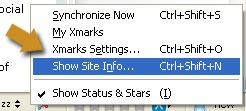
If you are using the addon, you can see similar sites right from the status bar icon (just right-click it):

Xmarks: site info

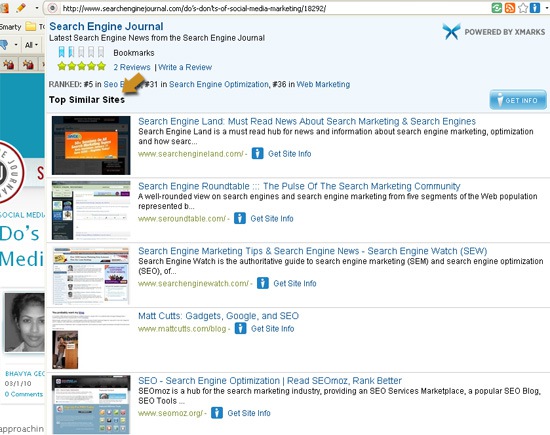
The report will load quietly in the foreground and will look like this:

Xmarks

By clicking “Get info” tab you’ll be taken to the full report online.

Search by tags

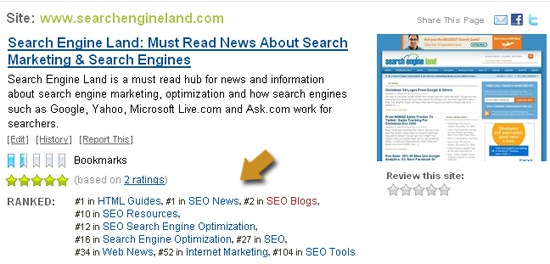
The detailed site report will also include all the tags people were using to organize the bookmark. You will also be able to see where the current site ranks for each tag.

The next thing you can do is to browse those tags to see more sites (and more tags!):

Xmarks tags

Enjoy enhanced Google search results

Xmarks search integration also looks cool to me (much better than any other “social” help to SERPs I would say).

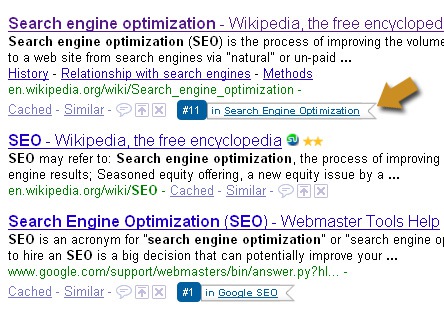
All it does basically is integrating its icon within Google SERPs for you to see that site rankings in Xmarks system and its main tag:

Xmarks Google

You can thus start your link-building research right from regular Google search.

Facebook Searches Grow by 10% in February

ComScore has just released its February search engine rankings data. And while there’s nothing new in terms of who is on top, who gained and who lost, what’s surprising about it is that among all the online properties where searches are conducted other than the five major search engines, Facebook gained a significant amount of searches in February.

Yes, it seems that more search activities are happening on Facebook lately.   Facebook’s total search queries may not be that significant compared to the top search engines, but then it was only the online property which registered search query growth in February – amounting to 10%  increase from its January search market  share. Total searches conducted on Facebook was 436 million while Google got 13.5 billion search queries, Yahoo got 2.5 billion and Microsoft sites got 1.7 billion searches.

In terms of Core Searches though, Facebook is nowhere near the top five search engines where Google stays on top of the pact with 65.5% of searches, Yahoo with 16.8% and Microsoft Sites with 11.5%. Both Google and Microsoft had a slight increase in search market share in February with 0.1% and 0.2% respectively.

Total searches in the U.S. amounted to 14.5 billion which is a slight 5% decrease compare with data in January. Google Sites got 9.5 billion of these searches, Yahoo got 2.5 billion and Microsoft 1.7 billion.

71 Technical Factors For Backlink Analysis (From 30 Link Building Experts) – Part 2

Welcome to part 2 of our 3-part group interview series on backlink profile analysis. Part 1 covered backlink analysis for link building campaign design. Part 2 covers the more technical aspects of analysis, and what elements that link building experts look at to gauge the overall strength of a backlink profile.

14 URL factors in backlink profile analysis

The URLs of linking pages can tell you a great deal about a given site’s backlink profile. The URLs themselves can shed some light too when evaluating the quality of a given link prospect. Some of the link builders interviewed didn’t place value in URL analysis when investigating backlink profiles. Some did. Often, this comes down to differences in style and process.
  1. TLD (if .govs or .edus have been linking it can indicate high-trust, high-value content)
  2. Target keywords in the URL
  3. Target keywords in the hostname
  4. Number of URL parameters
  5. Depth of the page on the site (as measured by /’s)
  6. Iterations of ? and other extraneous characters
  7. Excessive hyphens in a URL can indicate over-SEO’d content
  8. URLS on blogspot or wordpress
  9. Avoid https:// and ftp://
  10. “links4free,” “getfreelinks,” etc…
  11. The words “review” or “advertorial” (can indicate paid posts)
  12. The linked-to site mentioned by name in the URL (can indicate a paid review)
  13. Words that indicate content types (ie: “blog,” “news,” “forum,” etc…)
  14. Excessive amounts of links.html and links.php indicates a weak profile
Key comments on URL factors


“Anything that indicates a news and information site is high on my list.” -Ken McGaffin, of WordTracker

“I’ll look for footprints that can help me find more link sources similar to that one.” -Gab Goldenberg, SEO ROI

“It is not something I spend time on. It is nice if their URL has keywords in it, but the link is valuable with or without that being the case. Other factors matter much, much more.” -Eric Enge, Stone Temple Consulting

“When reviewing URLs, one strict but useful criteria is to scrutinize any website that uses hyphens in conjunction with keyword phrases in their domain name. A little SEO knowledge can sometimes be like a sharp stick in the hands of a child. Hyphenated domain names can be an indicator that a webmaster is running around with a sharp stick.” -Roger Montti, aka MartiniBuster

“I’m looking for the presence of target keywords in file paths and names and at TLDs. I’m also looking to see if there’s an opportunity to purchase a similar domain name (in the case of exact match), with an alternate TLD.” -Ken Lyons, of Wordstream

“Even an ugly URL can get indexed, but you want to make sure that it’s the canonical URL for that page and that your link didn’t wind up on some duplicate page. It’s also preferable when the URL structure is clean and uses descriptive phrases.” -Jennifer Van Iderstyne of Search Slingshot

“To me, if a page is quality (i.e. relevant, has PR, dofollow, ranks well etc), then I don’t really care what the URL is.” -Melanie Nathan, Canadian SEO

“It’s more of what I DON’T look at. A URL itself can be an amazing source of signals, but more often, I look at URLs as a means to steer away from the junk.” -Eric Ward, EricWard.com

“If you see a lot of gardening-resources-7 or links.html near the top of their backlinks you know their profile is pretty weak.” -Aaron Wall, of SEOBook

“I look for things like keywords in the URL (more is good), URL parameters (fewer is good), and the depth of the directory (fewer slashes is good).” -Jeremy Bencken, of WebSimple

29 on-page factors in backlink profile analysis


When investigating backlink profiles, it’s vital to look at the pages that contain (or will contain) the link. Link builders consistently cited on-page analysis as a crucial element of backlink profile analysis.
  1. Link embedded within relevant content that discusses link target
  2. Title, headers, and content to see if the theme of the page is on topic
  3. Text surrounding the link
  4. Does the link appear paid or given freely, by editorial choice?
  5. Does the page rank for its title?
  6. Spam content in comments
  7. The anchor text of the link
  8. Page linked from other external websites
  9. Proximity of the page to the root location
  10. How well the page is linked to from within the website
  11. The URL being Linked To (home page or deep)
  12. Location of the link (on the page)
  13. Number of outbound links on the page
  14. Page Content (topic and amount)
  15. Page back links
  16. Page cache date
  17. Pagerank
  18. Quality of outbound links
  19. Logical, appealing page layout
  20. Page is bot-readable
  21. Title and HX tags present?
  22. Content buried under CSS and javascript?
  23. Important page on the site vs. a “throw-away” blog post
  24. Can you add directly to the discussion
  25. Excessive advertising
  26. Intent
  27. Excessive links from link directories or blogrolls
  28. Excessive links from links.php pages
  29. Duplicate links on the same page (what is the first link’s anchor text?)
Key thoughts regarding on-page factors


“On page criteria is integral to the backlink analysis process. Outbound links are critical. It’s important to do a double backlink analysis. Analyze the backlinks of the sites your link candidate is linking to. This will help determine exactly what kind of link clique you are going to be associated with. Building a link clique independent from established link cliques is a way of combatting the established 800 pound gorillas that are entrenched in the top three. When you study the backlink of established sites you will generally see a relevancy pattern. Poaching from their backlinks only makes you a part of their sphere of influence. In my way of doing things, I aim to establish my own, and it has worked in overtaking websites that are a part of multi-million dollar networks for important two word keyword phrases. On page criteria is a key part of this process.

The ideal web page, in terms of on page factors, is a web page that has zero SEO fingerprints. Zero.”
-Roger Montti

“In general, I prefer to see a fairly decent pagerank (1-3 depending on how far down the page is in the site architecture) with a good amount of both external and internal links (can’t stress this point enough). Obviously relevancy is a must, but a more telling signs of a pages’ authority is its cache date; within one week is great, 1-2 weeks is average, 2-3 weeks is just OK, and anything 3+ weeks isn’t very powerful.” -Paul Teitelman, of Search Engine People

“The page must be closely geared towards my client’s target term or I don’t even bother. I want prospects where I don’t have to convince them to link; they just do it because it’s a logical fit. ” -Melanie Nathan

“A neat tool for quickly analyzing the value of getting a link once you’re on a page is Foxy Rank” -Tom Demers, of WordStream

“Is the link in the middle of content on the middle of the page, if not, take that into account. What other links are around it? Where do all the external links point out to on the page as a whole, are they relevant destinations to your site? Was this link added to the page after the fact or did it show up when the page was created?” -Brian Chappell, of Adapt Marketing

28 on-site or sitewide factors in backlink profile analysis


When analyzing a potential link prospect (or a key competitor) there are a number of sitewide inbound link factors to analyze.
  1. Site type distribution of inbound linking sites (Blog, Directory, Social Media, Press Release, Website, ETC)
  2. Domain age
  3. Toolbar PageRank (both domain and linking page)
  4. MozRank
  5. Recency of the latest post or other newest content
  6. Estimated traffic
  7. Presence of social network widgets
  8. Unique linking IPs
  9. Unique IP blocks
  10. Does the site rank for its domain name?
  11. Does the site rank for its target terms?
  12. Which pages of the site are getting the most links (helps to determine what has worked as link bait)
  13. Unique link distribution (Unique IP Adresses, Unique IP Blocks)
  14. PageRank distribution across site
  15. Link Type Distribution (No-follow, Do-follow, Missing, Broken)
  16. Reciprocal links
  17. Number of indexed pages (gauges how SEO friendly their site architecture is)
  18. Link accumulation speed
  19. RSS subscribers
  20. Human comments
  21. Does the site have a logical structure and hierarchy?
  22. Is it easy for a human and bot to navigate?
  23. Hosting Location Distribution
  24. The sites’ relevance to and focus on subject matter
  25. Site using KWD rich internal anchor text
  26. The total link count.
  27. Does the site come up for country-specific searches in Google
  28. Anchor text distribution
Key insights regarding on-site factors


“I look for evidence of human activity. I’ll want to see who writes the content and how dedicated to the task they are. I’ll also look at evidence of audience participation – do people leaves comments on articles for example. Once I’ve established in my head that it’s a quality site, I’ll look for opportunities such as ‘write for us’, ’submit an article’, ‘editorial guidelines’, etc. I’ll also look for partnership opportunities with sites I’m really taken with.” -Ken McGaffin

“We look at the website’s linking profile and overall strength of backlinks. Specifically, we look at deep links within a website we’re trying to acquire a link from for our client. If the homepage is very strong and the site has no deep links, then the value is typically lessened. The structure of the website and how strongly focused it is to the client’s business is the next best indicator for us. Is it easily spidered and indexed by Google. A quick way to see this would be to type in “site:widgetsite.com,” then look at not only the pages indexed, but also pay attention to the diversity of the title tags, descriptions, and URLs being indexed in Google. Stronger websites nearly always have a wider and more clear diversity while previewing the indexed pages from the website.” -Brian Gilley, of Social SEO

“A lot of the link stuff is recursive. So when you look at an individual page or site that someone is getting a link from sometimes you can also see where that site is getting links from and come up with new link building ideas based on that.” -Aaron Wall

Link Week 30 Link Builders Discuss Backlink Analysis For Campaign Design – Part 1

We asked 30 link building experts 9 questions about backlink analysis… and got 20,000 words of response. This article is part 1 of a 3 part group interview series on backlink analysis. Part 1 covers how backlink analysis – of your site and your competitors’ sites, as it applies to link building campaign design.

You’ll find each expert’s answer grouped by question. You’ll have to assemble the “big picture” takeaways yourself by reading through all the responses. I’ve read through this at least three times now, and each time I come away with new ideas. There is repetition, but there’s enough difference that I believe even the most experienced link builder will have a moment or two of discovery-induced excitement.

Thank you, thank you, thank you to the contributors. I can’t wait to put what you’ve taught me to work! And we’ll see you again in part 2, which looks at the technical aspects of what exactly gets analyzed, and in part 3, we’ll gather up all the loose ends.

Here are the 3 questions covering backlink analysis in campaign design:
  1. When and why do you perform backlink analysis?
  2. How does backlink analysis inform or affect your link building campaigns?
  3. What elements of a backlink profile are most useful/telling in competitive analysis?
When and why do you perform backlink analysis?


To warm up my experts, and provide a framework for the overall discussion, I asked about when and why they perform backlink analysis. By and large, backlink analysis is a first and foremost step in designing a link building campaign.

Julie Joyce, of Link Fish Media
I perform backlink analysis when I begin a new link building campaign and periodically throughout it, especially when something’s not quite right and I need to investigate to see what’s going on behind the scenes. In our agency, backlink analysis is almost always done by myself and other senior staff who have years of SEO experience, so we’ll typically formulate a plan with the clients, then pass on our plan to the link building team. The reason that we do this is to get a good outline of the site’s link profile. Are there link spikes over the past few months or years? If so, why? Analysis helps us to identify issues that we think could potentially become problematic, and to figure out why they occurred and what to do for the future. Without checking the past, it’s hard to know how to move forward properly.
Eric Ward, Search Engine Land link columnist
I do backlink analysis for any number of reasons, but there are two primary motivations. First, I do them for specific client work. Second, and far more often than the first reason, I do them as part of my own efforts to understand the types of things that affect link seeking success, rank, publicity, and tendencies across a wide variety of verticals.
Debra Mastaler, of Alliance Link
When doing custom, competitor outreach and content generation programs.
Roger Montti, aka MartiniBuster
The why is simple: the value of a website is as good as its backlinks. Content is great, but in terms of link building content takes a secondorary role for determining the value. The backlinks, ideally, are a reflection of the quality of the content.
Webmasters rely too much on the Google toolbar and on third party link analysis tools for metrics. Fact is, nothing is better than eyeballing the backlinks oneself in order to determine the value of a site. There are many poor practices that are commonly accepted as being useful. Eyeballing the backlinks, taking a moment to see why sites are linking to it and how they are linking to it will help determine whether a site is going to help your link building efforts.
Some of these bad practices arise from misinterpreted observations that are subsequently perceived as loopholes to be exploited. For instance, one of these poor practices started from the observation that nofollowed links showed up in the Google’s backlink reports, including Webmaster Tools. That’s the observation. The mistake is to be ignorant of the fact that Google only shows a sampling of backlinks and that this sampling has never differentiated backlinks that helped a site rank and backlinks that do not help a site rank. The observation of nofollow links in WMT has led to the erroneous conclusion that nofollowed links have value and has led to a resurgence of blog comment spam. Eyeballing the whys and hows of a backlink will help in the determination of whether the thousands of backlinks a site has are useful or not.
Where most backlink analyses falter however, is focusing on quantity while discarding otherwise quality backlink candidates, particularly those with low PageRank. This is a case of webmasters relying on the toolbar without realizing they are relying on the toolbar. Google is known to rank web pages in the top five regardless of a lack of backlinks. This is what some might call the mom and pop boost, elevating a quality site that lacks inbound links. But you have to think about why? Is it the content? That certainly has a role. It’s clear that simply counting the backlinks of a site and making the one with the most link the winner doesn’t work. The search engines are more sophisticated than that it’s not uncommon to see low pagerank pages ranking at the top. So something is going on here that needs investigation.
The search engines are analyzing link graphs to determine the relevance of a site to a particular query, and part of that analysis is to throw out sets of sites that raise certain flags. This process is generally referred to as earning trust, but I’ve been coming around to seeing it more as part of the process of identifying what niche bucket a site belongs in, with the spam bucket being one of several. Imagine these buckets as clouds of sites that are relevant for particular topics. Now here is the question that webmasters aren’t considering. Is it possible to rank a site according to the relevancy cloud that a site belongs in? If it’s possible to extract meaning from the clouds of “meaning” a site belongs to, then it’s possible that a relevant site with low to zero PR regains importance as part of a link building project. This is something I refer to as determining the link clique.
An important role of backlink analysis is culling out the bad link candidates in order to speed up the process of finding the best ones, to cut down on wasted time. For example, you can make your criteria strict in order to bypass sites that have the possibility of using questionable SEO tactics. One rule, a strict rule, is to remove from consideration any website that has an overwhelming amount of links from no-followed comments. There are other more specific rules I use, but I don’t want to single out specific groups.
Jeremy Bencken, of Web Simple
There are three reasons I perform backlink analysis (on sites other than my own):
1. Website acquisition. Is an acquisitions candidate’s backlinks paid – are they likely to disappear, or likely to be discounted by Google? Are they hard to replicate? For sites with mostly-organic traffic, backlinks are their core competitive advantage
2. Link prospecting. Do my competitors have links my site should have. Unfortunately, if you rely on this alone, you’re by definition trailing competitors. A better strategy is to ask, “what audiences are organically linking to my competitors and how can I use those ideas to generate my own focused link building campaigns?” What other adjacent markets might also be interested in my site’s story? The key is finding inspiration, ideas, and improving upon inbound linking trends you discover from competitors.
3. Link policing. Are my competitors participating in shady link schemes? I know this is controversial, but I’m of the opinion that link purchases that can be discovered is just poor SEO, and reporting them to Google (in hopes they will be penalized) is a service to the SEO industry.
Michael Gray, Search Engine Land columnist & Wolf-Howl.com
A backlink analysis is one of the key aspects of any site’s SEO profile. You should always address any on site issues first, such as canonical, site architecture, page templates, but backlinks are the first step when you start looking at offsite SEO. It can be your site, a clients site, or a competitors site, backlinks are really critical.
Shaun Anderson
I’ll carry out some simple backlink research at the beginning of any project to identify any obvious link hubs in the vertical, and/or any obvious quality link sources, or to just examine the types of link opportunities available in this sector. Once I get the team of flying monkeys out of keyword research and into deployment (via article submissions and dropping semi-quality links on sources I know change positions) I’ll revise my linkbuilding analysis and further target the next wave of links to try and acquire / emulate. So, in effect, I’m constantly analysising links month on month, but I never just rely on the links others have already got.
Eric Enge,  Stone Temple Consulting
There are two reasons for performing backlink analyses of your competitors and major players in your market space:
1. To identify the most important links that those sites have, so you can request links from them.
2. To learn what their link building strategies they have been using.
It is the latter point that is actually the more important point of the two. Once you understand your competitor’s strategies, and/or where they are obtaining quality links, it becomes much easier to decide on what your strategy will be.
We like to do backlinking of competitors very early in our engagements. Link building, and more broadly “promoting your web site” remains the most important thing you can do in an SEO effort. Yet there are so many different choices for link building campaigns that any given publisher can pursue, yet the return on each campaign can also vary significantly. For that reason it is critical that you put careful thought into deciding your strategy. Seeing what has helped major competitors thrive is invaluable.
Wiep Knol
I always do a quick backlink check before I take on a new client. Just to check what kind of link building they are doing, or have been in the past. If the client has high expectations, but also has a very polluted link profile, I might choose not to take on that client. A combination like that can only turn out the wrong way. When I start a campaign, I dig in a little deeper and take a look at the competition as well. This can give me an overview of the industry and competitors in general, but it could also give me inspiration for what websites to target or what kind of content to create.
Brian Gilley of Social SEO
We primarily use backlink analysis reports to dissect the backlink profiles of our client’s competitors. Running a thorough backlink analysis of between 4 and 7 competitors and then meshing those similar or unique backlink details together gives us a strong roadmap to help our initial link building efforts for the client. We don’t just look at domain and page authority or getting links from the aggregated backlink data we’ve collected. Instead, we use the data to really educate the client on the types of backlinks we should be focusing on within our link building campaign — whether that be industry-specific, local, social media, link bait creation, or another types of link that we can identify that’s paying off well for competitors.
Jennifer Van Iderstyne of Search Slingshot
I always perform a back link analysis at the beginning of an SEO campaign. I feel like it’s important to understanding a website’s history. Sort of like cutting down a tree and examining the rings, you can uncover vital information about a website’s past and use that information to plan for the future. I also like to perform a back link analysis periodically throughout a campaign, just to look for surprises either good or bad, and to gauge the success of any particular link building effort.
Then of course, there are good reasons to perform an analysis when a sudden problem arises, like a loss of rankings. I always check the back links to see if the answer is there. You might discover the site has some how got tied into a bad neighborhood. Maybe the site got lost, driving around downtown Compton in a Lexus at midnight… If that’s the case you wanna know about it, and a back link analysis will tell you if that is the case.
And sometimes, when you’ve hit a wall brainstorming new ideas, a back link analysis can provide inspiration.
Paul Teitelman of Search Engine People
Backlink analysis is absolutely crucial to get a solid insight into what previous efforts have been done for a client or for a potential client. Before starting on any SEO campaign for a client (or even when pitching clients) I do a complete, exhaustive backlink analysis to see both the amount of links, and the different types of links (articles, directories, blogs, social media sites) that have been built already. Even more importantly is to thoroughly analyze the anchor texts used in order to give you a complete insight into their current “link profile”. This helps determine what kind of link building strategy I need to execute both in terms of link velocity and link variation.
Melanie Nathan, Canadian SEO
I do backlink analysis mainly when starting work for a new client so I can get an idea as to their profile (number of links, strongest links, anchor text etc). I also mine the backlinks of competitors while looking for suitable prospects. Even if I find a 404 error on a competitor’s site, I’ll do a quick backlink check on that particular page, to see if the links have value and if there are any opportunities to scoop them.
Brian Chappell, of Adapt Marketing
Backlink analysis occurs typically when reviewing new niches for me lately. Or analyzing a clients site for potential answers into ranking falicies, good or bad. Links to me tell a story, so its very important to understand the age, location and anchor text of a sites links.
Wil Reynolds, of Seer Interactive
Now I do it at the onset of a campaign, sometimes you get beat on anchor text, sometimes its authority, sometimes it is just raw number of links. But you won’t know what you are up against unless you do a competitive backlink analysis up front.
Tom Demers, of Wordstream
When I consult, I do a lot of site audits, and a major piece of these is backlink analysis (for clients and competitors.) I also conduct a similar analysis upon taking on a new project, even if they haven’t ordered a site audit. This is basically a deep dive look at the types, quantity and quality of links in the client profile, and a slightly higher-level analysis of some of their competitors. On an ongoing basis, I’ll periodically audit a client’s backlink profile, and I’ll frequently look at backlink profiles of competitors or interesting sites to mine them for links I can either get or generate a link building idea from.
Ken Lyons, also from Wordstream
There are four distinct reasons I perform backlink analysis.
1. SERP appraisal: when targeting verticals for new clients, I evaluate the link profiles of the big dogs that dominate the page one SERPs. I want to know why they’re top ten. Usually, I can grab a lot of intelligence sifting through their links profile, both domain and page level. I’m looking for weakness and opportunity, something I can exploit or duplicate.
2. Competitor evaluation: when I see anyone else outranking my established sites for target keywords, I want to know why they’re ahead of my site in the SERPs. Typically, that boils down to some link advantage: more links, better links, superior relevance of links.
3. Internal link audits: I feel it’s critical to analyze my own site’s link profile to determine why certain pages perform better than others. Is it based on level of competition in the SERPs, or is it the result of certain links in my own profile that are passing equity and relevance to these top performers. If it’s the latter, I want to try to replicate these quality links to as many of the other “money” pages on my site.
4. Link discovery: most SEOs use keyword tools for keyword discovery. They should also be analyzing link profiles to discover new link opportunities. I’ve stumbled on some prime link partners sifting through a competitor’s backlinks. In fact, when I see spammy, low value sites outranking mine in the SERPs, I get giddy because I know if I rummage through their garbage link profiles, I’ll find gold. It’s evident that there’s some juicy link pushing them ahead of me. I just need to roll up my sleeves and find it.
I have to add that a backlink analysis is only a part of a link building campaign. In some cases, it’s a very small part, in other cases it may be a bit more, but only looking at your competitors or your own history will never get you optimal results.
Gab Goldenberg, Search Engine Land columnist & SEO ROI
I perform backlink analysis when I need to have an idea how challenging and time-intensive it’ll be to rank a prospective client. This also gives me an idea as to whether I should even take them on or whether their needs are beyond what I can provide. I’ll also do backlink analysis if I’m considering a few different affiliate niches and I want to see what’s easiest to rank on, relatively speaking.
Christoph Cemper
Whenever doing competitve analysis, going after competitors links, buying an existing domain, out of curiosity for good rankings
David Harry
Three main reasons are:
1.  Competitive analysis: whenever we’re getting into a new query space we use it to guage how tough the space may be by looking at some of the competitor link data.
2.  Client analysis: obviously when we get a new client, we’d be looking at the profile to get a feel for where they are at the moment.
3. Content programs: obviously when we’re looking at content placement and other strategic alliances we’ll look at link profiles for prospects.
Arnie Kuenn, of Vertical Measures
We perform backlink analysis whenever we are either performing an SEO review or trying to obtain links from pages linking to our clients’ competitors. It’s a very efficient and effective way for finding relevant pages and is a comparatively easy method to discover high quality links. This works especially well if you can discover a path that the competition has taken with respect to attracting links.
Dixon Jones, of Receptional
Whenever a client specifically approaches us for this, but also, we work on this with retained clients after we have sorted out their site architecture. No point in developing links unless and until the client understands that changing url structures has consequences! Typically, we carry out an analysis before starting ANY campaign, as our quickest wins are typically found during this exercise. We even, these days, conduct a very brief analysis free for the client for our own benefit in reply to their initial inquiry.
Ann Smarty
Backlink research has been a great way to do the following:
  • See the competitors’ strengths.
  • Learn the competitors’ friends and promoters. As well as their tactics to promote themselves.
  • Learn the clients’ past link building tactics (to diagnose the penalty for example).
Bill Hartzer, of Vizion Interactive
We have a very specific process for link building. We usually review the links to the site when we first hear of a domain name (like during the initial sales process or when talking to a potential client) so we can get a good idea of what would be involved in promoting that domain name/the site. We then perform an initial, detailed backlink analysis of the target domain, but also of many online keyword competitors so that we fully understand the market and the competition.
Ken McGaffin, of WordTracker
I’ll do informal and formal backlink analysis. Informal will just be a quick look to check out the quality of a site.
I’ll do formal analysis when I start on a new project. I’ll look in-depth at each of the major players. I want to assess what their linking strategies are and how well they’re implementing them. As well as that, I’ll be looking for influential blogs and the people behind them, community sites, news and information sites and particularly journalists who are writing about the topic I’m promoting.
David Lewallen, Cybernaut SEO
I perform a backlink analysis at the beginning of a new engagement with a client in order to get a feel for their backlink profile. This allows me to gauge the sophistication of their link building initiatives to date as well as to determine what is working for them or has worked in the past. I also like to see if the client has been up to risky business (buying links, bad neighborhoods ETC…) and to determine what needs to happen in order to mitigate that risk.
Ryan Clark, LinkBuildr
Backlink analysis is one of the most important aspects of any link building campaign, aside from the links themselves. You should be on top of your backlink analysis before, during and until you forget about the certain campaign. The first place you’ll need to look to is of course the top 10 websites ranking for your keyword. Without an idea of what the competitor has hidden behind the mask of their SEO efforts, you’re going to be building links in the dark…not something I’d recommend you should do. I always make sure to look at the sites ranking for the top 20 results. Eric Ward recently wrote about even checking past 40 -50-60 etc
(http://searchengineland.com/linking-food-for-thought-34113). There’s no harm in seeing what you can leverage for your own profile, and you’d most likely save yourself some time in the long run.
Ben Wills
Most often, I perform backlink analysis for two reasons: 1) to identify sites with multiple citations to competitors for link opportunities, and 2) as a method for identifying the competitiveness of a keyword space. The more competitive the backlink profiles, the more competitive that keyword space will be.
Aaron Wall, of SEOBook
Mostly I do it at the beginning of entering new markets…and mainly when trying to decide an entry point to the market. If you try to compete head on with limited resources that makes winning harder, but if you find an area where the competition is weak or you have a strong competitive advantage you give yourself a much better chance to succeed. Most of the backlink analysis I do is just an overview look at the market using SEO for Firefox.
How does backlink analysis inform or affect your link building campaigns?


With this question, I hoped to hear more about how link builders moved from the backlink profiles of clients and competitors to actually designing a campaign.
Roger Montti, aka MartiniBuster:
Link analysis is the backbone of all my link building campaigns. Let’s talk about a double backlink analysis. Eyeballing who links to a site is the first step. The second step is to review who they link to, and then doing a backlink analysis of those sites they are linking to. The other day, I found a PR 6 site that was linking out to what looked like decent websites but a backlink analysis showed that those sites had backlinks from sites that linked out to self-described black hat websites. None of those sites rank well, either. So the double backlink analysis is a good one to use. Most people would take the PR 6 but for me that site is a loser. A strong case for not trusting the toolbar for making link building decisions. Link analysis done by your eyeballs, without the use of a third party tool, is the way to go. It’s fundamental.
Jeremy Bencken:
It’s a huge source of ideas for finding audiences who’d be interested in a site and worth approaching with promotion opportunities. For example, if my client is a pizza restaurant and I realize some Pop Warner football team is linking to their competitor, then you can bet I’m going to look into why they’re linking. Once I figure it out, I’m going to try to improve upon the idea and pitch every kids sports team I can find to link to my client. This is the fun creative part of link building: reverse-engineering why people link, then creating new opportunities that take advantage of the same dynamic.
Michael Gray:
You want to look at who is linking to the competition, are they getting mostly low quality high volume links, or are they getting mentioned and linked to from authority sites. If a site is getting links from well known, and trusted online resources, you modify your strategy accordingly.
Ken McGaffin:
Backlink analysis is crucial to a campaign. But I’m not looking to chase up links to competitors, I’m looking to build up a sense of the important influencing or information sites in the market I’m researching. Once I’ve got that list, I move on to thinking about what type of outstanding content can I create.
Jennifer Van Iderstyne:
A back link analysis creates a baseline for any link building campaign, by posing and helping to answer these questions:
  • Are there problems which need to be rectified?
  • Have there been bad linking choices?
  • What existing success can be capitalized on?
  • What strategies have been used in the past that could be expanded or replicated in the future?
  • Are the back links too one note?
  • Is there a need for diversification?
All of these questions need to be answered in order to design the most effective campaign possible and can be answered at least in part, through a back link analysis. Also, existing back links can help create ideas for how to build new ones.
Dixon Jones:
The analysis helps to quantify and demonstrate the scale of the task at hand. In some instances, the website in question is underdeveloped by a massive factor compared to their competitors. This usually reflects relative differences in brand building on and offline in the past – but if a local paper hopes to compete with the BBC, they had better reframe their objectives to think around local terms, for example.
Julie Joyce:
We don’t get into the nitty-gritty of saying “well this backlink profile has 455 mentions of the keyword fashion and only 427 for clothing, so let’s attack clothing!” We use it to formulate a general outline. We want to know what the most commonly used anchor text was so that we can discuss plans with the client. We want to identify opportunities to make things better, so if we see an inbound link that points to a less-than-optimal page, we might want to contact the webmaster and point out a better bit of content. Basically, the analysis that we do gives us the information that we need to lay out our plan for the next few months. Without the analysis, I don’t see how we’d have a good idea of where to move next.
Bill Hartzer:
A thorough backlink analysis tells us where we are now, how many links we need to get, and where the competition is right now. Then, depending on our analysis, we will put a certain amount link building resources towards the project depending on how competitive the market is. We also continue to perform our link building analysis process on a regular basis to make sure that we’re keeping up with the competition.
David Lewallen:
I like to see what types of sites have linked to the client in the past and determine what specific strategies and techniques have worked for them. This gives me a starting point, if a client has not done any link building I start with the basics, but if they have a well versed link building then I will employ more advanced strategies to boost their profile. I also like to see if their business partners are linking to them and in what fashion. I check to see if there are links going to 404 pages, broken or missing pages.
Shaun Anderson:
It helps me see the linking habits in that vertical and the types of links that have secured sites top ranking already, and the types of links I may find available for me. For instance, Im currently looking at a vertical where the number 1 position has links that are all kind of spammy. But they’re working…. so I can assume there’s not a lot of domain authority in play in that vertical, and can assume if I throw a bucket load of low quality links at the site over a short time (months) I can hide the odd real quality link in there that will get me at least into the top few results.
Brian Gilley:
It affects our link campaigns heavily since we look at the overall compilation of link data from multiple sources and then determine our focus after we have fully examined the data. If it looks like a piece of content has gotten the majority of its ranking strength from industry-specific channels, then we know that following the same direction will likely be more costly. If the backlink data has a good percentage of article/contributor based websites, local links, and it heavily focused on driving linkable content from social media sources, then we can gear our campaigns and budgets accordingly.
Paul Teitelman:
Backlink analysis has huge implications on any link building campaign. As I mentioned, by analyzing the current amount of backlinks you can then set your campaign strategy both in terms of link velocity and link variation. For example, if a client had very few backlinks, you know that you need to take your time and only use the absolute safest link building practices with lots of anchor text variation. On the other hand, if the client has a massive amount of backlinks with lots of link and anchor variation already then it’s a completely different story. In this case, you know that you don’t need to be as concerned with the speed at which you build links, but need to concentrate on higher end link building strategies with focused anchor texts as the basics have already been mostly covered.
Brian Chappell:
At surface level, it tells you who’s linking to you, and who possibly you should go to for new prospects. But if you really dig deep you can gain intelligence required by competitive terms that require an understanding of the cost/benefit relationship to actually ranking higher organically. Aaron Wall has always nailed this home and I feel its right on point when thinking about time invested and link analysis.
Tom Demers:
It greatly impacts the quality and quantity of links I’ll target for a client or a project. Determining the competitiveness of a query space is pivotal in attempting to rank a keyword(s) efficiently. See this post on competitive query analysis.
Wiep Knol:
It can provide some basic historic and competitive insights, but it can also be used for identifying new potential link targets.
Gab Goldenberg:
It allows me to identify patterns as to the most valuable links in a particular niche, and perhaps come up with link sources I would never have thought of. For example, I found out that for a hotel I worked with, a local escort review board was a good source of links! By patterns, I should clarify that I mean what sorts of hubs you see in a niche. Escort review forums aren’t a pattern in the hotel space, but you can find things like Hamlet Batista did in promoting RankSense. I’ve done SEO for a mass-market piece of software too, and so I can confirm that PAD files are a source links.
Ryan Clark:
I’m a firm believer of building quality links over quantity, so I’m always looking to see how you’re doing on your end in that department. Let’s say someone ranking in the top 5 for your target keyword has 500 links, 75 of them are of medium to high quality. I can tell from that just what kind of links I’ll need to catch up to them and take over. If you’re specing things out for a client then you’ll also be able to have a sense of the cost for them. It’s really hard to measure a cost with ranking success from a link building campaign. A competitor’s backlink profile might reveal that they’ve paid to be in Business.com and the Yahoo Directory. Little tips like that can start to put a dollar value on your campaign costs which helps keep things in perspective. * keep notes/journal on how many links it took to rank for said keyword
Christoph Cemper:
By looking at what the competition has, or has not you get an idea of the playing field that you’re in. thats especially important if you work in so many different industries and niches as we do for our clients
David Harry:
I’d say many times one of the more important aspects of link profile analysis is finding new opportunities. Many times, unless one specializes in a market, it isn’t obvious which routes to take with link building. I find that the process of reverse engineering during the competitive analysis can help find approaches we may not have had in mind originally. This has a huge affect. Where are they strong? Where are they weak? How balanced is the profile? Much of this affects the actual campaign to be implemented.
Arnie Kuenn:
It gives us a lot of information if we do a deep analysis. We can certainly discover what is working to help other sites get ranked and as I mentioned in #1, sometime we discover a whole method of obtaining links, not just a list of domains and pages to target in our link building efforts. For example, did the competition have an angle to attract .edu links? Did they distribute any free products or tools to attract links?
Ann Smarty:
The best thing about the backlink research is that it inspires me: this way I can see which direction I can go, how creative I can get and which site types will work best.
Debra Mastaler:
Any information found is strategically used in our decision making process. We don’t necessarily use the same link sources in our linking efforts but knowing where and how a competitor links helps us plan a smarter strategy.
Dennis Hettema and Elias Kai:
When I identify an interesting source through backlinks I try to get a picture of the keywords that this source is strong in and target their competitors. ie. If I find a camping site linking to my website for (biking shoes) I figure out the keywords that this camping site is trying to rank on. These keywords I cluster and I identify the top ranking players in the SERPs for that cluster. These are the guys I would initially target for link building.
Ben Wills:
Backlink analysis is used mostly as seed data for identifying potential link prospects. As mentioned above, it might also be used for competitive analysis or multiple citation analysis.
Aaron Wall:
Mainly it determines if we decide to enter the market or not, and what piece of it to enter. Sometimes co-citation tools like Hub Finder and clever search queries can help you find particular competitive strategies which you can try to duplicate or at least learn from.
What elements of a backlink profile are most useful/telling in competitive analysis?
In this question, I hoped to draw out what’s most important to look at in the competition’s backlinks.
Julie Joyce:
This is a great question for discussion, because I think that we could get into the art vs. science thing here. Basically, I feel like a bit of a link analysis hippie. I see the general pattern, get an idea about the overall aspects of the backlinks without needing to tie it down into discrete bits. Therefore, all of it matters to me in terms of importance, but I honestly do not look at my site vs. yours and pick out why one is better. I think a lot of it is very relative, and I realize that I’m sounding too New Age-y here, but there’s a lot more to why someone does better than you than that they have 5000 more backlinks or that their anchor text variance is much nicer than yours. I’d look at everything. I’d look at variety of anchor text, deep linking, authority site links, sitewides, contextual links, types of sites linking, and of course the simple amounts of everything, but I couldn’t pick out any as being that much more critical to me than the others.
Ken McGaffin:
I really want to cherry pick the best targets and then concentrate on those. So I’m not concerned at all with numbers but with quality. I want only the best targets; links from them will be difficult to get, but they’ll be worth the effort many times over.
Roger Monti:
The most telling is how natural the links are and how relevant they are. I will not consider any site that has irrelevant backlinks that are a result of a link bait campaign. Google analyzes the relevance of a backlink. They have been doing this since at least 2003. Part of that analysis is to deprecate the PageRank of irrelevant backlinks. This is a fact. Link bait campaigns are about quantity. But quantity is only a part of the backlink equation. The lack of control over relevance and quality is where link baiting as a link building technique fails and becomes a dead end. This kind of analysis reveals things about a site that the toolbar will not.
Jeremy Bencken:
Time. If you have a link building tool that identifies when links first appeared, then you may be able to identify spikes around particular campaigns or link purchases. Then you can get clues to why the links were created by looking at them.
Shaun Anderson:
The actual sites the links are on. I use to find out if I am up against link farms, blog article syndication, properly marketed content, viral success, small business or big brand…. or indeed SEOs lol
Eric Enge:
We do still look at metrics such as PageRank (or mozRank) and mozTrust. A highly trusted site with high PageRank is not guaranteed to represent a killer link, but there is still a correlation there. I am sure we would all agree that MIT, or USA.gov, or the NY Times are all probably highy trusted by the search engines, and are cetainly perceived as authorities. They also happen to have a PR9 of PR10 Google Toolbar PageRank. That does not mean that there are no clunkers with high Toolbar PageRank – there are. But, the sites you are looking for most likely have high Toolbar PageRank as well.
However, you do want to look at other metrics as well. Gather the founders of the company together and simply ask them who the leaders in the field are. That data will also help you identify sites that are likely to be seen as trusted and authoritative by the search engines. Taking the authority aspect a bit further, sites that have lots of links from other authority and non-authorty sites in the space are more likely to be seen as authoritative, and a backlink profile can help you get a sense of that.
One component that people often overlook, is that it is not just about the authority and trust that a domain has, but it is also about the page which the link can be found on. The classic example is a student page on a major university web site. The student does not speak for the university, and it is not likely that the search engines credit much of the domain’s authority or trust in such a page. So you need to look at that as well.
You also don’t want to overthink theses analyses. If I have identifed 10 sites that based on their PageRank and mozTrust levels that might be authoritative, I could spend two hours per site trying to determine how authoritative they are. However, in 30 minutes I can analyze their site content and organization objectives, have determined who to contact, how to contact them, and written them a highly personalized email.
Wiep Knol:
It’s the overall picture that can tell the most. A backlink profile with a relatively high amount of links from home pages does not have to be bad. But if this website has an over optimized anchor text portfolio as well, and tends to get most of their links from navigational website elements such as footers or sidebars, some things may be wrong.
In general, you can tell if a website has been building links by their anchor text portfolio.
Paul Teitelman:
Great question, after a while all the different factors kind of blend together to tell a story when comparing one site vs the competition, but for those starting out I’d definitely say to first focus on looking at the anchor texts in each backlink profile. You obviously want to see a focus on your targeted keywords but want to ensure that good link variation was properly utilized.
Although the number of backlinks is obviously important, the link variation used is actually a more telling sign of the power of that link profile. Ideally you want to see a variation of link building strategies (articles, directories, blogs, social media, etc. etc.) as well as authoritative mentions (.org, .edu, online newspapers, clubs and business associations). The overall number of links can easily be inflated: whereas getting high authority mentions online cannot, so really can’t stress this point enough.
Brian Gilley:
The age and number of backlinks at the page level of a backlink analysis is the most helpful for us. If we see that a specific page of a link prospect’s website is 4 or more years old and has a solid backlink profile of tens or hundreds of links, then it will provide us with a solid and valuable link. The most informative backlink data we’ve used over the past few years is looking at how deep and diversified the backlink profile is for any given competitor’s website. That means examining the most linked-to pages and determining how we can create content that achieves the same greatness.
Tom Demers:
For me it’s (in no particular order):
  • Domain Page Rank
  • Links
  • Unique Linking Domains
  • Difficulty of Link Acquisition
  • Distribution of Link Types
These give me a nice baseline for how competitive a term may be to rank for, and can help me to generate ideas around which specific tricks I might replicate, and what my link profile will need to look like in terms of link quality distribution.
Ken Lyons:
These aren’t listed in any specific hierarchy of importance, but some of the critical link signals I look at in competitive analysis are:
  • Link quantity
  • Link quality
  • Page level vs. domain level links
  • Unique linking domains
  • Domain age
  • Top-level TLDs: .edu, .gov
  • Quality directory presence: DMOZ, BOTW, Business.com, Yahoo!
  • Social media mentions: Diggs, Delicious bookmarks, Twitter citations, etc
David Harry:
Certainly the old standard,  toolbar PR is useless by and large. Consider a page that has plenty of links, but they were obtained after the most recent export? Just because a page has no toolbar PR, doesn’t mean it isn’t garnering actual PageRank.
So we need to look at:
  • Total links
  • Status (nofollowed?)
  • Anchor text
  • Linking page TITLE
  • Link types (editorial, forum, social etc..)
  • Diversity (overview of link types analysis)
  • Link age (ie; link decay potential)
  • Velocity (rate of link growth)
Jennifer Van Iderstyne:
In a competitive analysis, I’m looking for quality but I’m more interested in discerning strategy. Trying to determine how this site has gone about getting links. That means looking for patterns and commonalities. Is there one particular page that has a lot of back links? What’s on it? Is there a predominance of one kind of link? Do the links appear (or could they be) paid?
I like to ask questions during a competitive analysis. Answering those questions is the most important part of identifying patterns and discerning the competitor’s strategy. Only when you have identified a pattern can you attempt to replicate it.
Bill Hartzer:
I’m more concerned about getting a lot of links from a lot of different domain names. I’d rather have 100 links on 80 different domains than 1100 links on 20 different domain names. A good mix of all types of links is helpful, as well, not just directory links or blog comments or article links or press release links, but a good mix of all of those. Even having some nofollow links may play into it, as well.
Melanie Nathan:
It really depends on the purpose of the analysis, but most often, sheer volume of links, backlink quality and targeted anchor text are what I scrutinize.
Knowing the sheer number of links my clients have vs. what their top competitors have, helps me determine how far I’ll have to climb to get them to (and beyond) that level. And knowing the quality of their links and what they’re heavily targeting helps me determine how fast I’ll be able to get them there.
Brian Chappell:
Age and anchor text as well as the rate of link growth over time.
Michael Gray:
Looking at the domains and URL’s can tell a lot, I’ve looked at so many backlinks now that I know example.com/keyword/page1.htm is almost certainly a link directory. Links from radio stations and local TV stations are also highly suspect since that industry is overflowing with link buying/selling.
Wil Reynolds:
Anchor text distribution for the top 10-20 sites vs. my site for a given keyword, this will let you know if you are in a dogfight for anchor text links.
Authority links that are not buried more than 3 clicks from the homepage – a lot of authority links get archived deep in a site, so its not enough just to look at if they have links from authority sites but to also evaluate how far from the homepage that link is, if that page with my link has any internal links pointing to it, and if I have targeted anchor text. Analyzing this on the top 10-20 will show you your highest value targets.
Christoph Cemper:
Each datapoint is valuable – we look at over 40 different parameters for each link! the most popular that you want to check for each link are obviously Domain Age, Backlinks to the page, Juice/Rankings for the page, if/when it was last changed, when the page was created, etc.
Arnie Kuenn:
I would have to say this starts to become some what subjective. Some of it you can only gain from experience, looking at hundreds of sites over time. You can get pretty good at spotting paid links, paid blog posts, free directory spam, etc. When that doesn’t jump out at you, you start looking deeper for “paths” as we call them here. What content are people linking to? Does this site work for coupon offers? Did they create some really cool research that people linked to? Is their blog attracting lots of links? And so on. If you can discover these “paths” then we try to create something similar on our client’s site to attract similar links.
Ann Smarty:
Of course, the answer may vary from niche to niche but most often these are links from blogosphere. Bloggers will tell a lot. How useful is the tool / service? How do they promote themselves (paid posts are usually either obvious or disclaimed). Do they have anything of value to offer? Were they ever engaged in some link bait / viral campaigns?
Dixon Jones:
We map the relative ACRanks of competing sites’ referring domains, creating normalized graphs that help to show the relative link “qualities”. This shows some interesting redflags in the competitor strategies.
Eric Ward:
Aside from the low hanging fruit of target site identification, what I find most useful is being able to look across a large sea of URLs pointing at any given site/URL, and based on experience, I can tell who is using what tactics, and whether or not they are going to work short and long term. Call it live link forensics. The ability to see who is on the right path, and who is about to blow up.
Ben Wills:
The relevance (keywords in the title, h tags, etc) and value (PageRank, backlinks, authority, etc) of the sites and URLs linking to those pages
Next time in this series…
  • URL assessment
  • On page & on-site factors

Advanced Search Engine Rankings Tracker

One of the most advanced and usable features inside SEJ tools is its SERP tracker. The benefits of the tool include:
(!) The tool is easy to use and configure;
(!) The tool is organically integrated with all other tools inside which makes adding terms to tracker simple and fun;
(!) The tool generates pretty and well-organized reports; etc.

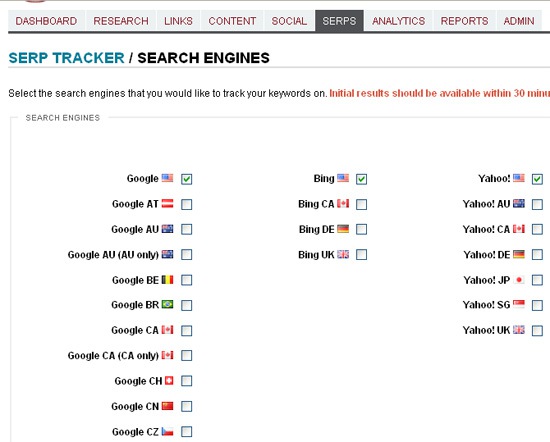
    Step 1: Set up your search engines

    Go: SERP tracker -> Search engines
    From there you’ll get access to plenty of search engines (including various local versions): choose all you want to monitor your progress in:
    SERP tracker: search engines

    Step 2: Add keywords to tracker

    I did a post last week on how to add keywords to tracker: there are actually 7 ways to do that: you can add words in bulk or one by one, you can select and add words from various third-party tools like WordTracker and SEMRush.
    You thus have many options to create a complete list of words you want to keep an eye on.

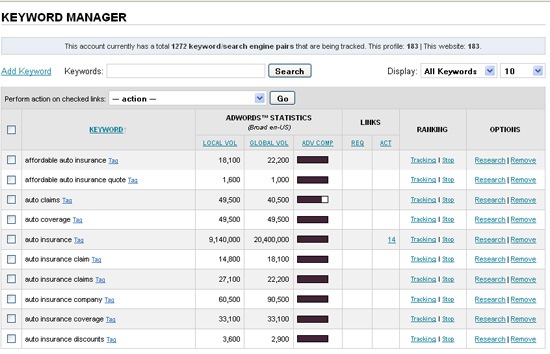
    Step 3: Manage your keywords

    Go: Dashboard -> Keyword Manager
    After you have your list of keywords to track, you should see a pretty table containing all your words and some important data:
    • Local search volume (source: Google Adwords Tools): the search volume for your keywords from the last available month, factoring in your country, language, and match-type preferences.
    • Global monthly search volume (source: Google Adwords Tools);
    • Advertisers’ competition (source: Google Adwords Tools);
    • Links: this column shows the number of links you managed to get for this specific keyword (grabbed from your site Link Manager);
    • Research: this link enables you to run additional keyword research via Google Adwords tool to find more terms to track.
    You can also stop tracking any word right from this table.

    Keyword manager

    Step 4: Tag keywords

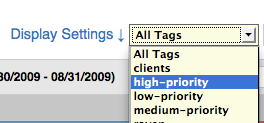
    Tagging allows you to better separate, filter and manage your keywords. For example, if you wanted to prioritize your keywords, you could apply a tag like “High Priority” to them. Tags allow you to filter the view in the SERP Tracker and can also be used when creating custom reports.
    You can tag the words right from the keyword manager (see above).
    SERP tracker: tagging and filtering

    Step 5: Monitor your progress

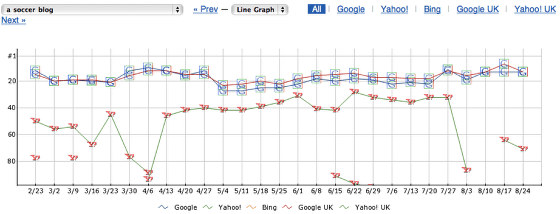
    Every keyword that you have entered into the SERP Tracker will, over time, accumulate keyword history. the software represents the changes on the Keyword History page with a trending graph and a historical results table.
    To access the graph, click on a keyword on the main SERP Tracker results page which will take you to it’s Keyword History page. The Keyword History page displays a trending graph:
    SERP tracker: trending graph

    Step 6: Create a keyword ranking report

    SEJ tools allow you to either export all monitored keywords together with their ranking to a CSV file or create a pretty PDF report where you (or your client) will be able to see:
    • Current search engine position;
    • The change (positive or negative);
    • How change value (how many points lost/gained).
    SERP tracker: report

    Tuesday, March 9, 2010

    Targeting Multiple Keywords vs. Singular Keyword Focus

    Despite being a seemingly simple topic, this one seems to stymie even experienced SEOs. There's a natural conflict that creates the issue - the more keywords you target on a single page, the less you need to link build and optimize (for both search engines and user experience/conversion rate) on many pages.

    How Many Keywords

    To answer this question in a logical and truly optimal fashion, you need to start with the answer to two other important questions:
    1. How many of these keywords carry the same visitor intent?
    2. How competitive are the targeted terms/phrases?
    When you answer the first question, you'll be able to break up lists of keyword terms into buckets of "intent." Searches are almost always intended to discover information or take action. If there are too many pieces of information/actions you need to provide on a single page, your conversion will drop. Remember that a 10% conversion rate for position #10 is better than a 0.5% conversion rate for position #1 (assuming the avgs. from the leaked AOL data cited below).

    CTRs from Leaked AOL Data 2007
    NOTE: This data is from averages via AOL's data release in 2007. New numbers have not been forthcoming from any of the engines or third-party studies.

    For the second question, you need to know something about the competition levels. In a scenario where every shred of keyword usage matters a great deal, from the anchor text focus to the keyword being employed at the very start of the title tag, breaking up keyword targeting to multiple pages can make a great deal of sense. If you're deep into research on this topic, you can do something like the image below, where I've taken stats and metrics for all of the top 25 ranking pages for the query "broadway tickets" on Google.com and run analysis:

    Broadway Tickets SERPs Analysis

    NOTE: data in this graph via Open Site Explorer's Backlink Analysis

    If a keyword is highly competitive, I suggest single page targeting. This is not only because you can maximize on-page optimization, but also because it means that internal and external links that point to the page can focus more directly on the target term/phrase. It's also likely that you'll be competing against pages that are more highly targeted on that keyword phrase and could lose out if you don't have that singular, pinpoint focus.

    7 Google Chrome Extensions To Make You A More Efficient SEO

    Google announced extensions with its latest Chrome release on 21st January this year – implemented to slow down improve the features of the browser and give Firefox a run for its money. Now Google Chrome for me is the super-fast, shiny browser used occassionally that resolves pages in an instant, handling as many tabs as you can throw at it (and periodically having a meltdown). However, when the real work needs to be done, it’s back to the trusty old Firefox.

    So six weeks since the launch of the extensions, we had a browse around the library to see which ones could tempt us into using Chrome as a daily browser.

    Ultimate Chrome Flag is a nifty little extension that sits in the end of the address bar.  You can quickly diagnose any geolocation issues as this tool displays the relevant flag for your website location and- importantly- no flag when the location can not be determined. Click on the flag and a box pops up showing the country or region name as well as the Domain name and IP address, Google and Alexa rank as well as the Web of Trust ratings.

    chromeflags


    Firebug Lite is the Chrome version of the fabulous Firebug add on that is a staple for any SEO using firefox. Whilst it seems the main significance of the world ‘lite’ equates to lack of javascript debugger, it still retains most of the features that have kept SEOs entertained whilst chopping and changing a client’s website.

    firebuglite


    Chrome SEO aims to be an all-in-one SEO extension. Whilst you’ll certainly need the help of some other extensions, Chrome SEO is great for some quick analysis of a website. The button sits in the top right corner of your Chrome page next to the address bar and clicking it opens up a scrollable frame containing lots of SEO-worthy metrics. The extension pulls in data from the search engines as well as popular tools such as Open Site Explorer  and MajesticSEO if you’re logged in. Combined with the robot.txt and sitemap detector, this is an extension that can save an SEO bags of time.

    chromeseo


    Meta SEO Inspector allows quick analysis of the meta tags of the page you are viewing. As well as the usual HTML meta tags you can see XFN tags, no-follow links and canonical tags. The box, which sits in the bottom right corner of your Chrome window, also displays warnings when tags are missing or wrong (ie. too short or too long).

    metaseoinspector


    SEO Site Tools is a great all round SEO tool which is talked about in much more detail over on SEOmoz. Using the free Linkscape API, this extension focuses on all aspects of SEO with the end result being a well-rounded SEO extension. With this tool you can measure external page data, social media stats, view your page terms such as meta and header tags, check your server and domain info and much, much more. If for some reason, you’re bound to installing just one Chrome extension – choose this one!

    seositetools


    SEO Quake is based on the Firefox plugin of the same name. It displays key SEO parameters at the top of any webpage as well as highlighting no-follow links. 

    seoquake1

    The extension also appends these SEO parameters to your SERPs, allowing for a quick, basic analysis of competitors and the ability to re-organise the results by the metric of your choice.

    seoquake2


    Link Grabber extracts all the links from the current webpage and throws them into a list on another tab, all in a split-second. I like this tool as it’s a great way to (very) quickly get a quick overview of the amount of links on any given page. Whilst it doesn’t throw any SEO-specific metrics into the mix (anyone fancy taking up the mantle), I installed it and have found myself using it more than I would have expected. Did I mention how fast it is?

    linkgrabber

    So here are seven Chrome extensions we have found pretty useful for SEO.  Which ones do you recommend? If you haven’t been too freaked out by the numerous screenshots of a close up Fabio Capello adjusting his glasses, then let us know which extensions are tempting you away from Firefox to the Google Chrome browser. For current Chrome users, what are you experiences using extensions with Google Chrome, does it actually slow down the browser?

    Top 5 elements that you need for high rankings on Google

    Getting listed on Google's first result page is the goal of many webmasters. Unfortunately, many webmasters still do the wrong things to improve their rankings.

    It's not possible to get top 10 rankings on Google by focusing on a single strategy. Getting listed on Google requires you to work on all elements of your website. Here are the top 5 factors that influence the position of your website in Google's search results:

    Ranking factor 1: website accessibility
    It doesn't make sense to optimize your web pages if search engines cannot access your web pages:
    • Your robots.txt file should allow search engines to visit your web pages. If your robots.txt file contains errors then many search engines won't list your website.

    • The HTML code of your web pages should be error-free and your web server should return the correct response code. The contents of your web pages should be readable to search engine spiders. 
    Before you start to optimize your web pages, check if search engines can read your web page content. You can do this with IBP's spider simulator. Double-check your robots.txt.
    Ranking factor 2: site architecture
    Google wants to show relevant websites in the search results. Your website shouldn't be a collection of random web pages. If you want to get top 10 rankings on Google, the pages of your website should be related.
    Your web pages should show Google that your website is relevant to a certain topic. All pages of your website should be linked. If possible, web surfers should reach any page of your website with a maximum of three clicks.
    The links and the directory structure of your website should make it easy to search engines to categorize the contents of your website.
    Ranking factor 3: keywords
    Choosing the right keywords is one of the most important steps. If you choose the wrong keywords, you won't succeed with your campaign.
    • Optimize different pages of your website for different keyphrases. The more pages of your website you optimize, the better.

    • Start with very targeted keyphrases that consists of many words, for example "find inexpensive hotels in brussels".

    • When you have top rankings for these targeted keyphrases, proceed with more general keywords such as "hotels in brussels".

    • When you have top rankings for these keyphrases, you can proceed with very general keywords such as "hotels".
    In general, targeted keywords have a much higher conversion rate than general keywords, i.e. you will get more sales per visitor with "find inexpensive hotels in brussels" than with "hotels".
    Also think about the type of visitor that you attract with a keyword. Are these people interested in information or do they want to buy?
    Use IBP's comprehensive keyword tools to find the keywords that will work best with your site. You can find further information on how to find the correct keyword type in the IBP manual (PDF).
    Ranking factor 4: content
    Your website won't get high rankings on Google if it only offers articles and affiliate links that can be found on dozens of other websites.
    Separate your website from the rest by creating unique and trustworthy content. Write your own articles about the topic of your website, publish them on your own website and make your website a useful resource.
    Ranking factor 5: links from other websites
    It is not possible to get high rankings on Google without having links from other websites.
    The more links point to your website, the more likely it is that your website gets good positions in Google's search results. The links to your website should be from trusted websites.
    If a web page that links to you is related to your own website then the effect of that link on the search engine rankings of your website is higher than the effect of an unrelated link.
    It also helps if social bookmark websites link to your website. If many people bookmark your website on social bookmark sites, then this is a sign that your website might deserve high rankings.
    A small error in one element can destroy your effects in all other ranking elements. For that reason, it is important to use the right strategy when optimizing your website.

    Monday, March 8, 2010

    AlertRank: Google Alerts on Steroids

    It is not really often that I am actually impressed by the tool (this is because I come across 2-3 new ones weekly so it is not really easy to surprise me already). But today’s one is truly awesome.

    AlertRank is a free web-based tool that helps to make sense of your Google alerts.

    Most of us use Google Alerts to keep an eye on our keyword or brand mentions but few of us are actually satisfied with the tool… Until you try AlertRank.

    Benefits of the tool 

    • Manage and analyze multiple Google Alerts through an online dashboard
    • Get more control over your email inbox: you may for example choose to block email alerts and only access results via online dashboard;
    • See the SEO rank of each result in your alerts;
    • Select alerts from sites that allow comments, trackbacks, DO FOLLOW, or display Adsense;
    • View over a dozen detailed ranking values for each alert to prioritize the ones you must act on;
    • Automatically post of alerts to Twitter or Delicious;
    • Create custom reports on your alerts in Excel or PDF formats;
    • View detailed and visualized analytics to identify the most influential sources for your keywords;
    • View daily, weekly, and monthly trends for any search term, and even compare trends between terms
    • Tag alerts by sentiment to analyze your brand feedback over time.

    The process

    Step 1: Tell Google to send alerts to your AlertRank address
    Alert Rank
    • Go to the Google account creation page and fill in your AlertRank email address, (which for me was seosmarty@alertrank.com);
    Alert Rank
    • Verify your new Google account;
    Step 2: While signed-in to this new account, go to Google Alerts and start creating alerts to track your keywords and brand name:
    Alert Rank
    Once you have created as many alerts as you need, let the tool collect and analyze the data.

    This is where all the fun starts

    Google Alerts on Steroids
    From now on, all Google alerts sent to you will contain “Alert Rank” – each site in the alert will be rated based on the internal algorithm that takes into account:
    • Google pagerank;
    • Alexa rank;
    • Inbound links;
    • Page features (number of comments, AdSense, etc);
    • Delicious bookmarks, etc.
    Alert rank


    Enhanced alert statistics:
    All the results sent by Google are compiled in a handy table containing the following columns:
    • The exact page based on your alert settings;
    • Search terms used to find that page;
    • The sentiment (you should change it yourself);
    • AlertRank;
    • Type of the alert (news, blogs, etc);
    • Date of the alert:
    You can customize the columns to hide any of them or add new ones (like comments, nofollow links on the page, trackbacks, top level domains, Delicious bookmarks of the page, etc):

    Alert Rank

    You can also click through SOURCES tab to see domain stats that got into your alerts:

    Alert Rank


    Alert Analytics
    This section displays handy charts that sum up the following:
    • Alert frequency over time;
    • Sentiment analysis;
    • Average AlertRank of each alert;
    • Percentage of total alerts:
    Alert rank analytics


    Daily Email Reports (Excel and/or PDF)
    These are actually ready-made reputation management report for your client!

    Alert Rank - reports

    Google Adds Public Data Search Tool To Labs

    Google has announced a new tool called Google Public Data Explorer that’s now available in Google Labs. The tool is a follow-up of sorts to last year’s announcement that a limited amount of public data would be used in response to certain Google.com search results.

    The Data Explorer tool includes data from the original three sources Google announced last year — the US Census Bureau, US Bureau of Labor Statistics, and the World Bank — as well as five new data providers:
    • Organization for Economic Co-Operation and Development (OECD)
    • California Department of Education
    • Eurostat
    • US Center for Disease Control
    • US Bureau of Economic Analysis
    The gee-whiz element in all this is the Data Explorer’s use of animated charts and graphs that let users see changes over time. The charts are also embeddable on any web site; here’s one that shows population growth rates in a few countries since 1960, and how the numbers compare to world population growth rate.